SSC Photo & Signature Resizer: Format Photo and Signature for SSC Forms
Applying for Staff Selection Commission examinations is a high-stakes milestone for millions of government job aspirants across India. Every year, candidates register on the centralized Staff Selection Commission portal (ssc.gov.in) to compete for prestigious vacancies across SSC CGL (Combined Graduate Level), SSC CHSL (Combined Higher Secondary Level), SSC MTS (Multi-Tasking Staff), SSC GD Constable, SSC CPO (Sub-Inspector in Delhi Police & CAPFs), SSC Selection Posts, Stenographer Grade C & D, and Junior Engineer (JE). With fierce competition where cut-off margins come down to fractions of a mark, the very first hurdle is successfully submitting your online application form without administrative rejection.
The Staff Selection Commission enforces automated technical criteria on all uploaded media files. Candidate passport photographs must be formatted strictly between 20 KB and 50 KB in JPG or JPEG format, with physical dimensions of 3.5 cm width by 4.5 cm height (equivalent to 413 × 531 pixels at standard 300 DPI print density). The photograph must show a clear frontal portrait against a solid white or light-colored background, with the face occupying 70% to 80% of the image area, both ears clearly visible, eyes open, and a neutral facial expression. Most importantly, SSC rules strictly prohibit candidates from wearing spectacles, reading glasses, tinted lenses, or caps; uploaded photos showing eyewear are rejected outright. Simultaneously, candidate signatures must fit strictly within a 10 KB to 20 KB file size limit with dimensions of 4.0 cm width by 2.0 cm height (472 × 236 pixels, a 2:1 horizontal ratio). The signature must be executed with black or dark blue ink on crisp, unlined white paper in natural cursive running handwriting—signatures rendered in capital or block letters are disqualified immediately.
Modern smartphone cameras produce ultra-high-resolution images that range from 3 MB to 15 MB with non-compliant aspect ratios, busy domestic backgrounds, and uneven room shadows. When applicants attempt to compress these files using generic image utilities, signatures often turn blurry, faces stretch unnaturally, or the file size drops below the mandatory 20 KB or 10 KB thresholds. ToolMela's SSC Photo & Signature Resizer resolves these formatting issues directly in your web browser. It provides locked aspect ratio cropping (3.5:4.5 for photos and 2:1 for signatures), intelligent white background replacement, precise file weight compression, and 300 DPI binary metadata embedding to ensure flawless acceptance on the SSC portal.
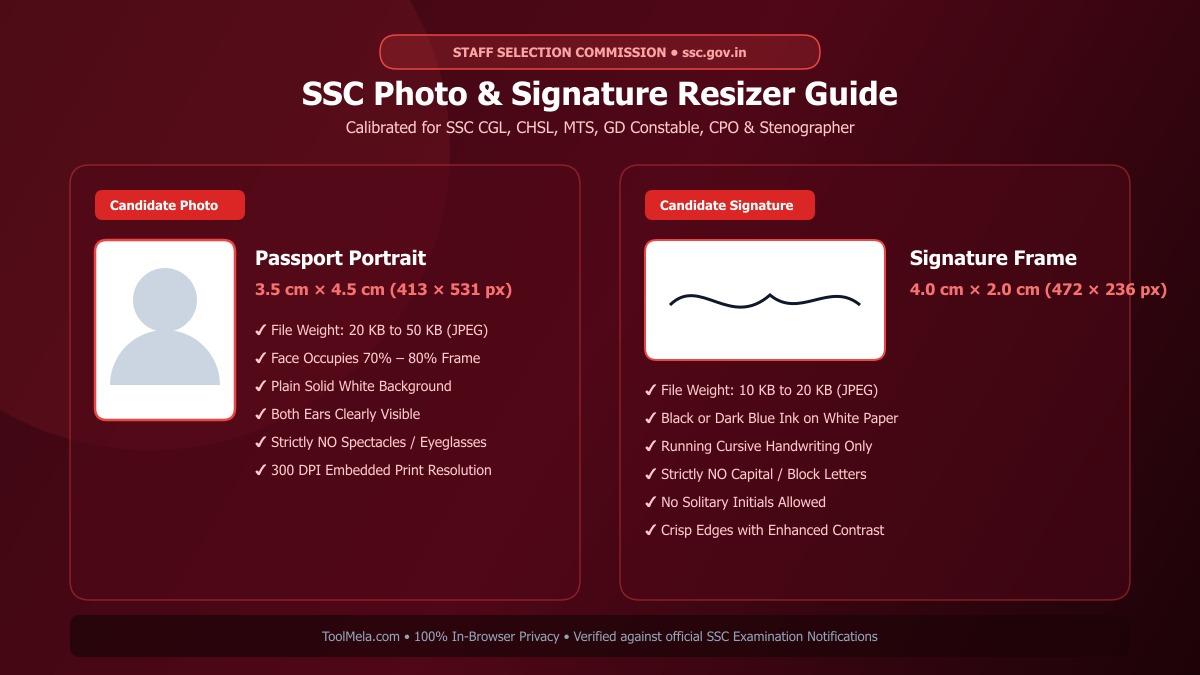
Visual Guide: Formatting passport photographs and signatures to official Staff Selection Commission (SSC) specifications on ToolMela.
Why People Use This Tool
- Locked Aspect Ratio Cropping: Enforces exact passport dimensions (3.5 cm × 4.5 cm / 413 × 531 px) for photographs and rectangular framing (4.0 cm × 2.0 cm / 472 × 236 px) for signatures so your images never appear distorted or stretched.
- Precise Target File Weight Compression: Accurately targets the mandatory 20 KB to 50 KB range for candidate photos and 10 KB to 20 KB for signatures, ensuring the output never triggers portal size rejection errors.
- AI-Powered White Background Replacement: Removes distracting domestic backgrounds, wallpapers, and shadows with a single click, replacing them with the clean, solid white backdrop required by SSC notifications.
- Embedded 300 DPI Print Resolution: Injects standard 300 DPI metadata directly into the image header, ensuring your photo and signature render razor-sharp on online admit cards and verification rosters.
- Cursive Signature Clarity Enhancer: Sharpens delicate ink strokes, removes paper grain, and increases contrast so scanned signatures remain legible and pass automated verification scans.
- Universal SSC Exam Coverage: Fully calibrated for all recruitment notices published under SSC CGL, CHSL, MTS, GD Constable, CPO, Stenographer, Selection Posts, and JE.
- Instant In-Browser Utility: Free to use without mandatory sign-ups, software installations, watermarks, or hidden usage limits.
How to Use the Tool
- Select Your Document Type: Choose either Photo or Signature mode to load the corresponding dimensions and file weight presets calibrated for SSC application forms.
- Upload Your Image File: Click the upload box or drag and drop your image (JPG, PNG, or WEBP) from your smartphone, tablet, or computer.
- Position the Crop Box: Drag and resize the preset framing box over your image. For photographs, center your head and shoulders so your face covers 70% to 80% of the frame. For signatures, tightly frame the written text while trimming away excess white margins.
- Clean the Background (Optional for Photos): Use the background removal tab to replace distracting or shaded room backgrounds with a compliant, uniform solid white tone.
- Adjust the Target File Size: Use the intuitive KB slider to fine-tune your desired output weight—recommend 35 KB for photos (within 20–50 KB) and 15 KB for signatures (within 10–20 KB).
- Preview and Download: Inspect the generated preview to verify clarity, dimensions, and file weight, then click Download to save your SSC-ready JPG file.
Understanding the Output
Once your file is processed by ToolMela's SSC Photo & Signature Resizer, you receive a production-grade image engineered to pass the validation filters of the official Staff Selection Commission recruitment server:
- File Format: Universal JPG/JPEG encoding, fully accepted by all modules of
ssc.gov.in. - Pixel Dimensions: Exactly 413 × 531 pixels for photographs (standard 3.5 cm × 4.5 cm passport ratio) and 472 × 236 pixels for signatures (standard 4.0 cm × 2.0 cm signature ratio).
- Calibrated File Weight: Candidate photos download securely between 20 KB and 50 KB, while signatures download between 10 KB and 20 KB.
- Visual Clarity: Retains sharp facial details, clear eye visibility, and crisp ink lines without pixelation, compression artifacts, or edge blurring.
- Header Metadata: Standard 300 DPI density tags written directly into the file structure for high-fidelity rendering on examination admit cards.
Privacy & File Handling
Candidate photographs and handwritten signatures represent sensitive biometric and identity data. ToolMela handles all resizing, background adjustments, and file compression entirely inside your web browser using client-side HTML5 Canvas and WebAssembly algorithms.
Your original files and processed images are never uploaded to ToolMela servers, remote cloud storage systems, or third-party databases. Every transformation takes place within your device's local memory and cache. The moment you close or refresh your browser tab, all temporary data is instantly cleared. You can safely prepare your official application documents even on shared computers or public Wi-Fi networks without worrying about identity theft or data misuse.
Useful Tips for SSC Application Photos and Signatures
- Never Wear Spectacles or Glasses: Staff Selection Commission guidelines strictly prohibit eyeglasses, tinted spectacles, sunglasses, and caps in application photos. Even if you wear prescription glasses daily, remove them before taking your photo to eliminate lens reflections and avoid outright rejection.
- Sign on Blank, Unruled Paper: Always sign your name using a black or dark blue ballpoint or gel pen on clean, unlined white printing paper. Avoid lined notebook paper, as ruling lines interfere with optical recognition systems.
- Never Sign in Capital or Block Letters: SSC rules explicitly disqualify signatures written entirely in block capital letters or initials. Your signature must be your customary, running cursive handwriting.
- Ensure Balanced Frontal Illumination: Face a soft, natural window light or even room lighting when capturing your photo. Avoid strong overhead lights that cast deep shadows under your eyes, nose, or chin.
- Keep Both Ears and Forehead Visible: Ensure your hair does not cover your eyes, eyebrows, or ears. Both ears must be clearly visible in the frame, and your facial expression should remain neutral with your mouth closed.
Common Problems and Solutions
Problem: “Photo file size must be between 20 KB and 50 KB” error on the SSC portal.
Solution: The portal rejects files smaller than 20 KB or larger than 50 KB. In ToolMela, adjust the file size slider to approximately 35 KB to produce a file that comfortably clears both boundary limits.
Problem: “Signature is blurred, smudged, or illegible.”
Solution: Capturing signatures with mobile cameras under dim indoor lighting creates gray, grainy backgrounds. Sign firmly using a dark ink pen on clean white paper, illuminate the paper evenly, crop closely around the writing, and use the contrast enhancement tool to ensure deep black text against pure white.
Problem: Image appears stretched, squashed, or distorted after upload.
Solution: Manually forcing non-standard pixel dimensions into image editors distorts aspect ratios. ToolMela automatically locks the 3.5:4.5 passport ratio and 2:1 signature ratio, ensuring your facial proportions and signature flow remain completely natural.
Problem: Application rejected during document verification due to background issues.
Solution: SSC requires a plain white or light background. If your photo was taken against a patterned wall, door, or outdoor scenery, use ToolMela's one-click background remover to replace it with a clean, solid white background before submitting.
Frequently Asked Questions (FAQs)
What are the official photo and signature size requirements for SSC online forms?
For all Staff Selection Commission (SSC) online examinations hosted on ssc.gov.in, the candidate photograph must have a file size between 20 KB and 50 KB with physical dimensions of 3.5 cm (width) × 4.5 cm (height), equivalent to 413 × 531 pixels at 300 DPI. The signature must have a file size between 10 KB and 20 KB with physical dimensions of 4.0 cm (width) × 2.0 cm (height), equivalent to 472 × 236 pixels. Both files must be saved in JPG or JPEG format.
What are the exact dimensions for the SSC signature upload?
The Staff Selection Commission specifies signature dimensions of 4.0 cm in width by 2.0 cm in height. In digital pixels at standard resolution, this corresponds to approximately 472 × 236 pixels (a 2:1 horizontal aspect ratio) or 140 × 60 pixels depending on regional notice formatting. ToolMela automatically applies this exact 2:1 rectangular aspect ratio and compresses the file strictly within the 10 KB to 20 KB threshold.
Can I sign my SSC application using capital or block letters?
No. Official Staff Selection Commission guidelines strictly prohibit signatures written entirely in capital letters, block characters, or solitary initials. An application containing a signature written in capital letters will be rejected during scrutiny. You must sign in your natural, flowing cursive handwriting using black or dark blue ink.
Is my personal photograph or signature stored on ToolMela servers?
No. ToolMela processes all images locally inside your web browser using client-side JavaScript, HTML5 Canvas, and WebAssembly. Your photograph and signature files are never transmitted to external servers, cloud databases, or third parties. All processing happens entirely on your own device, guaranteeing complete privacy and biometric data security.
