Bengali Typing Tool: Write Fluent Unicode Bangla Online Using Any English Keyboard
Communicating effectively in Bengali often presents a frustrating challenge when using modern computing hardware. While millions of native speakers across Bangladesh, West Bengal, and global communities read and write Bengali daily, standard physical keyboards worldwide are manufactured exclusively with the Latin QWERTY layout. For individuals who have not memorized legacy mechanical layouts such as Bijoy or national fixed-key configurations, attempting to draft an email, compose an essay, or complete a government job application can be slow and discouraging. Traditional software packages frequently require administrative privileges to install on work or school computers, and older font encodings often turn into broken glyphs when transferred to mobile messaging apps or modern websites.
Phonetic transliteration completely solves this barrier by translating words based on how they sound. Instead of hunting for individual vowels, consonants, and diacritic marks across unfamiliar keys, you simply spell Bengali words phonetically using English letters. Typing everyday phrases such as "ami banglay gan gai" or "apnake dhonnobad" converts instantly into authentic Bengali script—"আমি বাংলায় গান গাই" and "আপনাকে ধন্যবাদ". This natural typing approach allows anyone familiar with basic texting habits to draft articulate Bengali correspondence without memorizing arbitrary keyboard mappings or configuring regional operating system settings.
ToolMela provides a comprehensive, browser-based Bengali Typing Tool that combines real-time phonetic conversion with smart vocabulary suggestions, microphone voice dictation, an interactive virtual keyboard, and a full-featured rich text editor. Because every character generated conforms strictly to universal Unicode standards, your finished writing can be copied and pasted directly into social media apps, office suites, emails, or web portals without font distortion, missing characters, or display errors.
Why People Use This Tool
- Intuitive Phonetic Transliteration: Type naturally using familiar English letters, and watch words convert into authentic Bengali script the moment you press the spacebar.
- Universal Unicode Output: Generates standardized Unicode text that renders accurately across Windows, macOS, iOS, Android, and Linux without requiring custom font installations.
- Built-In Voice Dictation: Speak directly into your computer or smartphone microphone to convert spoken Bengali into written text in real time.
- Interactive Compound Letter Keyboard: Access an on-screen virtual keyboard with dedicated layouts for shift characters and complex conjuncts (যুক্তাক্ষর).
- Full Rich Text Formatting: Organize and enhance your writing with headings, bold and italic styles, bulleted lists, font color highlights, and distinct Bengali typography options.
- Instant Multi-Format Export: Copy your text to the clipboard with a single click, download an offline plain text file, or generate a formatted PDF ready for printing.
How to Use the Tool
Activate Bengali Typing Mode
Ensure the language toggle is switched to Bengali so that your keystrokes are automatically transliterated into Bengali script.
Type Phonetically in English
Type your intended Bengali words using Roman letters based on their sound (for instance, type 'khobor' for 'খবর' or 'shadhinota' for 'স্বাধীনতা').
Select From Real-Time Suggestions
If a word has multiple possible spellings, glance at the suggestion box and select the intended word by clicking it or pressing Ctrl plus the number key.
Finalize Words With Space or Enter
Pressing the spacebar or Enter key immediately commits the active word and converts it into standard Bengali characters.
Apply Text Formatting
Use the toolbar controls above the editor to apply bold styling, insert headings, create bulleted lists, or select specialized fonts like Hind Siliguri.
Track Real-Time Statistics
Review the status bar metrics at the bottom of the editor to monitor your live word count, character count, sentence count, and estimated reading time.
Export or Copy Your Text
Click the 'Copy' button to transfer your text directly to your clipboard, or choose 'Download' to save a text file or print a finished PDF document.
Understanding the Output
The primary advantage of this tool is its adherence to international Unicode encoding standards. In earlier eras of digital publishing, Bengali typing relied on legacy ANSI fonts that simply mapped Bengali letter shapes onto standard Latin character slots. When documents created with those legacy fonts were opened on devices lacking the exact font file (such as SutonnyMJ), the sentences collapsed into meaningless visual noise. ToolMela outputs pure Unicode, where every Bengali vowel (স্বরবর্ণ), consonant (ব্যঞ্জনবর্ণ), dependent sign (কার ও ফলা), and compound character holds an immutable, globally recognized digital code point.
This standardized output ensures complete cross-platform flexibility. You can copy text drafted in this editor and paste it immediately into WhatsApp conversations, Facebook posts, YouTube video descriptions, Microsoft Word documents, Google Docs, or municipal online forms. Furthermore, the editor includes live content analytics—measuring total words, characters with and without spaces, paragraphs, and keyword density—which helps content creators, copywriters, and students adhere to strict length guidelines for academic papers, newspaper articles, or social media updates.
Privacy & File Handling
Confidentiality is a paramount concern when drafting personal letters, professional emails, academic assignments, or official administrative petitions. Many cloud-based text processors transmit user documents to external database servers for indexing, storage, or commercial language modeling.
ToolMela operates with a browser-centric privacy architecture. All typing input, rich text styling, word counting, clipboard operations, and document downloads take place directly within your device's web browser. Transliteration assistance queries merely check individual active phonetic words against standard spelling dictionaries to return suggestions; your complete sentences, paragraphs, and personal drafts are never saved, tracked, or archived on ToolMela's servers. Once you finish your session and close the browser tab, your working text is instantly purged from device memory.
Useful Tips for Best Results
- Rely on Standard Phonetic Spelling: For words containing aspirated consonants or retroflex letters, use common phonetic conventions—such as typing "th" for "থ" or "thh" for "ঠ"—to trigger the correct Bengali glyph.
- Consult the Suggestion Menu for Silent Letters: Certain Bengali words contain silent vowels or subtle spelling nuances. When typing formal vocabulary, check the floating suggestion box to ensure you pick the grammatically precise form.
- Utilize the Virtual Keyboard for Rare Conjuncts: If you need an uncommon Sanskrit conjunct (যুক্তাক্ষর) that is difficult to trigger phonetically, click the virtual keyboard icon, switch to the "যুক্তাক্ষর" layout, and insert the exact character directly.
- Speak Clearly in a Quiet Setting: When using voice dictation, speak at an even conversational pace near your microphone to minimize background noise and ensure accurate speech transcription.
- Format Documents Before Exporting: Take advantage of the built-in headings, alignments, and Bengali font selectors to create polished, ready-to-print PDF documents directly from the editor without switching to third-party software.
Common Problems and Solutions
Word Converts to the Wrong Letter Variant
Bengali features multiple characters that share similar phonetic sounds, such as three distinct sibilants (শ, ষ, স) and two nasals (ণ, ন). If the automatic conversion selects the wrong letter, press backspace to reopen the suggestion menu and click the correct spelling, or select it using Ctrl plus the assigned number.
Voice Typing Fails to Start
Voice recognition requires active microphone authorization through the browser's Web Speech API. If clicking the microphone icon produces no response, verify that your browser has permission to access your microphone in site settings, and ensure you are using a browser with full speech recognition support such as Chrome.
Keystrokes Remain in English Letters
If your typing appears in Roman letters without converting to Bengali, check the language toggle button on the toolbar to ensure that Bengali mode is active.
Accidental Text Deletion
If you unintentionally clear your editor or delete an essential paragraph, immediately click the "Undo" arrow on the toolbar or press Ctrl+Z on your keyboard to restore your previous draft.
Frequently Asked Questions
Do I need to install any software or Bengali keyboard drivers to use this tool?
No. The entire transliteration system, on-screen keyboard, and editor operate directly inside your web browser. You can type on any standard physical keyboard without installing Avro, Bijoy, or regional operating system language packs.
Can I use the text generated by this tool on social media, Word, and mobile apps?
Yes. The tool outputs standardized Unicode Bengali text, meaning you can copy and paste your writing into Facebook, WhatsApp, YouTube, Microsoft Word, Google Docs, and official application portals without font corruption or missing characters.
How do I type Bengali compound letters (যুক্তাক্ষর) using an English keyboard?
Most common compound letters form automatically through intuitive phonetic spelling (for example, typing 'shanto' produces 'শান্ত'). For rare or complex conjuncts, you can open the built-in virtual keyboard and switch to the 'যুক্তাক্ষর' layout to click the exact letter.
Does ToolMela store or monitor the text I type in the editor?
No. Your document contents, formatting, and drafts are handled strictly within your browser's local memory. ToolMela does not log, save, or store your typed sentences, personal messages, or exported files on any external server.
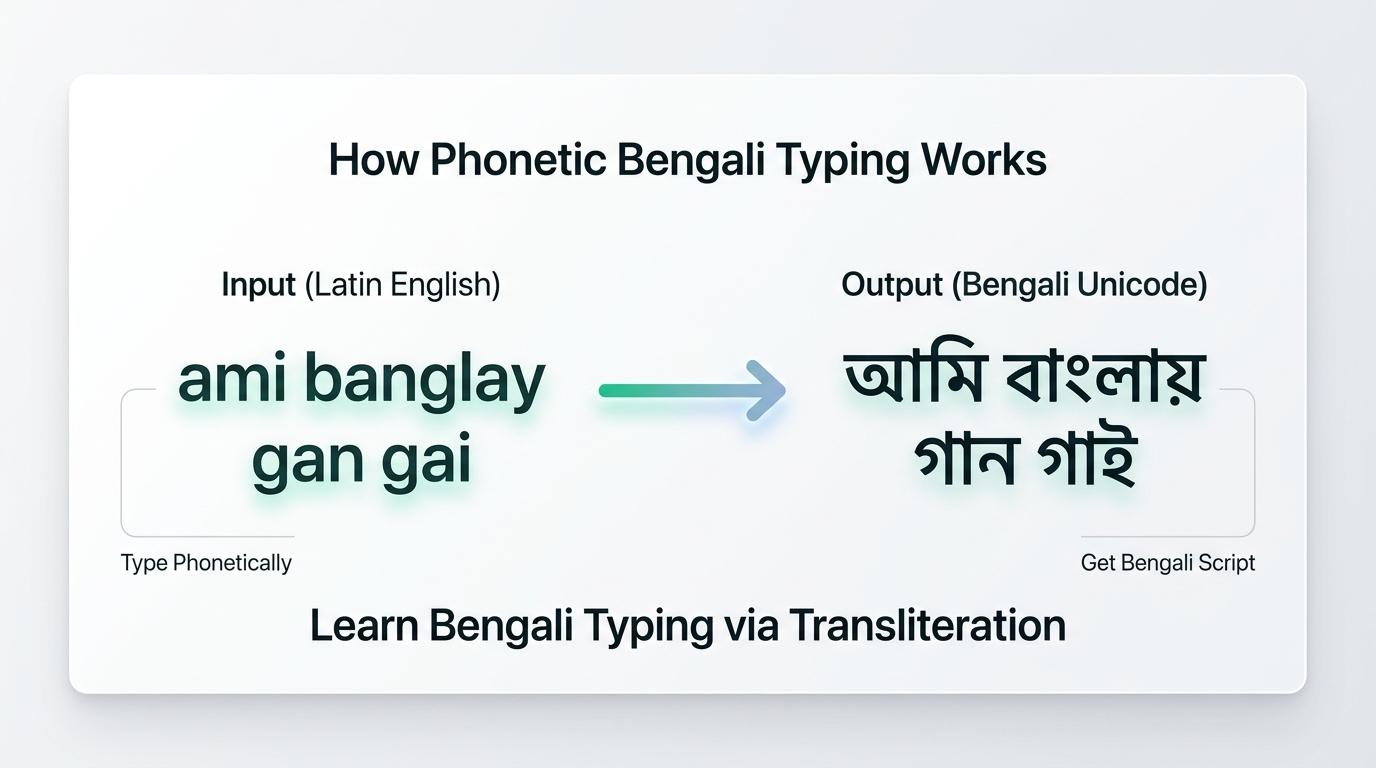
Visual Guide: Type words phonetically in English, observe instant transliteration into standard Bengali Unicode script, and copy or export your text.
Explore Related Text Tools
Hindi Typing Tool
Type Hindi online effortlessly using English keyboard transliteration.
Word Counter
Calculate words, characters, sentences, paragraphs, and reading time.
Case Converter
Convert text instantly between UPPERCASE, lowercase, Title Case, and more.
Text Repeater
Repeat words, sentences, or phrases multiple times with line breaks.
Compress PDF to 1MB
Compress your exported documents under 1MB for portal uploads.
