Railway ALP Photo Resizer: Format Photo and Signature for RRB ALP Forms
Millions of engineering diploma holders, ITI technicians, and trade apprentice graduates across India apply for Assistant Loco Pilot (ALP) vacancies released by Railway Recruitment Boards (RRBs) under Centralized Employment Notice guidelines (such as CEN 01/2024). Operating locomotives across Indian Railways' extensive freight and passenger network requires clearing multiple competitive stages—including First Stage Computer Based Test (CBT-1), Second Stage CBT-2, Computer Based Aptitude Test (CBAT), Document Verification, and stringent A-1 medical examinations.
Before candidates can sit for these exams, their online application must pass automated validation on the centralized Railway Recruitment Board portal (rrbapply.gov.in). RRB enforces exacting parameters on biometric files. The candidate photograph must be a clear color portrait (35mm × 45mm, approximately 275 × 354 pixels) with a file weight strictly confined between 30 KB and 70 KB in JPG or JPEG format. Official notifications require that the photo be captured against a clean, plain white background with 70% to 80% facial coverage. Crucially, RRB strictly prohibits candidates from wearing sunglasses, tinted spectacles, reading glasses, or caps. Concurrently, the applicant's signature must measure approximately 140 × 60 pixels with a file size strictly between 30 KB and 70 KB, executed in black or blue ink on unlined white paper in natural running cursive handwriting; block capital letters or initials lead to immediate disqualification.
Modern mobile phones produce images between 4 MB and 10 MB with wide aspect ratios and domestic room shadows. When candidates attempt to resize these photos using uncalibrated compression apps, pictures often become blurry, distorted, or drop below the strict 30 KB minimum threshold enforced by the RRB recruitment engine. Furthermore, many applicants inadvertently leave spectacles on or struggle with rectangular signature formatting. ToolMela's Railway ALP Photo Resizer provides an integrated, browser-native utility built specifically to match RRB standards: locked aspect ratio cropping, AI solid white background replacement, target file-size sliders calibrated to 30 KB – 70 KB, and binary 300 DPI metadata injection.
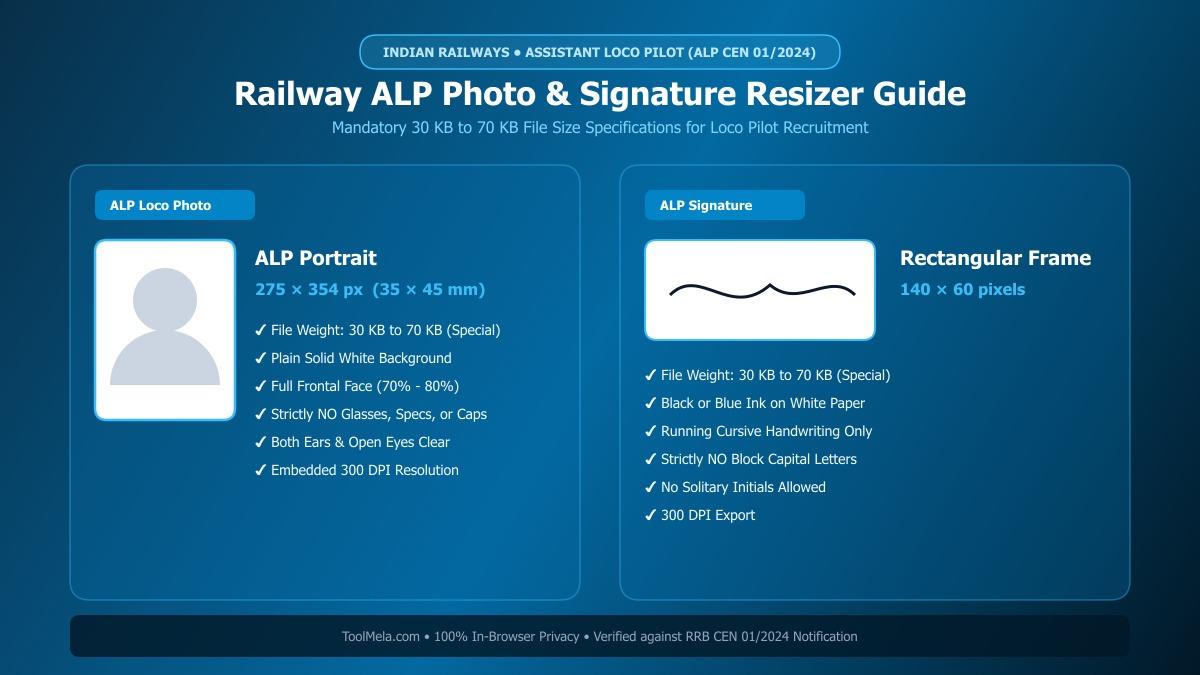
Visual Guide: Formatting passport photographs and signatures to official RRB Assistant Loco Pilot (ALP) specifications on ToolMela.
Why People Use This Tool
- Locked RRB ALP Aspect Ratios: Automatically locks crop boundaries to standard portrait dimensions (275 × 354 pixels) for passport photos and 140 × 60 pixels for signatures, preventing portal dimension errors and squashed faces.
- 30 KB to 70 KB Precision Slider: Enables exact calibration of file weight to meet the strict 30 KB minimum floor and 70 KB upper ceiling enforced by the
rrbapply.gov.inrecruitment portal. - AI Plain White Background: Instantly removes domestic room backgrounds, shadows, and outdoor colors, replacing them with an official solid white studio background.
- Binary 300 DPI Header Injection: Writes standard 300 dots-per-inch density metadata directly into the JPEG JFIF binary header, guaranteeing crisp reproduction on printed RRB CBT admit cards and CBAT attendance sheets.
- Loco Pilot Medical Verification Prompts: Includes built-in rule checklists reminding applicants to remove eyeglasses, align shoulders, and verify cursive signatures before finalizing files.
- Zero-Upload Local Privacy: Executes all image cropping, background substitution, scaling, and compression locally inside your web browser without sending biometric data to remote web servers.
How to Use the Tool
- Open the tool and choose your target document type by clicking either Photo or Signature at the top of the interface.
- Drag and drop your image file (JPG, JPEG, PNG, or WebP) into the upload box, or tap to browse files on your mobile phone or computer.
- On the Crop tab, adjust the locked cropping box around your portrait—keeping your head centered, eyes forward, and both ears clearly visible without spectacles—then click Next.
- On the Background tab, review your backdrop. If your photo has colored walls or room clutter, click Remove Background to render a clean, plain white studio backdrop.
- On the Settings tab, set the target file size slider to your preferred weight (50 KB is ideal within the mandatory 30 KB to 70 KB range) and verify the guideline checklist.
- Click Process Image to trigger client-side canvas scaling, adaptive compression, and 300 DPI JFIF binary header writing.
- On the Download tab, inspect the live preview and technical metrics, then click Download to save your compliant JPG file. Repeat the workflow for your signature.
Understanding the Output
Railway Recruitment Board servers inspect submitted image files for exact aspect ratios, file size boundaries, and facial clarity. Checking these details before submitting your application prevents unnecessary rejection:
- Photo Dimensions & Framing: The exported photograph measures 275 × 354 pixels within the 30 KB to 70 KB bracket. The face occupies 70% to 80% of the canvas with visible ears and a solid white backdrop, free from pixelation or facial stretching.
- Signature Dimensions & Contrast: The exported signature file measures 140 × 60 pixels with a weight between 30 KB and 70 KB, displaying dark ink strokes on an unlined white background.
- Embedded 300 DPI Metadata: Standard 300 DPI density tags are written into the JFIF binary stream, ensuring sharp, smudge-free printing on RRB e-call letters and physical attendance sheets at railway exam centers across India.
- Pre-Submission Verification: Review the downloaded file in your gallery to verify that your eyes are clearly visible without eyeglasses, lighting is balanced, and the signature reflects your natural running cursive handwriting.
Privacy & File Handling
Biometric credentials such as personal photographs and handwritten signatures require strict confidentiality. ToolMela delivers absolute privacy through its browser-based architecture:
- In-Browser Execution: Image rendering, AI background segmentation, cropping transformations, and JPEG compression algorithms execute entirely within your device's web browser using HTML5 Canvas, WebAssembly, and local JavaScript.
- Zero Remote Data Transmission: Your photographs, signatures, and personal biometric files are never uploaded to ToolMela servers, external APIs, or cloud databases.
- Immediate Local Memory Clearance: Files loaded into the tool reside strictly in temporary browser RAM and are discarded immediately when you refresh the page, navigate away, or close your browser tab.
- Safe for Public Cyber Cafes: Candidates preparing applications at commercial computer kiosks, cyber cafes, or common service centers across India can format their files safely without leaving digital copies stored on remote web servers.
Useful Tips
- Strictly Remove All Spectacles: RRB recruitment notices explicitly disqualify photos showing reading glasses or spectacles. Even clear lenses create flash glare that obscures the pupil. Always take your photo without glasses.
- Maintain A-1 Medical Appearance: Because Assistant Loco Pilots must meet the stringent A-1 medical standard (6/6 distant vision without glasses), having an unobstructed, recent facial photograph is critical for verification at every CBT and CBAT stage.
- Sign on Unruled Pure White Paper: Sign with a dark black or deep blue ballpoint or gel pen on plain printer paper. Never sign on lined school notebooks, as printed horizontal lines cause scanning artifacts.
- Never Sign in Capital or Block Letters: RRB guidelines treat signatures in block capital letters or initials as non-compliant. Sign only in your standard cursive running handwriting.
- Keep at Least 12 Identical Physical Prints: Print at least 12 to 15 physical passport-sized copies of the exact digital photograph uploaded to the RRB portal. You will need to bring identical physical copies to CBT-1, CBT-2, the Computer Based Aptitude Test, and Document Verification.
Common Problems and Solutions
- Problem: The RRB portal shows an error saying "File size is less than 30 KB".
Solution: Many third-party compressors compress signatures down to 10 KB or 15 KB. In ToolMela, adjust the target file size slider to 50 KB and reprocess to ensure the output sits safely between 30 KB and 70 KB. - Problem: The portal rejects the photo due to spectacles or dark glasses.
Solution: Retake your photograph completely without glasses. RRB scanning software automatically flags lens reflections or eye obstructions. - Problem: The signature looks squashed or stretched vertically.
Solution: This happens when a signature is forced into a square box. ToolMela's signature mode uses a locked 140 × 60 rectangular frame to preserve natural handwriting proportions. - Problem: The photo background has household shadows or uneven lighting.
Solution: On the Background tab, click "Remove Background" to replace your room backdrop with a solid studio-grade white background before generating the final image.
Frequently Asked Questions
What are the official photo and signature size requirements for Railway ALP applications?
For RRB Assistant Loco Pilot (ALP CEN 01/2024), both the photograph and signature must have a file size between 30 KB and 70 KB in JPG or JPEG format. The photo should have standard passport dimensions (approximately 275 × 354 pixels or 320 × 240 pixels) against a plain white background, while the signature should measure approximately 140 × 60 pixels on unlined white paper.
Can I wear spectacles or glasses in the Railway ALP application photograph?
No. Railway Recruitment Boards strictly prohibit spectacles, tinted glasses, sunglasses, and caps in application photos. Even prescription reading glasses must be removed to avoid flash reflections and facial recognition rejections.
Can I sign the Railway ALP form using capital letters?
No. Official RRB notifications explicitly state that signatures written entirely in capital letters, block characters, or solitary initials are invalid and can result in application disqualification. You must sign in natural cursive running handwriting.
Is my photo or signature uploaded to ToolMela servers during processing?
No. ToolMela processes all images locally inside your device's web browser using HTML5 Canvas, client-side JavaScript, and WebAssembly. No files are ever sent to ToolMela servers or third-party storage, ensuring total privacy.
