RRB NTPC Photo Resizer: Format Photo, Signature, and Thumb for Railway NTPC Forms
Every year, over ten million undergraduate and graduate job seekers across India apply for Non-Technical Popular Categories (NTPC Graduate and Undergraduate posts) conducted by Railway Recruitment Boards (RRBs) under Centralized Employment Notice notifications. These premier railway posts include Station Master, Goods Train Manager (Goods Guard), Commercial Apprentice, Junior Accounts Assistant cum Typist, Senior Clerk cum Typist, Trains Clerk, and Commercial cum Ticket Clerk across 21 railway recruitment zones.
Before candidates can sit for these exams, their online application must pass automated validation on the centralized Railway Recruitment Board portal (rrbapply.gov.in). RRB enforces rigid parameters on biometric files during the application window. Candidate photographs must measure 200 × 230 pixels with file weights strictly confined between 20 KB and 50 KB in JPG or JPEG format. Official RRB notifications specify a plain, light or solid white background with 70% to 80% face coverage, with the applicant's full name and the date of photo capture clearly printed on a white strip at the bottom of the photo. Crucially, RRB explicitly bans spectacles, reading glasses, sunglasses, caps, and headwear. Concurrently, candidate signatures must measure 140 × 60 pixels (10 KB to 40 KB) in black or blue ink on unruled white paper in natural cursive running handwriting; block capital letters lead to instant cancellation. Left thumb impressions, when requested, must be clear, unsmudged, and scaled to 100 × 100 pixels within 10 KB to 40 KB.
Modern smartphone snapshots produce multi-megabyte files (3 MB to 12 MB) with non-compliant dimensions, domestic room backgrounds, and uneven shadows. When candidates use basic image editing apps, handwriting gets stretched, photos drop below 20 KB or exceed 50 KB, and adding name and date captions manually is cumbersome. ToolMela's RRB NTPC Photo Resizer provides an integrated, browser-based solution engineered specifically around official RRB NTPC requirements: locked aspect ratio cropping (200 × 230 px photo, 140 × 60 px signature, 100 × 100 px thumb), automated Name and Date text overlay stamping, AI plain white background replacement, calibrated target file-size sliders, and binary 300 DPI metadata injection.
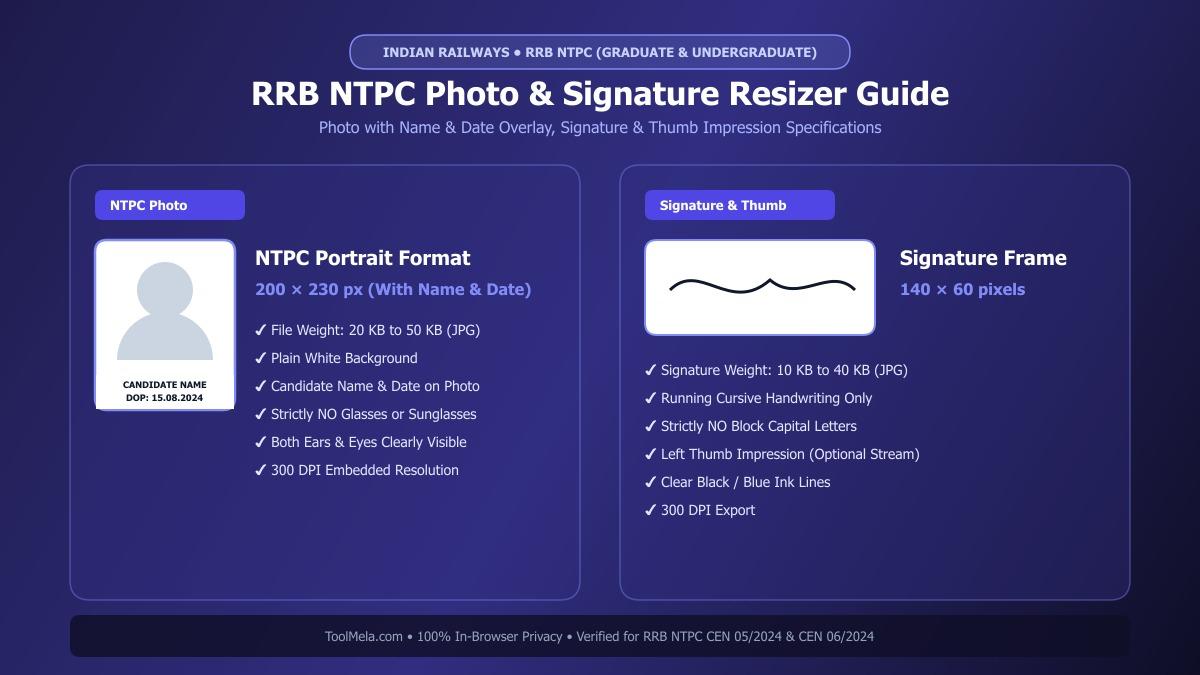
Visual Guide: Formatting passport photographs, signatures, and thumb impressions to official RRB NTPC specifications on ToolMela.
Why People Use This Tool
- Locked RRB NTPC Aspect Ratios: Automatically locks crop boundaries to 200 × 230 pixels for passport photos, 140 × 60 pixels for signatures, and 100 × 100 pixels for thumb impressions, eliminating portal dimension rejections and facial distortion.
- Integrated Name & Date Stamping: Automatically prints your full name and photo capture date across a clean white strip at the bottom of your photo, strictly satisfying RRB notice guidelines without third-party graphics software.
- Target File Size Sliders: Calibrates image weight with precision—targeting 20 KB to 50 KB for photos and 10 KB to 40 KB for signatures and thumb prints.
- AI Plain White Background: Instantly replaces colored walls, room shadows, and outdoor textures with a clean solid white studio backdrop directly inside your browser.
- Binary 300 DPI Header Injection: Encodes standard 300 dots-per-inch density metadata into the JPEG JFIF binary stream, ensuring sharp printing on RRB CBT-1 and CBT-2 admit cards and railway attendance sheets.
- Zero-Upload Local Privacy: Executes all image cropping, background removal, text stamping, and compression locally inside your device's web browser without uploading files to remote servers.
How to Use the Tool
- Select your target document type by clicking Photo, Signature, or Thumb at the top of the interface.
- Drag and drop your camera photo or scanned file (JPG, JPEG, PNG, or WebP) into the upload area, or tap to choose a file from your device.
- On the Crop tab, center your face (or signature / thumbprint) inside the locked cropping frame—verifying level shoulders, forward gaze, open eyes, visible ears, and no spectacles—then click Next.
- On the Background tab, inspect your backdrop. If your photo contains room shadows or colored walls, click Remove Background to render a clean white studio backdrop.
- On the Settings tab, adjust the target file size slider to your preferred weight (35 KB to 40 KB for photos; 20 KB to 25 KB for signatures), enable the "Print Details" toggle to type your Name and Date of Photo, and review the checklist.
- Click Process Image to trigger client-side canvas scaling, text rendering, compression, and 300 DPI JFIF binary header writing.
- On the Download tab, review the live preview and technical metrics, then click Download to save your compliant JPG file. Repeat the workflow for your signature and thumb impression.
Understanding the Output
Railway Recruitment Board servers inspect submitted image files for exact aspect ratios, file size boundaries, and visual legibility. Checking these details before submitting your application prevents unnecessary rejection:
- Photo Dimensions & Framing: The exported portrait measures 200 pixels wide by 230 pixels high within the 20 KB to 50 KB range. The face occupies 70% to 80% of the canvas with visible ears, a solid white backdrop, and a sharp, legible name and date banner along the bottom margin.
- Signature Dimensions & Contrast: The exported signature measures 140 pixels wide by 60 pixels high (10 KB to 40 KB), featuring dark, unbroken ink strokes on an unlined white surface without cut-off letters.
- Thumb Impression Output: When processing thumbprints, the export measures 100 × 100 pixels (10 KB to 40 KB), displaying clear ridge details free from excessive smudge or pixelation.
- Embedded 300 DPI Metadata: Standard 300 DPI density tags are written into the JFIF binary stream, ensuring sharp, smudge-free reproduction on RRB e-call letters, computer-based testing registers, and document verification rosters.
Privacy & File Handling
Biometric credentials such as personal photographs, signatures, and thumbprints require strict confidentiality. ToolMela delivers absolute privacy through its browser-based architecture:
- In-Browser Execution: Image rendering, AI background segmentation, cropping transformations, text stamping, and JPEG compression algorithms execute entirely within your device's web browser using HTML5 Canvas, WebAssembly, and local JavaScript.
- Zero Remote Data Transmission: Your photographs, signatures, thumb impressions, and personal credentials are never uploaded to ToolMela servers, external APIs, or cloud databases.
- Immediate Local Memory Clearance: Files loaded into the tool reside strictly in temporary browser RAM and are discarded immediately when you refresh the page, navigate away, or close your browser tab.
- Safe for Public Cyber Cafes: Aspirants preparing applications at commercial computer kiosks, cyber cafes, or library terminals across India can format their files safely without leaving digital copies stored on remote web servers.
Useful Tips
- Strictly Avoid Spectacles or Glasses: Railway Recruitment Boards automatically disqualify photographs showing reading glasses or spectacles due to flash reflections and pupil obstruction. Always capture your photo without glasses.
- Ensure Name and Date Accuracy: Double-check that your name spelled in the text overlay exactly matches your Class 10 / Matriculation certificate, and ensure the date of photo capture falls within the recent application window.
- Sign on Plain White Paper: Always sign on unruled copier or printer paper using a dark black or deep blue ballpoint or gel pen. Never sign on ruled school notebook pages, as printed horizontal lines disrupt scanning software.
- Never Sign in Capital Letters: RRB guidelines strictly reject signatures written in block capital letters or abbreviated initials. Only use your natural cursive running handwriting.
- Keep at Least 15 to 20 Identical Physical Prints: Obtain identical physical passport-sized prints of the exact photo uploaded to the RRB portal. You will need these identical copies for CBT-1, CBT-2, Computer Based Typing Skill Test (CBST) / CBAT, Document Verification, and Medical Examination.
Common Problems and Solutions
- Problem: The RRB portal displays an error saying "File size exceeds 50 KB" or "File size is below 20 KB".
Solution: On the Settings tab of the tool, set the target file size slider to 35 KB or 40 KB and click "Process Image" again to ensure the output sits safely in the center of the acceptable 20 KB to 50 KB range. - Problem: The candidate's name or date of photo appears cropped or cut off.
Solution: In the Settings tab under "Print Details on Photo", review your text entries and ensure the text is within reasonable character lengths so the banner renders comfortably within the 200 × 230 px boundary. - Problem: The signature looks stretched vertically or squashed.
Solution: This happens when a signature is compressed into a square frame. ToolMela's signature mode uses a locked 140 × 60 rectangular frame to preserve natural handwriting proportions. - Problem: The photo background has household shadows or uneven lighting.
Solution: Use the AI Background tab and click "Remove Background" to convert any backdrop into a clean, solid studio-grade white background before generating the final image.
Frequently Asked Questions
What are the official photo and signature size requirements for RRB NTPC applications?
For RRB NTPC (CEN 05/2024 & CEN 06/2024), photographs must measure 200 × 230 pixels with file size between 20 KB and 50 KB in JPG or JPEG format against a plain white background, featuring candidate name and date printed on a bottom strip. Signatures must measure 140 × 60 pixels with file size between 10 KB and 40 KB in black or blue ink on unlined white paper.
Is it mandatory to print Name and Date on the RRB NTPC photograph?
Yes. Official RRB notifications instruct candidates to upload a clear passport photograph that includes the candidate's full name and the date on which the photograph was captured printed on a white strip at the bottom of the photo.
Can I sign my RRB NTPC form using capital or block letters?
No. Railway Recruitment Boards strictly reject applications containing signatures written in capital block letters or disjointed initials. Signatures must be executed in your standard cursive running handwriting.
Is my personal photo or signature stored on ToolMela servers?
No. ToolMela performs all image cropping, background removal, name/date stamping, resizing, and compression locally inside your web browser using HTML5 Canvas and JavaScript. No files are ever transmitted to ToolMela servers or third-party storage.
