SBI Clerk Photo and Signature Resizer: Format Images to Official Bank Standards
Applying for the State Bank of India (SBI) Junior Associates (Customer Support & Sales) recruitment requires candidates to submit multiple digital credentials through the online registration portal. The application system enforces rigorous technical parameters for all graphical uploads. Applicants must supply a color passport photograph scaled between 20 KB and 50 KB, a scanned signature fitting strictly within 10 KB to 20 KB, and a distinct left thumb impression weighing between 20 KB and 50 KB.
Standard smartphone cameras capture pictures with resolutions exceeding 12 megapixels, resulting in files between 3 MB and 8 MB. When candidates try to shrink these high-weight files using basic photo editors, images often suffer from blurry pixelation, distorted facial ratios, or smudged handwriting that fails automated validation gates during online submission. Furthermore, portraits taken against patterned wallpapers or uneven indoor lighting frequently cause portal rejection alerts.
The ToolMela SBI Clerk Photo & Signature Resizer provides a dedicated, browser-based utility calibrated to official banking guidelines. With preset aspect ratios (200×230 pixels for photographs, 140×60 pixels for signatures, and 240×240 pixels for thumb impressions), built-in background refinement, 300 DPI density preservation, and precise kilobyte slider control, you can produce compliant, application-ready JPEG files on any desktop or mobile device.
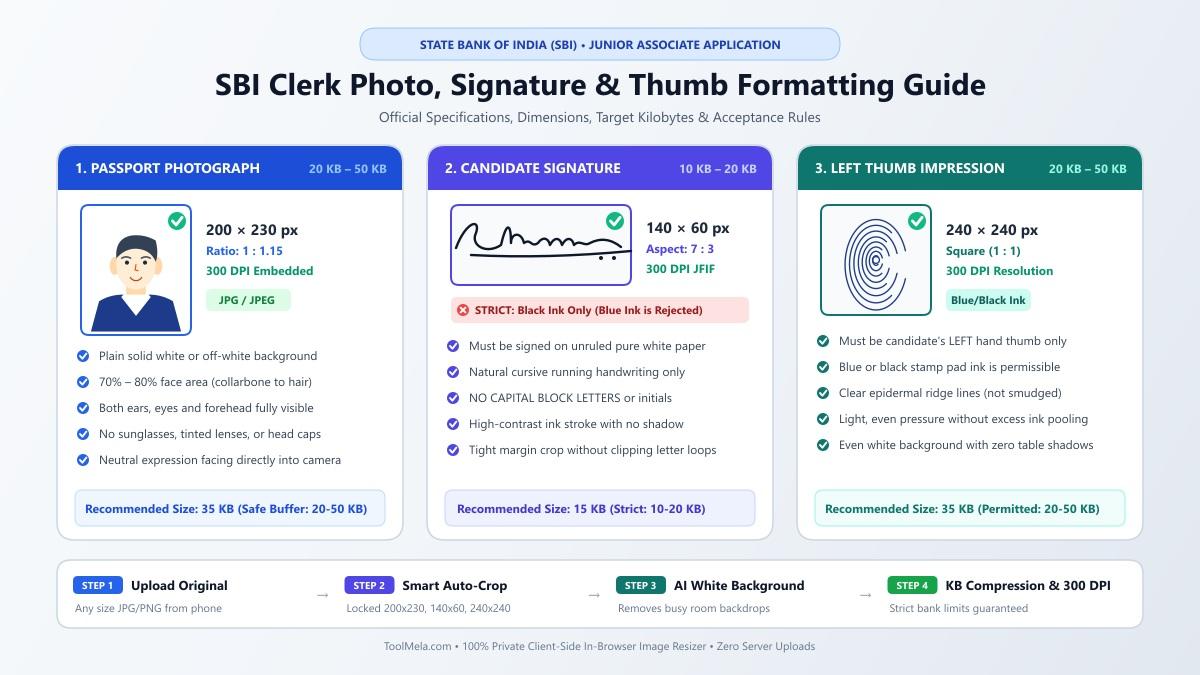
Visual Guide: Formatting passport photographs (200×230 px), signatures (140×60 px), and left thumb impressions (240×240 px) for State Bank of India online recruitment.
Why People Use This Tool
- Calibrated banking dimensions: Automatically locks image frames to 200×230 pixels for portraits, 140×60 pixels for signatures, and 240×240 pixels for thumb impressions to prevent proportion warping.
- Tight kilobyte compression: Lets you target precise file weights within the mandatory limits (20–50 KB for photos and thumb impressions, 10–20 KB for signatures).
- Multi-document versatility: Handles all three essential banking registration assets—photograph, signature, and left thumb impression—within a unified workspace.
- In-browser background cleaning: Features client-side portrait isolation to turn busy room backgrounds into clean white backdrops without external editing software.
- Embedded 300 DPI density: Injects standard print density metadata directly into the image header so validation checks verify scan quality.
- Client-side data security: Executes all rendering, cropping, and compression routines directly on your personal device without sending identity files to remote storage.
How to Use the Tool
- Choose your document mode: Select Photo, Signature, or Thumb Impression at the top of the resizer to load matching dimensions and size boundaries.
- Upload your source file: Drag and drop your JPG or PNG image into the upload box, or click to browse files from your computer or phone.
- Set the crop frame: On the Crop tab, move the locked boundary box over your subject. For portraits, position your face so it covers 70% to 80% of the frame. For signatures and thumb marks, center the ink evenly.
- Clean the background: On the Background tab, inspect your portrait backdrop. If shadows or colored walls exist, use the background removal feature to isolate your portrait against pure white.
- Adjust target file weight: On the Settings tab, review the kilobyte slider and confirm the compliance checklist.
- Process the file: Click Process Image to run local canvas scaling, quality compression, and binary metadata injection.
- Verify and download: On the Download tab, review the output dimensions and file size, then click Download to save your finalized JPG.
Understanding the Output
Before uploading your processed files to the SBI recruitment portal, inspect these core technical elements:
- File weight limits: Confirm that your photograph and thumb impression measure between 20 KB and 50 KB, and your signature measures strictly between 10 KB and 20 KB. Files outside these brackets will trigger immediate portal errors.
- Exact pixel dimensions: Ensure the photograph measures 200×230 pixels, the signature measures 140×60 pixels, and the thumb impression measures 240×240 pixels.
- File format: Verify that the exported file has a
.jpgor.jpegextension. Portals reject other formats such as PNG, WebP, or PDF. - Visual definition: Confirm that both ears, eyes, and facial contours are sharp on your photo. On signatures, verify that black ink lines remain dark, continuous, and unclipped. On thumb impressions, ridge patterns should remain legible.
Privacy & File Handling
Bank recruitment applications involve sensitive biometric and identity documents. The ToolMela SBI Clerk Photo & Signature Resizer operates entirely inside your web browser.
When you select an image, it loads into temporary local browser memory. Cropping, background segmentation, canvas scaling, and kilobyte compression run locally via client-side JavaScript. Your original documents, signatures, and biometric impressions are never uploaded to ToolMela servers or retained in external cloud databases. Once you refresh or close the browser tab, your session data clears automatically.
Useful Tips
- Sign with black ink on unlined paper: Write your signature on clean white printer paper using a black ballpoint or gel pen. Blue ink or lined notebook paper can reduce digital contrast.
- Face natural light when photographing: Stand facing an open window to avoid dark shadows under your nose, chin, or behind your ears. Avoid direct flash against reflective walls.
- Roll thumb impression cleanly: Apply even, light pressure when inking your left thumb. Excessive ink creates smudged black blobs that obscure ridge patterns.
- Never sign in block capital letters: State Bank of India guidelines explicitly prohibit signatures written entirely in uppercase or block letters. Use natural running handwriting.
- Save master original files: Keep your unedited, high-resolution original images safe on your computer or phone for future document verification during interview stages.
Common Problems and Solutions
- Signature file exceeds 20 KB: Because the signature bracket is narrow (10–20 KB), high-resolution uploads can initially overshoot. Return to the Settings tab, move the target slider to roughly 15 KB, and process again.
- Thumb impression ridges look smudged: If ink ridges appear filled or blurry, re-take the impression on fresh paper with lighter ink coverage, holding your camera steady in bright daylight.
- Portal flags invalid image dimensions: This occurs when files are altered in basic image editors that stretch pixels unevenly. Always use the preset locked aspect ratio in the tool to ensure exact width-to-height scaling.
- Background contains room shadows: Use the integrated background tab to replace colored walls with solid white, satisfying the portal's plain background requirement.
Frequently Asked Questions
What are the official photo, signature, and thumb impression sizes for SBI Clerk?
Passport photographs must measure 200×230 pixels with a file size between 20 KB and 50 KB. Signatures must measure 140×60 pixels with a file size between 10 KB and 20 KB. Left thumb impressions must measure 240×240 pixels with a file size between 20 KB and 50 KB. All uploads must be in JPG or JPEG format.
Does the SBI Clerk signature allow blue ink?
No. Official SBI Clerk notifications state that candidate signatures must be written with black ink on white paper. Blue ink is permissible for thumb impressions, but black ink is strictly mandated for signatures.
Can I resize all three application files directly on a mobile phone?
Yes. The resizer operates inside standard mobile web browsers on both Android and iOS. You can upload existing gallery pictures or take new captures directly through your mobile browser.
Why does my processed photo include embedded 300 DPI metadata?
Banking registration servers often check image header density during automated pre-screening. The tool embeds standard 300 DPI JFIF markers into the JPEG header to prevent automated DPI validation warnings.
Inspect your downloaded JPG files on your screen to verify legibility and file weights before submitting your final application on the SBI recruitment portal.
