UPSC NDA Photo Resizer: Format Photo and Signature for Defence Academy Forms
Each year, hundreds of thousands of motivated high school graduates and 10+2 students across India apply for the National Defence Academy and Naval Academy Examination (NDA & NA I and II) conducted by the Union Public Service Commission (UPSC). Serving as the world's premier tri-service military training institution, the National Defence Academy in Khadakwasla, Pune, trains young cadets for permanent commissioned officer roles in the Indian Army, Indian Navy, and Indian Air Force, while the Indian Naval Academy in Ezhimala, Kerala, prepares future naval officers through its B.Tech cadet program.
Candidates must submit their applications through the Commission's centralized One Time Registration (OTR) portal (upsconline.nic.in). Because many candidates are young students aged 16.5 to 19.5 filling out a national competitive exam form for the first time, document formatting errors are widespread. Unlike standard rectangular passport photos, UPSC strictly enforces a 1:1 square aspect ratio with pixel dimensions measuring at least 350 × 350 pixels (and up to 1000 × 1000 pixels) for both photographs and signatures. File sizes must sit comfortably within the 20 KB to 300 KB range in JPG or JPEG format. Crucially, current UPSC guidelines mandate that the candidate's face must occupy three-fourths (approximately 75%) of the frame against a clean, plain white background, and the candidate's full name along with the date of photo capture must be legibly printed across a white banner at the bottom of the photo.
Modern smartphones capture high-resolution rectangular images between 5 MB and 15 MB with non-compliant aspect ratios, domestic room backgrounds, and uneven lighting. Young candidates frequently attempt to upload casual mobile selfies, photos with bedroom backgrounds, or pictures wearing prescription glasses. These non-compliant files are rejected by the UPSC online validation engine or cause complications during identity checks at the written exam centers and 5-day Services Selection Board (SSB) interviews. ToolMela's UPSC NDA Photo Resizer provides an integrated, browser-based solution engineered specifically around official Union Public Service Commission defense exam rules: locked 1:1 square aspect ratios, AI plain white background replacement, automated Name and Date caption stamping, 20 KB to 300 KB target sliders, and binary 300 DPI metadata injection.
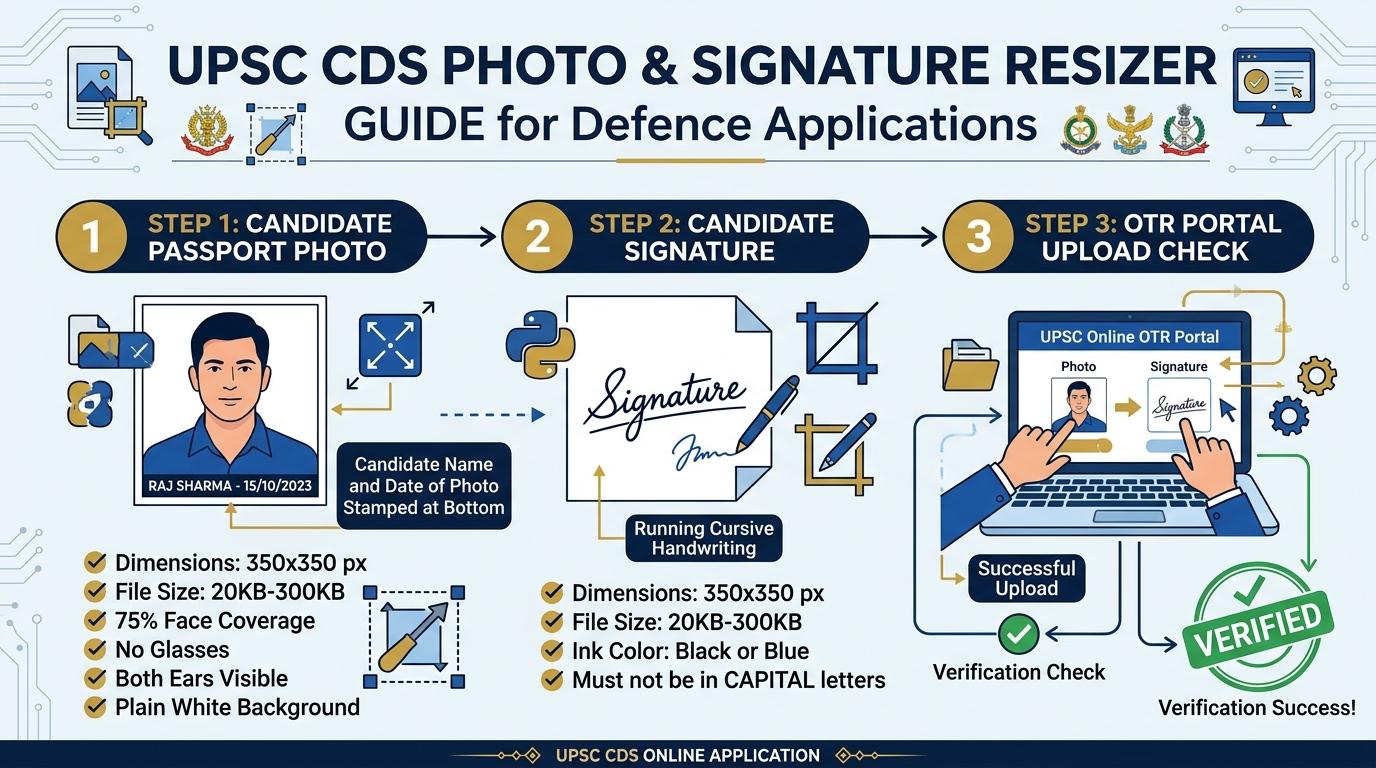
Visual Guide: Formatting passport photographs and signatures to official UPSC NDA & NA Defence Examination specifications on ToolMela.
Why People Use This Tool
- Locked UPSC 1:1 Square Frame: Automatically locks the cropping canvas to a 350 × 350 square aspect ratio, eliminating portal dimension errors and facial distortion on the UPSC OTR server.
- Candidate Name & Date Overlay: Includes an integrated text overlay generator to stamp the applicant's name and photo capture date cleanly across the base of the photograph as mandated by UPSC circulars.
- Wide File Size Range Slider: Allows precise calibration of image weight anywhere within the official 20 KB to 300 KB bracket (targeting 100 KB to 150 KB for optimal clarity).
- AI Plain White Background: Automatically detects portraits and replaces colored domestic walls, outdoor textures, or cluttered rooms with an official solid white studio background directly inside your browser.
- Binary 300 DPI Header Injection: Encodes standard 300 dots-per-inch density metadata into the JPEG JFIF binary header to ensure sharp reproduction on printed UPSC e-Admit Cards and SSB call letters.
- Zero-Upload Local Privacy: Executes all image resizing, cropping, background removal, text stamping, and compression locally in your browser without transmitting your files to external servers.
How to Use the Tool
- Select your target document type by clicking either Photo or Signature at the top of the resizer tool.
- Drag and drop your camera photo or scanned file (JPG, JPEG, PNG, or WebP) into the upload box, or tap to choose a file from your device.
- On the Crop tab, center your face within the 350 × 350 square cropping boundary—verifying level shoulders, forward gaze, open eyes, visible ears, and no spectacles—then click Next.
- On the Background tab, inspect your backdrop. If your photo was captured against a colored wall, click Remove Background to render a clean white studio backdrop.
- On the Settings tab, adjust the target file size slider to your preferred weight (100 KB to 150 KB is recommended), enable the "Print Details" overlay to enter your Name and Date of Photo, and review the checklist.
- Click Process Image to trigger client-side canvas scaling, text rendering, compression, and 300 DPI JFIF header writing.
- On the Download tab, review the live preview and technical metrics, then click Download to save your compliant JPG file. Repeat the workflow for your signature.
Understanding the Output
Union Public Service Commission servers inspect submitted files for square aspect ratios, binary integrity, and visual legibility. Verifying these parameters prior to submission protects your candidature from rejection:
- Photograph Dimensions & Framing: The exported photograph measures at least 350 pixels wide by 350 pixels high (a 1:1 square ratio). The candidate's face must occupy 75% of the frame, showing sharp facial features, visible ears, and a legible printed banner containing the candidate's name and photo capture date.
- Signature Dimensions & Contrast: The exported signature measures at least 350 pixels by 350 pixels within the 20 KB to 300 KB range, delivering dark, unbroken ink strokes on an unblemished white surface without clipped letters.
- Embedded 300 DPI Metadata: ToolMela writes standard 300 DPI density tags into the JFIF binary stream, ensuring that admit cards, physical attendance registers, and biometric scorecards print cleanly at exam centres across India.
- Pre-Submission Checklist: Open your downloaded files in your device viewer to confirm that facial contours are crisp, no eyeglasses or head coverings are present, the name and date stamp is fully legible, and the signature consists of natural running handwriting.
Privacy & File Handling
Candidate photographs, handwritten signatures, and identity details represent sensitive personal credentials. ToolMela ensures absolute confidentiality through its browser-native architecture:
- In-Browser Execution: Image rendering, AI background segmentation, cropping transformations, text stamping, and JPEG compression algorithms execute entirely within your device's web browser using HTML5 Canvas, WebAssembly, and local JavaScript.
- Zero Remote Data Transmission: Your photographs, signatures, and personal details are never uploaded to ToolMela servers, external APIs, or cloud databases.
- Immediate Local Memory Clearance: Files loaded into the tool reside strictly in temporary browser RAM and are discarded immediately when you refresh the page, navigate away, or close your browser tab.
- Safe for Public Cyber Cafes: Aspirants preparing applications at commercial computer kiosks, cyber cafes, or school computer labs across India can format their files safely without leaving digital copies stored on remote web servers.
Useful Tips
- Date of Photograph Must Be Recent: UPSC rules stipulate that the photograph should not be more than 10 days old from the commencement of the online application process. Ensure the date stamped on the image reflects this mandatory window.
- Strictly Remove All Eyeglasses and Spectacles: UPSC examination guidelines explicitly reject photographs showing reading glasses, prescription spectacles, or tinted lenses due to flash reflection and eye-line obstruction. Always photograph your face without glasses.
- Maintain Consistent Appearance on Exam Day: If you take your application photograph clean-shaven, you must appear clean-shaven on the day of the written examination, SSB interview, and medical board; if you have a beard or specific haircut in the photo, you must maintain that same appearance throughout all selection stages.
- Never Sign in Capital Letters: Examination authorities mandate signatures in standard cursive running handwriting. Signatures written entirely in block capital letters or abbreviated initials are treated as invalid and lead to rejection.
- Preserve the Original Master Photograph: Keep the original uncropped digital photograph on your phone or computer and obtain at least 15 to 20 physical passport prints of the identical image. You will need identical physical photos during the written test, SSB interview rounds, and medical examination.
Common Problems and Solutions
- Problem: The portal displays an error saying "File size must be between 20 KB and 300 KB".
Solution: On the Settings tab of the tool, set the target file size slider to 100 KB or 150 KB and click "Process Image" again. This ensures the output sits safely in the center of the acceptable file size range. - Problem: The candidate's name or date of photo appears cut off or misaligned.
Solution: Review your text entry in the "Print Details" fields before clicking "Process Image". Enter your full name in standard letters and ensure the date format adheres to DD/MM/YYYY. - Problem: Background removal softens the edges of light-colored clothing.
Solution: If wearing white or light cream shirts against a light background, edge detection algorithms may struggle. Switch the AI model dropdown in the Background tab to an alternate engine, or capture a photo wearing darker clothing to provide strong contrast. - Problem: The portal rejects the file format.
Solution: Ensure you are uploading the processed JPG file downloaded from ToolMela, rather than raw PDF or WebP files, as UPSC portals accept only standard JPG/JPEG formats.
Frequently Asked Questions
What are the official photo and signature specifications for the UPSC NDA exam?
For the UPSC National Defence Academy (NDA & NA) exam, photographs and signatures must be square with dimensions between 350 × 350 pixels and 1000 × 1000 pixels. The file size for both images must be between 20 KB and 300 KB in JPG or JPEG format. The photograph must be taken against a plain white background with 75% face coverage.
Is it mandatory to print candidate name and date on the UPSC NDA photograph?
Yes. Current UPSC guidelines require the candidate's full name and the date on which the photograph was taken to be clearly printed in black font on a white strip at the bottom of the photo. The photograph must have been taken within 10 days prior to registration.
Can I wear spectacles or reading glasses in the UPSC NDA photograph?
No. UPSC explicitly prohibits spectacles, reading glasses, sunglasses, caps, and headwear. Both eyes must be open and both ears must be clearly visible against a plain white background. Photographs showing glasses will be rejected due to lens reflections obscuring facial features.
Are my personal photo or signature uploaded to any server during processing?
No. ToolMela performs all image cropping, background replacement, text stamping, resizing, and compression locally inside your web browser using client-side JavaScript, Canvas, and WebAssembly. No files or personal biometric documents are ever uploaded to ToolMela servers or third-party storage.
