WB Police Photo and Signature Resizer: Format Images for Online Applications
Applying for recruitment examinations conducted by the West Bengal Police Recruitment Board (WBPRB)—such as Constable, Lady Constable, Sub-Inspector, and Warder positions—requires uploading digital identity files through the official portal. When handling your wb police photo resize and wb police signature resize, the application system enforces strict technical upload boundaries to ensure admit cards and physical attendance rosters print clearly. An applicant must submit a recent passport-style color photograph meeting the official wbprb photo size of 320×400 pixels within a file size of 20 KB to 50 KB, and a handwritten signature measuring 250×150 pixels within 10 KB to 20 KB in JPG format.
Most applicants take photos using smartphones or scan their physical documents at local shops. These raw digital files often exceed several megabytes, contain uneven home backgrounds, or use non-standard dimensions. When candidates try to reduce file weight with general image compressors, facial details often blur, or the file shrinks below the mandatory 20 KB minimum threshold. Similarly, cropping signatures without maintaining proper aspect ratios distorts cursive handwriting strokes, triggering portal upload errors or document scrutiny rejections.
Whether you need an accurate wb police constable photo resize or a fast wbp photo resizer for Sub-Inspector posts, ToolMela's wbp image resizer provides a specialized utility built around the exact technical parameters of the West Bengal Police application system. It locks image proportions to official dimensions, applies targeted compression within required kilobyte boundaries, and helps replace irregular backdrops with solid white without requiring design software.
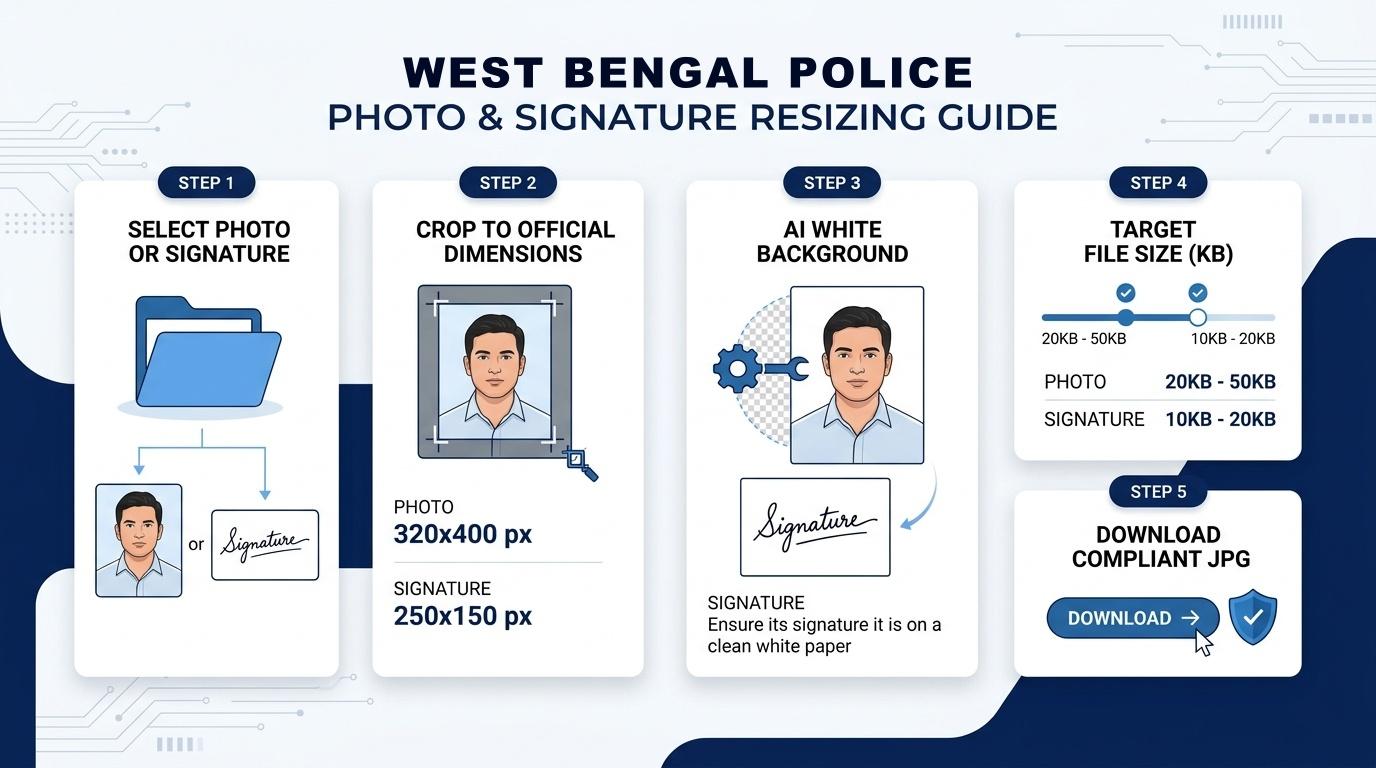
Visual Guide: Formatting passport photographs (320x400 px) and signatures (250x150 px) to official WBPRB specifications on ToolMela.
Why People Use This Tool
- Pre-calibrated aspect ratios: Locks image framing to 320×400 pixels for portraits and 250×150 pixels for signatures, preventing unnatural stretching or squashing.
- Targeted kilobyte compression: Lets you set exact target sizes between 20 KB and 50 KB for photos and 10 KB to 20 KB for signatures to clear portal file-weight checks.
- Automated white background adjustment: Replaces busy domestic walls or outdoor shadows with a clean white backdrop required by recruitment guidelines.
- Dedicated signature framing: Isolates dark ink strokes against plain white paper to ensure clear recognition on printed attendance registers.
- Orientation controls: Includes quick 90-degree left and right rotation buttons to correct sideways mobile camera captures before cropping.
- Local browser processing: Performs all resizing, cropping, and compression inside your web browser so your personal identification documents stay on your device.
How to Use the Tool
- Choose your document type: Click either the Photo or Sign button at the top of the interface depending on which document you need to prepare.
- Select your image file: Click Select Image or drop a JPG, JPEG, or PNG file into the upload area.
- Crop and orient: Adjust the locked cropping boundary over your face or signature. Make sure your face covers roughly three-quarters of the vertical frame, or that your signature is centered. Use the rotation buttons if the photo is rotated, then click Next Step.
- Adjust background if needed: On the background screen, review your portrait setting. If your picture has a colored or shadowy background, click Remove Background to apply a solid white backdrop, then proceed.
- Set target file size: Adjust the target file weight slider within the permitted range (such as 35 KB for photos or 15 KB for signatures) and check the rule confirmation box.
- Process the image: Click Generate Image to execute canvas scaling and adaptive quality compression.
- Download your completed file: Check the live preview, confirmed dimensions, and final kilobyte weight. Click Download Image to save the finished JPG directly to your device.
Understanding the Output
Before uploading the downloaded file to the WBPRB portal, verify three critical technical details:
- File weight: Check that your photograph file measures between 20 KB and 50 KB, and that your signature falls between 10 KB and 20 KB. A file sized around 30 KB to 40 KB for photos provides an ideal balance of visual sharpness and fast upload.
- Pixel dimensions: Confirm that the exported photograph measures exactly 320 pixels wide by 400 pixels high, and that the signature measures 250 pixels wide by 150 pixels high. The proportions should look natural without flattened facial features or squashed lettering.
- Clarity and contrast: Zoom in slightly on your downloaded file. Ensure facial features, eyes, and ears remain sharp against the white background. For signatures, verify that ink strokes remain continuous and legible without fuzzy pixel artifacts.
Privacy & File Handling
ToolMela processes photographs and signatures entirely within your web browser using HTML5 canvas technology and local scripts. When you select an image file, your device loads and alters it directly in your browser's temporary memory.
Because all cropping, white background conversion, and JPEG compression take place on your local device, your files are never transmitted to or stored on ToolMela servers. This client-side architecture keeps your personal identity credentials private and under your direct control throughout the preparation process.
Useful Tips
- Capture signatures with black ink: Write on smooth, unlined white paper using a fresh black or dark blue pen, and photograph directly from above to avoid shadows.
- Maintain neutral facial expression: Look straight into the camera lens with open eyes and a closed mouth, ensuring both ears remain clearly visible.
- Remove accessories before photographing: WBPRB rules prohibit caps, hats, dark sunglasses, or tinted lenses. Take off headwear and tinted spectacles before taking your photo.
- Avoid low-resolution source files: Cropping an already-compressed social media profile picture creates severe pixelation. Always begin with a crisp, original camera capture.
- Keep original uncropped files: Retain full-resolution master files on your phone or computer in case physical passport photographs are requested during later physical measurement tests.
Common Problems and Solutions
- Output file size is outside portal limits: If the exported file lands outside the allowed kilobyte window, return to the settings step, adjust the target slider slightly upward or downward, and click Generate Image again.
- Signature lines appear broken or faint: Faint ballpoint ink can lose contrast during file compression. Retake the snapshot under bright indirect daylight using a dark pen on clean paper.
- Upload surface rejects the file: The tool accepts JPG, JPEG, and PNG images. If your smartphone saved the image in HEIC or WebP format, convert it to standard JPG before selecting it.
Frequently Asked Questions
What are the official photo and signature dimensions for WB Police recruitment?
Photographs must measure 320×400 pixels with a file size between 20 KB and 50 KB. Signatures must measure 250×150 pixels with a file size between 10 KB and 20 KB. Both files must be in JPG format.
Can I upload a photograph with a blue or outdoor background?
Official WBPRB guidelines require a plain white or light background. If your original portrait was taken against an outdoor scene or colored wall, use the built-in background tool to replace it with solid white.
Are capital letters allowed for the signature upload?
No. Recruitment notifications explicitly state that signatures written entirely in capital block letters or abbreviated initials are invalid. Your signature must be written in standard running cursive handwriting.
Does ToolMela upload my documents to an external server?
No. All cropping, background conversion, and file compression run locally in your web browser. Your images remain on your personal device and are not uploaded or stored remotely.
