Bihar Police Photo Resizer: Format Photo and Signature for CSBC & BPSSC Forms
Every year, hundreds of thousands of aspirants register for recruitment drives conducted by the Central Selection Board of Constable (CSBC) and the Bihar Police Sub-ordinate Services Commission (BPSSC). Whether applying for Bihar Police Constable, Prohibition Constable, Fireman, or Police Sub-Inspector (SI) positions, candidates must complete an online application form that requires uploading recent passport-style photographs and handwritten signatures.
The CSBC and BPSSC recruitment portals enforce rigorous automated validation filters on uploaded media. Photographs must conform to standard portrait proportions of 320 × 400 pixels with a file size typically restricted to under 25 KB or within a 20 KB to 50 KB bracket, set against a plain light or white background. Official guidelines strictly prohibit photographs featuring spectacles, dark sunglasses, caps, mufflers, or hair covering the ears. Signatures must measure 250 × 150 pixels with a file size between 10 KB and 20 KB on plain white paper, and notifications frequently require candidates to upload separate signature files in both Hindi and English.
Submitting raw smartphone photos often leads to rejected applications due to multi-megabyte file sizes, improper framing, uneven room lighting, or distorted signatures. The ToolMela Bihar Police Photo Resizer simplifies this process directly in your browser. With locked official dimensions, AI-powered white background replacement, target file size sliders, 300 DPI metadata injection, and dual signature support, you can produce verified, portal-ready files in seconds.
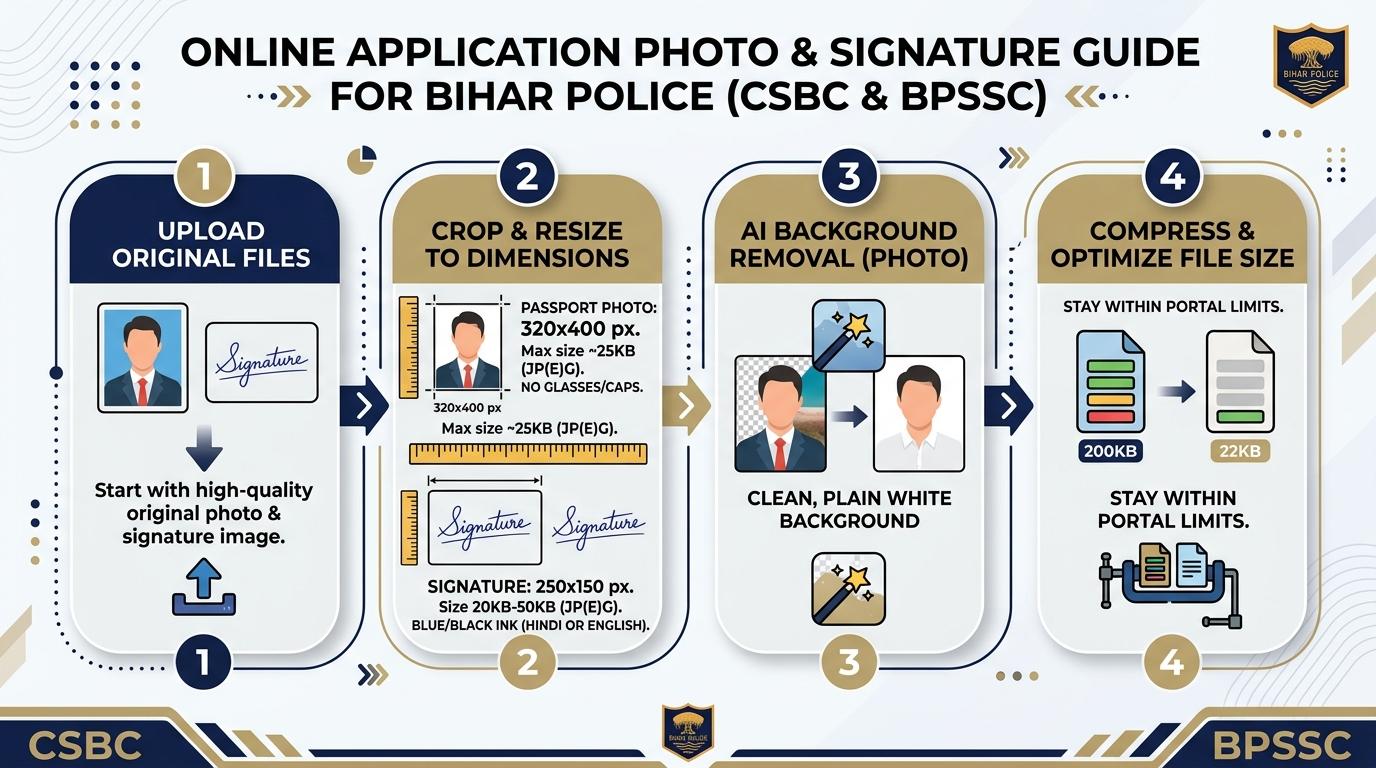
Visual Guide: Formatting passport photographs and signatures to official Bihar Police CSBC and BPSSC recruitment portal specifications on ToolMela.
Why People Use This Tool
- Exact CSBC & BPSSC Dimensions: Locks the crop box to 320 × 400 pixels for photographs and 250 × 150 pixels for signatures, preventing upload distortion.
- Strict File Size Compression: Compresses files into the mandatory under-25 KB or 20 KB–50 KB range without blurring facial details or signature strokes.
- AI Plain White Background: Automatically detects and replaces cluttered room backgrounds with an official solid white background directly in your browser.
- Dual Hindi & English Signature Support: Formats both required signature versions with high-contrast ink isolation on clean white backgrounds.
- Embedded 300 DPI Print Density: Injects standard 300 DPI metadata into the JPEG header to ensure sharp printing on physical admit cards and biometric roll sheets.
- Optional Candidate Name & Date Stamp: Provides a built-in toggle to embed the applicant's name and photo capture date if demanded by specific recruitment advertisements.
How to Use the Tool
- Select whether you are formatting a Photo or Signature using the mode toggle at the top of the resizer engine.
- Drag and drop your camera image or scanned file (JPG, PNG) into the upload area, or click to choose a file from your device.
- On the Crop tab, center your face within the 320 × 400 selection box—ensuring forehead to chest visibility with both ears uncovered—then click Next.
- On the Background tab, review your portrait. If your photo was captured against a colored or busy background, click Remove Background to replace it with pure white via the AI engine.
- On the Settings tab, verify the target file size slider (set to 25 KB or 50 KB depending on your notice), check the rules confirmation box, and optionally enable "Print Details" to add your name and date.
- Click Process Image to execute canvas scaling, quality compression, and 300 DPI header injection.
- On the Download tab, review the live preview and file statistics, then click Download to save your compliant JPG. For signatures, repeat the process for your Hindi and English files.
Understanding the Output
The CSBC and BPSSC application servers review uploaded image streams for pixel geometry, aspect ratio, file size boundaries, and visual clarity. Understanding the output parameters prevents last-minute form rejections:
- Photograph Metrics: The exported photograph measures exactly 320 pixels wide by 400 pixels high (a 4:5 aspect ratio) and is compressed to sit safely within the specified KB threshold at 300 DPI. The subject's face must occupy 70% to 80% of the vertical frame, showing open eyes and both ears clearly visible without spectacles.
- Signature Metrics: The signature exports at 250 pixels wide by 150 pixels high (a 5:3 aspect ratio) within the 10 KB to 20 KB range, delivering dark, continuous ink strokes on a solid white surface.
- Embedded 300 DPI Header: ToolMela injects a standard 300 DPI density tag into the binary JFIF APP0 header, ensuring document verification engines recognize the file as high-density print media.
- Pre-Submission Check: Before finalizing your online application, verify that your portrait is sharp and that your signature does not clip the edges of the image box.
Privacy & File Handling
Candidate photographs and handwritten signatures represent critical personal and biometric data. ToolMela operates with strict privacy guarantees:
- In-Browser Execution: Image rendering, AI background segmentation, cropping, and compression happen entirely inside your web browser using client-side JavaScript, HTML5 Canvas, and WebAssembly.
- Zero Server Uploads: Your photographs, signatures, and personal identity data are never transmitted over the internet to ToolMela servers, cloud databases, or third-party storage.
- Local Memory Isolation: Uploaded files exist only in your browser's temporary local RAM during the active session and are wiped immediately when you reload or close the tab.
- Safe for Commercial Kiosks: Common Service Centres (CSCs), cyber cafés, and public computer centres can process applicant documents without retaining candidate files or risking data breaches.
Useful Tips
- Remove Spectacles and Eyeglasses: CSBC guidelines explicitly reject photographs showing eyeglasses, reading glasses, or tinted lenses. Always remove spectacles before taking your application photo.
- Keep Both Ears Uncovered: Ensure your hair or headwear does not cover your ears, as verification staff check ear contours during physical measurement tests.
- Sign Separately in Hindi and English: Write your signature in both scripts on unlined white paper using black or blue ink, and process each signature separately.
- Use Natural Window Light: Capture your photo facing a well-lit window in daylight to avoid harsh flash reflections or dark under-eye shadows.
- Retain Master Copies: Keep the original high-resolution master photo on your phone or computer, as you will need identical printed passport photographs during the physical test and document verification.
Common Problems and Solutions
Problem: The CSBC portal says "File size exceeds 25 KB".
Solution: On the Settings tab, pull the target file size slider down to 22 KB or 20 KB and click "Process Image" again to create a lighter file.
Problem: The photo was rejected because of glasses or covered ears.
Solution: Retake a fresh photo without spectacles and with your hair tucked behind your ears, then process the new image through the tool.
Problem: Background removal clipped part of the candidate's shirt.
Solution: This happens when light clothing matches a light background. Choose an alternate AI model from the dropdown or take a photo wearing darker clothing against a plain background.
Problem: The signature stroke appears faint or broken.
Solution: Avoid using fountain pens or light-colored ballpoint pens. Sign firmly with a fresh black gel pen on plain printer paper and re-crop tightly.
Frequently Asked Questions
What are the photo and signature size rules for Bihar Police (CSBC/BPSSC) online forms?
For Bihar Police online applications, the passport photograph must measure 320 × 400 pixels (a 4:5 aspect ratio) with a file size under 25 KB or between 20 KB and 50 KB, depending on the notification. The signature must measure 250 × 150 pixels (a 5:3 aspect ratio) between 10 KB and 20 KB.
Are spectacles or caps allowed in the Bihar Police application photograph?
No. CSBC guidelines strictly prohibit spectacles, reading glasses, sunglasses, caps, hats, and mufflers. Both eyes must be open and both ears must be clearly visible against a light or white background.
Does the Bihar Police application require both Hindi and English signatures?
Yes. Most CSBC and BPSSC recruitment forms require applicants to upload two separate signature files: one signed in Hindi and one signed in English. You can use this tool to format and compress both signatures to the required 250 × 150 pixel standard.
Is my personal photograph or signature uploaded to any server during resizing?
No. All cropping, background replacement, and compression execute entirely inside your web browser. Your photo, signature, and personal information are never transmitted to ToolMela servers, saved in databases, or shared with third parties.
