Delhi Police Photo Resizer: Format Photo and Signature for SSC & Delhi Police Forms
Every recruitment cycle, hundreds of thousands of candidates apply for competitive openings in the Delhi Police, including Constable (Executive), Head Constable (Ministerial), Head Constable (AWO/TPO), Police Driver, and Sub-Inspector posts recruited through the Staff Selection Commission (SSC) Central Police Organisation (CPO) examination. Aspirants must register their candidatures through modern online application portals, which require uploading digital passport photographs and handwritten signatures that strictly comply with automated validation standards.
The Staff Selection Commission and Delhi Police recruitment portals enforce stringent technical parameters on uploaded media. Photographs must meet standard portrait proportions of 320 × 400 pixels (or 3.5 cm × 4.5 cm) with an unyielding file size bracket between 20 KB and 50 KB, captured against a clean, plain white or light-colored background. Guidelines explicitly forbid photographs featuring spectacles, sunglasses, caps, hats, religious head coverings that obscure the forehead, or hair masking the ears. Signatures must measure 250 × 150 pixels (or 4.0 cm × 2.0 cm) within a compact 10 KB to 20 KB range on unlined white paper. Uploading files outside these narrow boundaries triggers immediate upload errors or silent form rejections during scrutiny.
Most smartphone cameras produce high-resolution files measuring 5 MB to 15 MB with non-standard aspect ratios, textured wall backgrounds, and uneven domestic lighting. Manually cropping and recompressing these files with generic photo editing apps often introduces pixelation, unnatural stretching, or blurry signatures that fail verification. The ToolMela Delhi Police Photo Resizer provides an all-in-one browser solution tailored directly to these requirements. With locked official aspect ratios, client-side MediaPipe AI background replacement, exact target file size compression sliders, and standard 300 DPI metadata injection, candidates can produce fully compliant, submission-ready files in seconds.
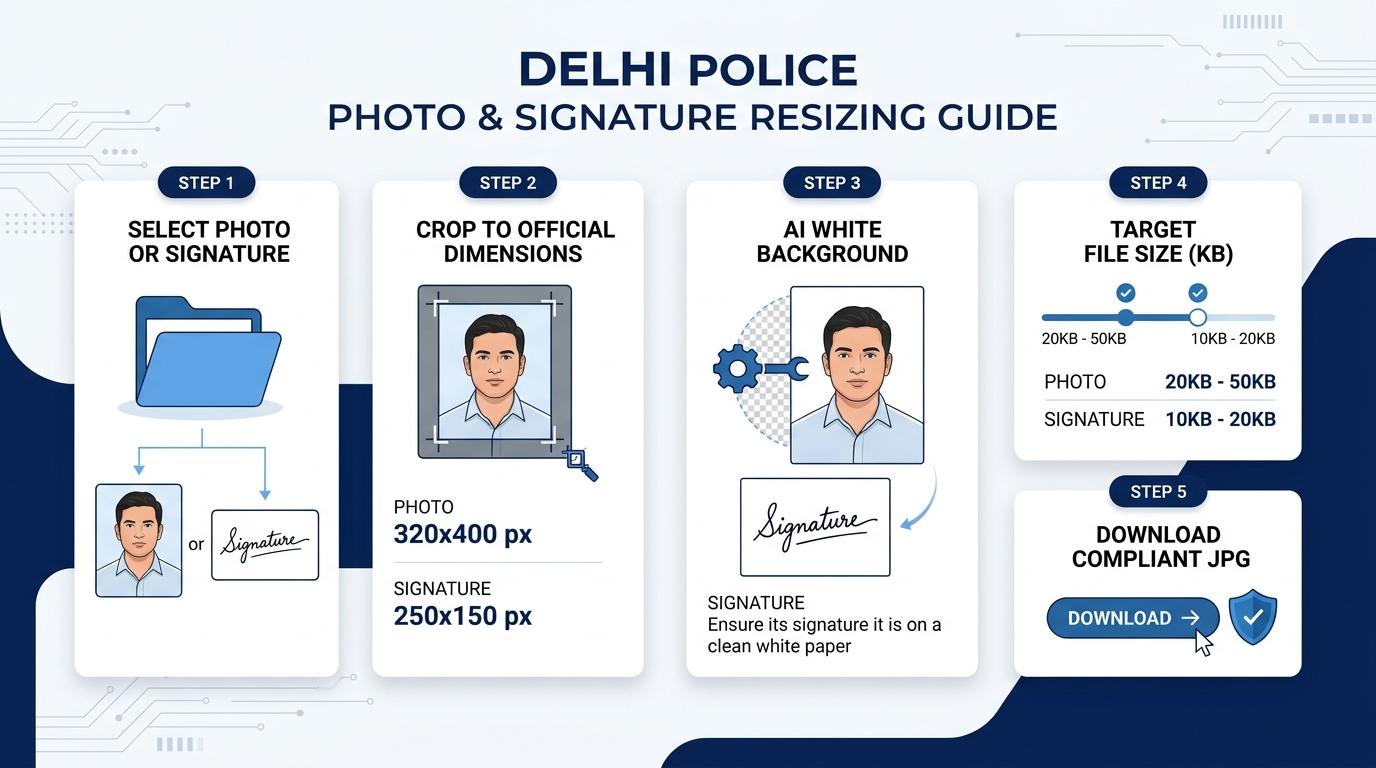
Visual Guide: Formatting passport photographs and signatures to official Delhi Police and SSC recruitment portal specifications on ToolMela.
Why People Use This Tool
- Locked Official Dimensions: Automatically locks the cropping canvas to 320 × 400 pixels for photographs and 250 × 150 pixels for signatures, preventing portal aspect ratio distortion.
- Precise File Size Compression: Employs intelligent canvas compression algorithms that fit images accurately within the mandatory 20 KB to 50 KB photo limit and 10 KB to 20 KB signature limit without degrading visual sharpness.
- AI White Background Replacement: Uses on-device artificial intelligence to cleanly segment portraits and substitute distracting domestic backgrounds with the required solid white background.
- Binary 300 DPI Header Injection: Injects standard 300 DPI density tags directly into the JPEG JFIF APP0 header to satisfy high-resolution printing benchmarks on physical admit cards.
- Optional Name & Date Overlay: Includes a built-in text overlay toggle to render the applicant's name and photo date onto the base of the image when mandated by specific recruitment circulars.
- 100% Private Client-Side Engine: Processes all crops, backgrounds, and compression routines directly inside your web browser so personal identity files never leave your device.
How to Use the Tool
- Choose your processing mode by clicking either Photo or Signature at the top of the resizer engine.
- Drag and drop your source file (JPG, JPEG, PNG, or WebP) into the upload container, or click to browse files from your computer or phone.
- On the Crop tab, position and scale your face inside the 320 × 400 box—ensuring frontal eye contact, level shoulders, and both ears clearly visible—then click Next.
- On the Background tab, check your image background. If your original shot has a colored, uneven, or textured background, click Remove Background to replace it with pure white.
- On the Settings tab, adjust the target file size slider to your preferred value within the 20 KB to 50 KB bracket (35 KB is ideal), verify the exam compliance checklist, and optionally toggle "Print Details" if your notification requires name and date stamps.
- Click Process Image to trigger browser-side canvas rendering, iterative quality compression, and 300 DPI header tagging.
- On the Download tab, examine the output dimensions and final file size in the live preview, then click Download to save the compliant JPG file. Repeat the workflow for your signature.
Understanding the Output
Application servers scanning your uploaded files verify both technical binary headers and visual layout metrics. Reviewing your processed images before submission protects your application from disqualification:
- Photograph Metrics: The exported photograph measures exactly 320 pixels wide by 400 pixels high (a 4:5 vertical aspect ratio) with a file weight calibrated between 20 KB and 50 KB. The subject's face must occupy 70% to 80% of the frame, showing both eyes open, a neutral expression, and both ears visible without eyeglasses or headwear.
- Signature Metrics: The signature exports at 250 pixels wide by 150 pixels high (a 5:3 horizontal aspect ratio) within the 10 KB to 20 KB file size range. The strokes must appear dark, crisp, and continuous against an unblemished white background without clipping the canvas borders.
- Embedded 300 DPI Metadata: ToolMela writes standard 300 dots-per-inch density indicators into the JPEG JFIF metadata header, guaranteeing sharp reproduction when admission tickets and attendance rosters are printed at examination test centres.
- Pre-Upload Verification: Before uploading to the SSC or Delhi Police recruitment dashboard, open your downloaded files in your device's image viewer to double-check that facial features are sharp and signature strokes are clear and legible.
Privacy & File Handling
Candidate photographs, signatures, and personal credentials constitute sensitive biometric data. ToolMela is engineered with zero-server architecture to provide uncompromising privacy:
- In-Browser Execution: Image rendering, AI background segmentation, cropping transformations, and JPEG compression algorithms execute entirely within your device's web browser using client-side JavaScript, HTML5 Canvas, and WebAssembly.
- Zero Remote File Transfers: Your photographs, signatures, and personal details are never uploaded to ToolMela servers, external APIs, or cloud storage buckets.
- Immediate Local Memory Clearance: Files loaded into the tool reside strictly in temporary browser RAM and are discarded immediately when you refresh the page, navigate away, or close your browser tab.
- Safe for Public Cyber Cafes: Aspirants preparing applications at commercial computer kiosks, Common Service Centres (CSCs), and cyber cafes can safely format their documents without leaving copies stored on remote web servers.
Useful Tips
- Strictly Avoid Spectacles: The Staff Selection Commission and Delhi Police reject application photographs showing reading glasses, prescription spectacles, or tinted shades due to flash reflection and eye-line obstruction. Always take your photo without glasses.
- Keep Both Ears Clearly Visible: Style your hair back and ensure that headwear or religious caps do not cover your ears, temples, or forehead. Facial verification algorithms require clear facial contours.
- Sign with Black Ink on Unlined Paper: Write your signature using a dark black gel pen or ballpoint pen on pristine, unlined white printer paper. Avoid ruled notebook paper, as notebook lines create scanning artifacts that interfere with portal processing.
- Avoid All-Capital Letter Signatures: Examination authorities mandate signatures in standard running handwriting. Signatures written entirely in block capital letters or abbreviated initials are routinely rejected.
- Preserve the Original Master Photograph: Keep the original uncropped digital photograph on your phone or computer. You will need identical physical prints during the Physical Endurance and Measurement Test (PE&MT) and Document Verification (DV) stages.
Common Problems and Solutions
Problem: The SSC portal displays an error saying "File size must be between 20 KB and 50 KB".
Solution: On the Settings tab of the tool, set the target file size slider to 35 KB or 40 KB and click "Process Image" again. This ensures the output sits comfortably in the middle of the allowed threshold.
Problem: The photo was rejected because of glasses or facial shadows.
Solution: Stand approximately two to three feet away from a plain wall facing a soft, natural window light. Remove your spectacles, keep your expression neutral, capture a fresh photograph, and run it through the resizer.
Problem: The AI background remover cut off part of the applicant's white shirt.
Solution: If wearing white clothing against a light wall, contrast boundaries can blur. Switch the AI model dropdown in the Background tab to an alternate engine or take a photograph wearing a dark shirt so the edge detection algorithm segments the background cleanly.
Problem: The signature appears jagged or faint after compression.
Solution: Ensure your original signature was drawn with firm pressure using black ink. Re-crop the signature tightly around the text to eliminate excessive empty margins before processing.
Frequently Asked Questions
What are the official photo and signature size requirements for Delhi Police application forms?
For Delhi Police examinations conducted through SSC or Delhi Police recruitment portals, passport photographs must measure 320 × 400 pixels (3.5 cm × 4.5 cm) with a file size between 20 KB and 50 KB. Signatures must measure 250 × 150 pixels (4.0 cm × 2.0 cm) with a file size between 10 KB and 20 KB. Both files must be saved in JPG or JPEG format.
Can I wear spectacles or a cap in the Delhi Police application photo?
No. Official examination guidelines strictly prohibit spectacles, reading glasses, sunglasses, caps, hats, and mufflers. Both eyes must be open and both ears must be fully visible. Photographs showing glasses or head coverings that obscure facial features will be rejected.
Why does the Delhi Police recruitment portal reject photos with dark or scenic backgrounds?
Recruitment portals utilize automated facial recognition and biometric matching algorithms that require a clean, uniform contrast between the applicant and the background. Domestic walls, outdoor landscapes, and colored patterns introduce shadows and noise that fail verification checks. The background must be solid white or light-colored.
Does ToolMela store or upload my photograph and signature to a server?
No. ToolMela processes all image scaling, cropping, AI background replacement, and file compression locally inside your web browser. No files, personal data, or biometric documents are ever uploaded to ToolMela servers or third-party storage.
