RRB Photo & Signature Resizer: Format Photo and Signature for Railway Application Forms
Annually, tens of millions of job seekers across India register on the official Indian Railways recruitment portal (rrbapply.gov.in) to participate in nationwide Railway Recruitment Board (RRB) hiring drives. Whether competing for Non-Technical Popular Categories (NTPC), Assistant Loco Pilot (ALP), Junior Engineer (JE), Technician Grades, Paramedical staff, or Ministerial & Isolated categories across all 21 regional RRBs, qualifying for a career in Indian Railways begins with a flawless online registration.
The centralized RRB recruitment engine relies on strict automated computer vision algorithms to vet uploaded image files. Candidate passport photographs must be formatted to 200 × 230 pixels (width 35mm × height 45mm equivalent) with file weights constrained strictly between 20 KB and 50 KB in JPG or JPEG format. Commission notifications mandate a clear frontal portrait against a plain, light or solid white background with 70% to 80% facial coverage, open eyes, visible ears, and neutral facial expression. Crucially, RRB strictly prohibits candidates from wearing sunglasses, tinted spectacles, reading glasses, or caps. Simultaneously, candidate signatures must be scanned to a 140 × 60 pixel rectangular frame with file sizes held strictly between 10 KB and 40 KB, executed in black or blue ink on unruled white paper in natural cursive running handwriting; block capital letters or initials lead to immediate disqualification.
Modern smartphones shoot ultra-high-resolution images (4 MB to 12 MB) with non-compliant aspect ratios, busy domestic backgrounds, and harsh room lighting. When candidates attempt to shrink these files using uncalibrated photo apps, faces become pixelated, signatures become stretched into unreadable squiggles, or file weights drop below the mandatory 20 KB and 10 KB floors. ToolMela's RRB Photo & Signature Resizer provides an integrated, browser-native utility built specifically to match Indian Railways recruitment guidelines: locked aspect ratio cropping (200 × 230 px for photos and 140 × 60 px for signatures), AI solid white background replacement, target file-size sliders calibrated to 20 KB – 50 KB (photo) and 10 KB – 40 KB (signature), and binary 300 DPI metadata injection.
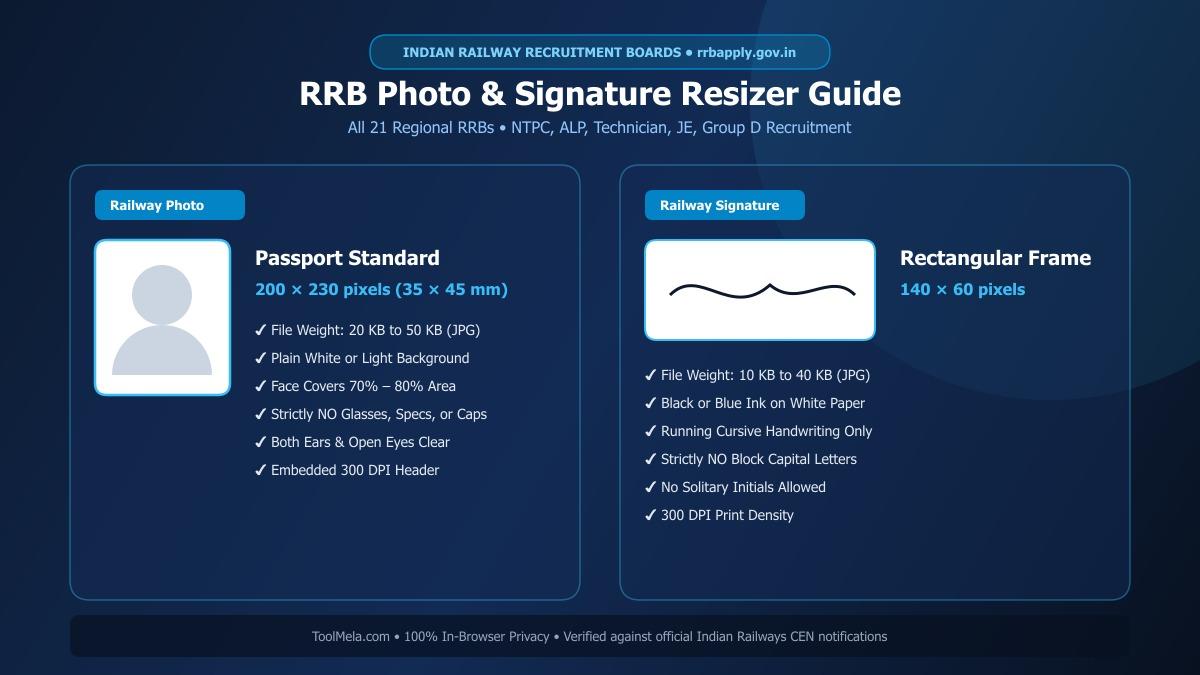
Visual Guide: Formatting passport photographs and signatures to official Indian Railways (RRB) specifications on ToolMela.
Why People Use This Tool
- Locked RRB Aspect Ratios: Automatically locks crop boundaries to 200 × 230 pixels for passport photos and 140 × 60 pixels for signatures, preventing portal dimension rejections and distorted facial features.
- Dual Target File Size Sliders: Calibrates image weight with precision—targeting 20 KB to 50 KB for photos and 10 KB to 40 KB for signatures to ensure immediate compliance on
rrbapply.gov.in. - AI Plain White Background: Instantly removes domestic room backgrounds, shadows, and outdoor colors, replacing them with an official solid white studio background.
- Binary 300 DPI Header Injection: Writes standard 300 dots-per-inch density metadata directly into the JPEG JFIF binary header, guaranteeing crisp reproduction on printed RRB CBT admit cards and exam attendance registers.
- Railway Vision & Cursive Prompts: Includes built-in rule checklists reminding applicants to remove eyeglasses, align shoulders, and verify cursive signatures before finalizing files.
- Zero-Upload Local Privacy: Executes all image cropping, background removal, scaling, and compression locally inside your device's web browser without sending biometric data to remote web servers.
How to Use the Tool
- Open the tool and select your target document type by clicking either Photo or Signature at the top of the interface.
- Drag and drop your image file (JPG, JPEG, PNG, or WebP) into the upload box, or tap to browse files on your mobile phone or computer.
- On the Crop tab, adjust the locked cropping box around your portrait—keeping your head centered, eyes forward, and both ears clearly visible without spectacles—then click Next.
- On the Background tab, review your backdrop. If your photo has colored walls or room clutter, click Remove Background to render a clean, plain white studio backdrop.
- On the Settings tab, set the target file size slider to your preferred weight (35 KB to 40 KB for photos; 20 KB to 25 KB for signatures) and verify the guideline checklist.
- Click Process Image to trigger client-side canvas scaling, adaptive compression, and 300 DPI JFIF binary header writing.
- On the Download tab, inspect the live preview and technical metrics, then click Download to save your compliant JPG file. Repeat the workflow for your signature.
Understanding the Output
Railway Recruitment Board servers inspect submitted image files for exact aspect ratios, file size boundaries, and facial clarity. Checking these details before submitting your application prevents unnecessary rejection:
- Photo Dimensions & Framing: The exported photograph measures 200 × 230 pixels within the 20 KB to 50 KB bracket. The face occupies 70% to 80% of the canvas with visible ears and a solid white backdrop, free from pixelation or facial stretching.
- Signature Dimensions & Contrast: The exported signature file measures 140 × 60 pixels with a weight between 10 KB and 40 KB, displaying dark ink strokes on an unlined white background.
- Embedded 300 DPI Metadata: Standard 300 DPI density tags are written into the JFIF binary stream, ensuring sharp, smudge-free printing on RRB e-call letters and physical attendance sheets at railway exam centers across India.
- Pre-Submission Verification: Review the downloaded file in your gallery to verify that your eyes are clearly visible without eyeglasses, lighting is balanced, and the signature reflects your natural running cursive handwriting.
Privacy & File Handling
Biometric credentials such as personal photographs and handwritten signatures require strict confidentiality. ToolMela delivers absolute privacy through its browser-based architecture:
- In-Browser Execution: Image rendering, AI background segmentation, cropping transformations, and JPEG compression algorithms execute entirely within your device's web browser using HTML5 Canvas, WebAssembly, and local JavaScript.
- Zero Remote Data Transmission: Your photographs, signatures, and personal biometric files are never uploaded to ToolMela servers, external APIs, or cloud databases.
- Immediate Local Memory Clearance: Files loaded into the tool reside strictly in temporary browser RAM and are discarded immediately when you refresh the page, navigate away, or close your browser tab.
- Safe for Public Cyber Cafes: Candidates preparing applications at commercial computer kiosks, cyber cafes, or common service centers across India can format their files safely without leaving digital copies stored on remote web servers.
Useful Tips
- Strictly Remove All Spectacles: RRB recruitment notices explicitly disqualify photos showing reading glasses or spectacles. Even clear lenses create flash glare that obscures the pupil. Always take your photo without glasses.
- Capture Fresh Passport Photos: Do not crop tiny passport portraits from old group festival photos or casual family vacation snapshots. Capture a fresh portrait against a clean wall specifically for this examination cycle.
- Sign on Unruled Pure White Paper: Sign with a dark black or deep blue ballpoint or gel pen on plain printer paper. Never sign on lined school notebooks, as printed horizontal lines cause scanning artifacts.
- Never Sign in Capital or Block Letters: RRB guidelines treat signatures in block capital letters or initials as non-compliant. Sign only in your standard cursive running handwriting.
- Keep at Least 12 to 15 Identical Physical Prints: Print at least 12 to 15 physical passport-sized copies of the exact digital photograph uploaded to the RRB portal. You will need to bring identical physical copies to CBT stages, Document Verification, and Medical Examination.
Common Problems and Solutions
- Problem: The RRB portal shows an error saying "File size exceeds 50 KB" or "File size is below 20 KB".
Solution: In ToolMela, adjust the target file size slider to 35 KB and reprocess to ensure the output sits safely in the center of the acceptable 20 KB to 50 KB range. - Problem: The portal rejects the photo due to spectacles or dark glasses.
Solution: Retake your photograph completely without glasses. RRB scanning software automatically flags lens reflections or eye obstructions. - Problem: The signature looks squashed or stretched vertically.
Solution: This happens when a signature is forced into a square box. ToolMela's signature mode uses a locked 140 × 60 rectangular frame to preserve natural handwriting proportions. - Problem: The photo background has household shadows or uneven lighting.
Solution: On the Background tab, click "Remove Background" to replace your room backdrop with a solid studio-grade white background before generating the final image.
Frequently Asked Questions
What are the official photo and signature size requirements for RRB online applications?
For general RRB online application forms on the rrbapply.gov.in portal, candidate photographs must measure 200 × 230 pixels with file size between 20 KB and 50 KB in JPG or JPEG format against a plain white or light background. Signatures must measure 140 × 60 pixels with file size between 10 KB and 40 KB in black or blue ink on unlined white paper.
Can I wear spectacles or glasses in the RRB application photograph?
No. Railway Recruitment Boards strictly prohibit spectacles, tinted glasses, sunglasses, and caps in application photos. Even prescription reading glasses must be removed to avoid flash reflections and facial recognition rejections.
Can I sign the RRB application form using capital letters?
No. Official RRB notifications explicitly state that signatures written entirely in capital letters, block characters, or solitary initials are invalid and can result in application disqualification. You must sign in natural cursive running handwriting.
Is my photo or signature uploaded to ToolMela servers during processing?
No. ToolMela processes all images locally inside your device's web browser using HTML5 Canvas, client-side JavaScript, and WebAssembly. No files are ever sent to ToolMela servers or third-party storage, ensuring total privacy.
