Unicode to Bijoy Converter: Convert Avro and Web Text to SutonnyMJ ANSI Online
Preparing Bengali documents for commercial printing, publishing, and graphic design frequently involves a persistent technical barrier between modern computing standards and legacy prepress workflows. Today, virtually all digital text created on smartphones, web applications, email clients, and modern word processors is written in Unicode. Typing utilities like Avro, Google Input Tools, and native operating system keyboards output standardized Unicode text. However, a significant portion of the commercial printing industry, publishing houses, regional newspapers, and packaging design studios in Bangladesh and West Bengal still operate production pipelines built around classic desktop publishing suites such as Adobe Illustrator, InDesign, Photoshop, and QuarkXPress. These specialized environments depend on legacy ANSI-encoded typography, predominantly the classic SutonnyMJ font.
When you attempt to paste standard Unicode Bengali text directly into older graphic templates or software configured for SutonnyMJ, the text immediately breaks down into meaningless symbols, unreadable English characters, or disjointed punctuation marks. Re-typing thousands of words from scratch on a mechanical Bijoy keyboard layout is tedious, introduces typographical errors, and squanders valuable production hours. Graphic designers, legal clerks, typesetters, and students need a dependable converter that accurately translates modern Unicode characters into legacy Bijoy ANSI encoding while respecting complex Bengali vowel positioning and conjunct rules.
ToolMela provides a dedicated, browser-based Unicode to Bijoy Converter built to resolve this formatting conflict instantly. By parsing your modern Bengali text directly on your device, our tool maps Unicode characters to their precise SutonnyMJ ANSI counterparts, automatically repositioning pre-vowels and restructuring compound letters. If you are preparing advertising banners, formatting a legal deed, typesetting a book chapter, or submitting official print files, our utility delivers print-ready Bijoy text without requiring software downloads or account registrations.
Why People Use This Tool
- Seamless Graphic Design Workflow: Enables designers to paste Unicode web drafts directly into Adobe Illustrator, Photoshop, and InDesign templates using SutonnyMJ font without broken glyphs.
- Accurate Complex Conjunct Mapping: Automatically processes intricate Bengali conjuncts (যুক্তাক্ষর), reordering pre-vowels (ই-কার, এ-কার) and post-vowels to match ANSI visual ordering.
- Instant Real-Time Conversion: Text converts as you type or paste, eliminating waiting times and manual button presses.
- Complete Client-Side Security: Conversion executes locally inside your web browser, ensuring private legal briefs, business contracts, and personal manuscripts never touch remote servers.
- Zero Software Dependencies: No need to install complex font conversion utilities, keyboard patches, or administrative drivers on your machine.
- One-Click Clipboard Export: Copy converted Bijoy text with a single tap or download an offline text file backup ready for desktop publishing.
How to Use the Tool
Copy Your Unicode Text
Select and copy your modern Bengali text from your web browser, Avro document, social media draft, or smartphone notes.
Paste into the Input Field
Paste your copied text into the left-hand 'Unicode Bengali' box on ToolMela.
Automatic Cluster Transformation
The conversion engine immediately analyzes the input string, identifies consonants, reorders vowel signs, and maps glyphs to ANSI code points.
Examine Live Counts
Check the statistics counter beneath the input and output boxes to verify that your full draft has been processed without accidental omission.
Copy the Converted Bijoy Text
Click the 'Copy Bijoy' button to store the converted ANSI text onto your clipboard.
Apply SutonnyMJ Font
Open your graphic design suite, paste the copied text into your layout, and change the font to SutonnyMJ to display authentic Bengali typography.
Understanding the Output
Users converting text from Unicode to Bijoy for the first time are often surprised when the output box displays what appears to be random English letters, symbols, and accented characters (such as "Avgvi †mvbvi evsjv" for "আমার সোনার বাংলা"). Understanding why this happens clarifies the difference between logical digital encoding and visual font mapping.
Modern Unicode represents language logically. Every Bengali letter has an assigned universal number, and modern font engines assemble the glyphs into readable shapes on screen. In contrast, legacy fonts like SutonnyMJ were developed before universal Bengali Unicode support existed on personal computers. To enable Bengali typing, developers replaced standard Latin alphabet glyphs (ASCII 32 through 255) with visual pieces of Bengali characters. In the SutonnyMJ font, the letter "A" draws the shape of "অ", the letter "v" draws the shape of the aa-kar "া", and the letter "w" draws the shape of the i-kar "ি".
Furthermore, because SutonnyMJ relies on visual order rather than linguistic order, vowel signs that appear to the left of a consonant (such as "ি" or "ে") must physically precede the consonant in the text string. When our tool processes your Unicode input, it restructures the character sequence into this visual arrangement and replaces Unicode points with their corresponding ANSI Latin values. Your web browser displays these raw Latin characters because the output box uses a standard web font. The moment you paste that text into Adobe Illustrator, Photoshop, or Word and apply the SutonnyMJ font, the software draws the intended Bengali glyphs with complete visual fidelity.
Privacy & File Handling
Data security and client confidentiality are critical considerations when handling commercial contracts, governmental petitions, unpublished literary manuscripts, or sensitive financial statements. Many web-based utilities transmit user data across the internet to third-party cloud servers for background processing, introducing risks of unauthorized access, server caching, or commercial text harvesting.
ToolMela is built with a browser-native privacy architecture. All Unicode analysis, cluster reordering, and ANSI character mapping occur exclusively inside your web browser using client-side JavaScript. Your text is processed locally in device memory and is never transmitted to ToolMela's servers or stored in remote databases. Once you complete your conversion and close the browser tab, all temporary data is immediately cleared from your device's memory.
Useful Tips for Best Results
- Always Select SutonnyMJ Font After Pasting: Without selecting SutonnyMJ in your target software, the pasted text will continue to display as raw Latin characters. Make sure the font is installed on your computer and applied to the text layer.
- Inspect Complex Conjuncts in Prepress Proofs: While our conversion engine accurately maps standard Bengali conjuncts, always perform a visual proof of rare or historic Sanskrit ligatures before sending finalized layouts to printing presses.
- Preserve the Unicode Original as Master Copy: Retain your original Unicode document as an editable digital archive. Use the converted Bijoy version strictly for prepress layout and printing purposes.
- Avoid Extraneous Spaces Around Vowel Marks: In informal typing, users sometimes insert spaces between consonants and vowel signs (such as typing a space before "ে"). Clean up these irregular spaces in your Unicode source so the converter can identify the syllable cluster correctly.
- Save Large Converted Drafts as Offline Text: If you are preparing long book chapters or multi-page documents, use the "Save TXT" button to archive an offline ANSI text file for convenient importing into Adobe InDesign.
Common Problems and Solutions
Output Appears as English Letters in the Target Program
If the pasted text looks like English gibberish in Adobe Illustrator, Photoshop, or Microsoft Word, the active text layer is still using a standard Latin font (like Arial or Calibri). Highlight the text and select SutonnyMJ from the font dropdown menu.
Vowel Marks Appear on the Wrong Side
This issue occurs if the original Unicode text contains invalid character orders, such as entering an independent vowel diacritic without an anchor consonant. Correct the Unicode spelling in the input box to resolve the positioning error.
Broken or Unrendered Characters in Modern Windows Software
Some modern text fields in online government portals or web forms only accept Unicode. Never paste converted Bijoy ANSI text into modern web forms, as those portals will interpret the text as literal Latin characters rather than Bengali.
Missing Conjunct Glyphs in Certain Font Variants
While SutonnyMJ is the industry benchmark, certain modified or third-party ANSI fonts lack specific ligature glyphs. If a complex conjunct appears missing or distorted, verify that your computer is using the authentic SutonnyMJ TrueType font.
Frequently Asked Questions
Why does the converted Bijoy text look like jumbled English letters?
The output appears as Latin characters because SutonnyMJ is an ANSI-encoded font that replaces English alphabet glyphs with Bengali visual shapes. The text string stores ANSI characters, which display as raw letters in standard web browsers. Once pasted into your design program and formatted with the SutonnyMJ font, it displays as authentic Bengali script.
How do I make the converted Bijoy text look like Bengali in Adobe Photoshop or Illustrator?
Copy the converted text from ToolMela, select the text tool in Adobe Photoshop or Illustrator, paste the text onto your canvas, and change the font name to 'SutonnyMJ' in the character options panel. The text will instantly render into proper Bengali.
Can I paste converted Bijoy text onto social media or modern websites?
No. Modern websites, messaging apps, and social platforms use Unicode. Pasting Bijoy text into these platforms will display raw Latin characters like 'Avgvi †mvbvi evsjv'. Keep your original Unicode text for websites, mobile apps, and emails, and use Bijoy exclusively for legacy desktop publishing and prepress printing.
Does ToolMela store or monitor the text I convert on the site?
No. ToolMela does not store, view, or record your text. The entire conversion process executes entirely within your browser's local memory using client-side JavaScript. Your confidential documents never leave your computer or mobile device.
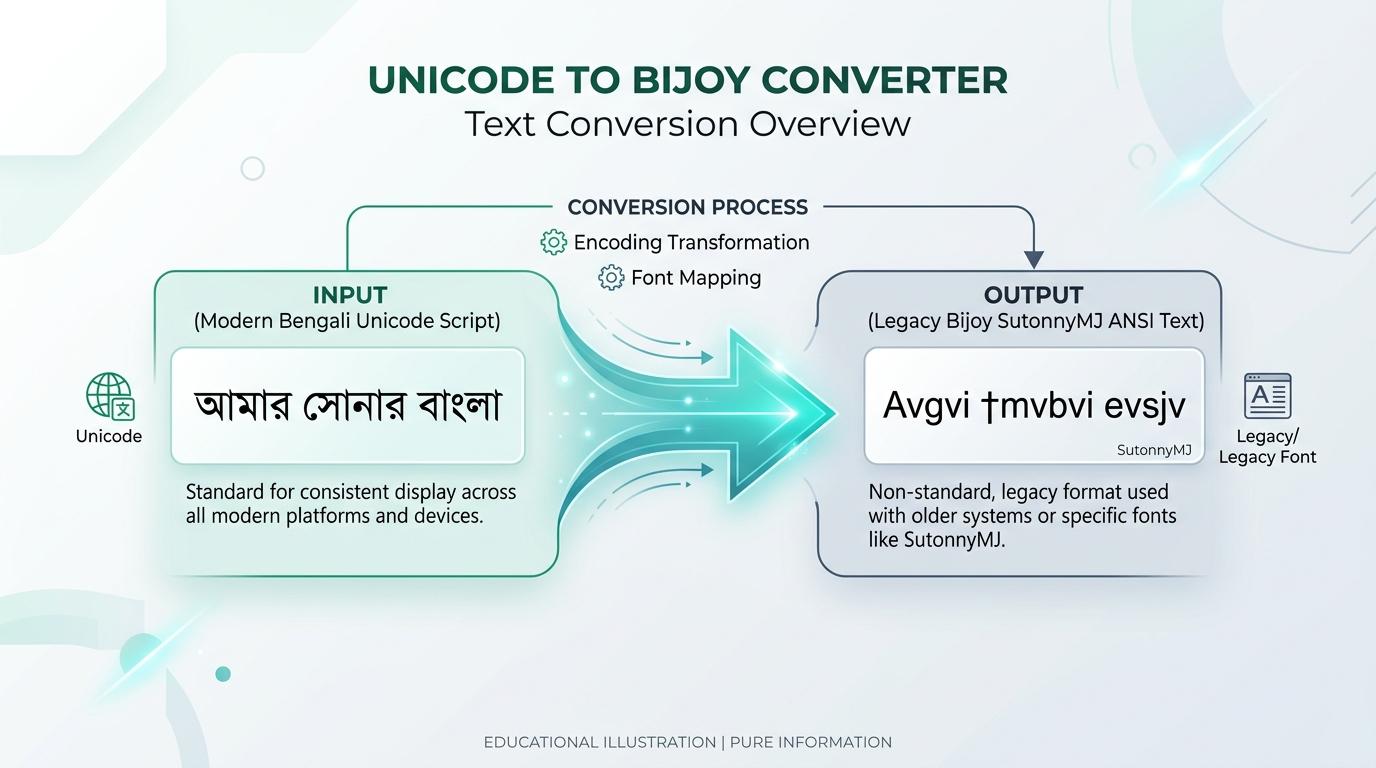
Visual Guide: Paste your Unicode Bengali text, observe real-time conversion into Bijoy ANSI encoding, copy with one click, and format using the SutonnyMJ font.
Explore Related Text Tools
Bengali Typing Tool
Type fluent Bengali online easily using an English keyboard with phonetic transliteration.
Word Counter
Count words, characters, sentences, paragraphs, and reading time in real time.
Case Converter
Transform text between UPPERCASE, lowercase, Title Case, and Sentence case instantly.
Text Repeater
Repeat words, sentences, or paragraphs multiple times with customizable delimiters.
Compress PDF to 1MB
Compress your exported print publications and documents under 1MB easily.
