APSC Photo Resizer: Format Photo and Signature for Assam PSC Online Forms
Candidates applying for recruitment exams conducted by the Assam Public Service Commission (APSC)—such as the Combined Competitive Examination (CCE), Assistant Engineer posts, Inspector positions, and state departmental selections—must submit their application forms through the official APSC online portal. During the application process, candidates are required to upload digital copies of their recent passport photograph and handwritten signature.
The APSC application portal enforces strict technical upload boundaries to ensure identity documents render legibly on e-Admit cards and attendance sheets. Photographs must generally conform to 320 × 400 pixels in dimension with a file size between 20 KB and 50 KB (or within the portal's maximum 200 KB threshold) set against a clean white background. Signatures must conform to 250 × 150 pixels with a file size between 10 KB and 20 KB on plain white paper. Uploading raw smartphone captures invariably results in validation errors due to multi-megabyte file sizes, mismatched aspect ratios, or distracting backgrounds.
Attempting to adjust these dimensions using generic photo editors frequently leads to blurry portraits, unreadable signatures, or stretched facial features. The ToolMela APSC Photo Resizer provides a specialized four-stage processing engine that automates this workflow directly inside your browser. With locked APSC aspect ratios, built-in AI white background conversion, binary 300 DPI metadata injection, target file size compression, and optional name-and-date overlay stamping, you can prepare portal-compliant files in seconds.
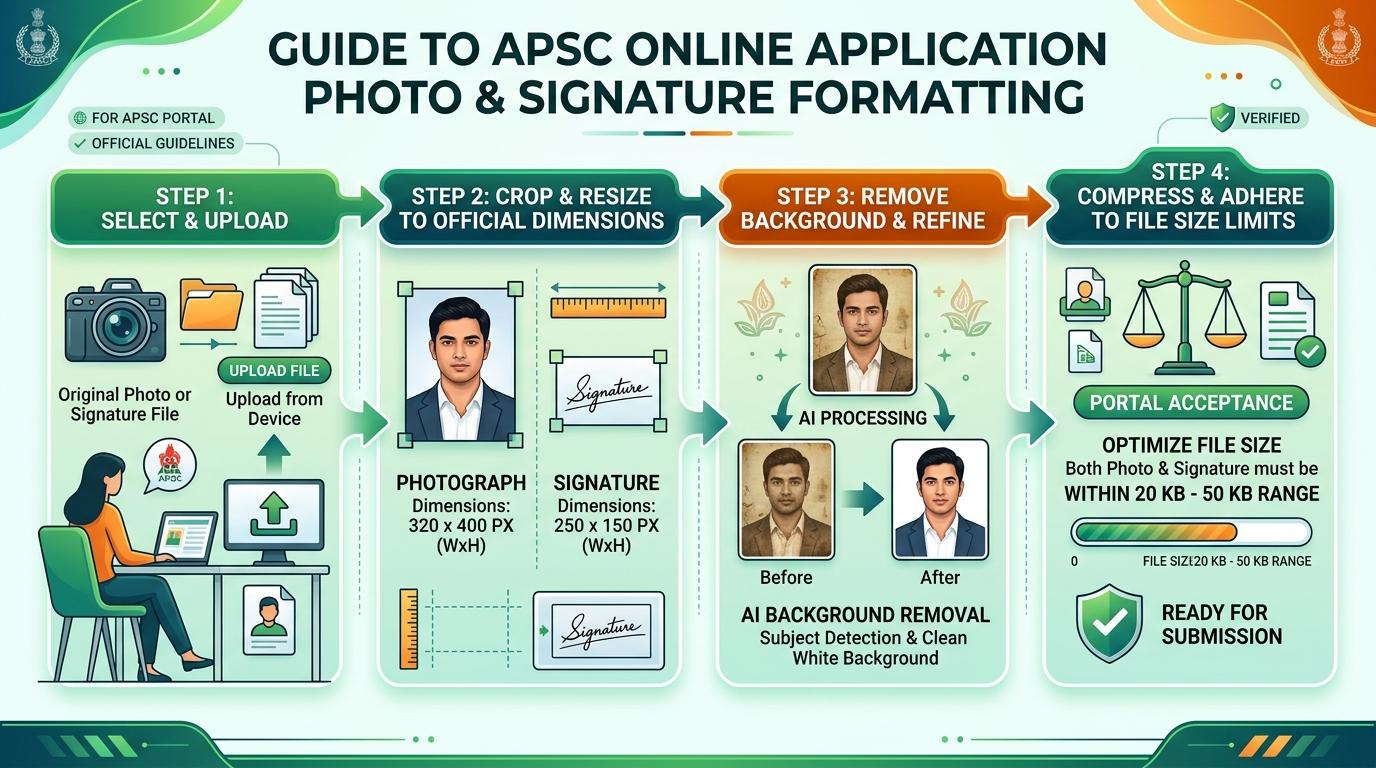
Visual Guide: Formatting passport photographs and signatures to official APSC recruitment portal specifications on ToolMela.
Why People Use This Tool
- Exact APSC Dimensions: Automatically locks crop boundaries to 320 × 400 pixels for photographs and 250 × 150 pixels for signatures, preventing portal aspect ratio distortion.
- Target File Size Compression: Compresses photos into the mandatory 20 KB to 50 KB range (and signatures into 10 KB to 20 KB) without introducing severe compression artifacts or pixelation.
- Built-In White Background AI: Automatically isolates the candidate from busy domestic backgrounds and replaces it with an official plain white background directly in the browser.
- Embedded 300 DPI Resolution: Injects standard 300 DPI resolution metadata into the JPEG header so online document validators verify image density requirements.
- Optional Name & Date Overlay: Includes a built-in toggle to add candidate name and photo capture date at the bottom of the picture if required by specific recruitment advertisements.
- Dedicated Signature Mode: Automatically calibrates high-contrast ink detection on plain white backgrounds to ensure signatures remain sharp and recognizable on admit cards.
How to Use the Tool
- Select whether you are formatting a Photo or Signature using the mode toggle at the top of the resizer engine.
- Drag and drop your camera image or scanned file (JPG, PNG) into the upload area, or click to choose a file from your computer or smartphone.
- On the Crop tab, adjust the locked selection frame over your subject—ensuring your face covers approximately 70% to 80% of the vertical frame—then click Next.
- On the Background tab, review the portrait backdrop. If your original photograph contains a colored, outdoor, or uneven background, click Remove Background to convert it to crisp white using the integrated AI model.
- On the Settings tab, verify the target file size slider, check the rules confirmation box, and optionally enable the "Print Details" toggle if you need candidate name and capture date stamped at the bottom.
- Click Process Image to execute canvas scaling, iterative quality compression, and binary DPI header rewriting.
- On the Download tab, review the final preview alongside the reported dimensions and exact KB size, then click Download to save the finished JPG file.
Understanding the Output
The APSC application server validates incoming image streams based on pixel dimensions, aspect ratio, file size, and color encoding. Understanding these specifications ensures a successful upload on the first attempt:
- Photograph Metrics: The exported photograph measures exactly 320 pixels in width by 400 pixels in height (a 4:5 aspect ratio) and is compressed to sit safely within the 20 KB to 50 KB bracket at 300 DPI. Facial features should remain centered with clear visibility from the top of the hair to the collarbone.
- Signature Metrics: The signature file exports at 250 pixels in width by 150 pixels in height (a 5:3 aspect ratio) and sits comfortably within the 10 KB to 20 KB size range, maintaining dark, unpixelated handwriting strokes against a solid white canvas.
- Embedded DPI Headers: Unlike basic image editors that strip metadata during web export, ToolMela rewrites the JPEG binary JFIF APP0 marker to guarantee a registered 300 DPI density.
- Verification Before Submission: Before finalizing your APSC application, inspect the downloaded JPG file on your device to confirm that your eyes and face are sharp and that no part of your signature touches the outer borders.
Privacy & File Handling
Candidate photographs and signatures are sensitive biometric and personal identity credentials. ToolMela handles all document processing with absolute privacy:
- In-Browser Execution: Image rendering, AI background segmentation, cropping, and compression happen entirely inside your web browser using client-side JavaScript, HTML5 Canvas, and WebAssembly.
- Zero Server Uploads: Your photographs, signatures, and personal identity data are never transmitted over the internet to ToolMela servers, cloud databases, or third-party storage.
- Local Memory Isolation: Uploaded files exist only in your browser's temporary local RAM during the active session and are wiped immediately when you reload or close the tab.
- Safe for Commercial Kiosks: Common Service Centres (CSCs), cyber cafés, and public computer centres can process applicant documents without retaining candidate files or risking data breaches.
Useful Tips
- Use Daylight for Initial Captures: Take your source photo facing a window in natural daylight rather than using a camera flash, which creates harsh glares and dark background shadows.
- Sign With Dark Ink on Unruled Paper: Write your signature using a clean black or dark blue ballpoint pen on plain white printer paper. Avoid lined notebooks or textured surfaces.
- Crop Tightly to the Signature: When setting the signature crop frame, trim excess white margins around the text while ensuring the top and bottom loops of letters are not cut off.
- Check Name & Date Advertisement Rules: Check your specific APSC advertisement notification. If the notification specifies printing the date of the photo, enable the "Print Details" toggle to embed it cleanly.
- Keep Original High-Resolution Masters: Always store your original, uncompressed source files safely on your phone or computer in case physical passport photos are required during later interview phases.
Common Problems and Solutions
Problem: The APSC portal displays "File size exceeds allowable limit".
Solution: On the Settings tab, pull the target file size slider slightly lower (for example, to 35 KB for photos or 15 KB for signatures) and click "Process Image" again to re-compress.
Problem: Background removal clips hair or ear edges.
Solution: This occurs when the subject's clothing or hair blends into a dark background. Select an alternative AI segmentation model from the dropdown or upload a photo captured against a lighter wall.
Problem: The signature appears faint or illegible after processing.
Solution: Faint fountain pen or light ballpoint ink loses contrast during compression. Re-sign using a fresh black gel or felt-tip pen and upload a clear, well-lit snapshot.
Problem: The uploaded PNG file is rejected by the portal.
Solution: Government portals require standard JPEG files. ToolMela automatically encodes and exports your finished image as a compliant JPG, resolving format incompatibilities automatically.
Frequently Asked Questions
What are the official photo and signature dimensions for APSC online applications?
For APSC online forms, the passport photograph must measure 320 pixels wide by 400 pixels high (a 4:5 aspect ratio) between 20 KB and 50 KB (up to 200 KB maximum). The signature must measure 250 pixels wide by 150 pixels high (a 5:3 aspect ratio) between 10 KB and 20 KB.
Can I use a photo with a blue or green background for the APSC application?
APSC guidelines require a clean, plain white or light-colored background. If your original photo has a colored, dark, or outdoor background, use the built-in "Remove Background" feature on the Background tab to replace it with solid white automatically.
Does the APSC exam photo require the candidate's name and date printed on it?
Certain APSC recruitment notices require the candidate's name and the date of photograph capture to be printed at the bottom of the photo. ToolMela includes an optional "Print Details" toggle in the Settings tab that lets you add this text strip cleanly if required by your specific advertisement.
Is my personal photo or signature uploaded to any server when using this tool?
No. All cropping, AI background removal, and compression occur locally inside your web browser. Your photo, signature, and personal details are never uploaded to ToolMela servers, stored in databases, or shared with third parties.
