PAN Card Resize: Format Photo and Signature for NSDL and UTIITSL Applications
Applying for a Permanent Account Number (PAN) card is one of the most critical financial identity milestones for citizens, taxpayers, and businesses across India. Issued by the Income Tax Department through its authorized processing agencies—Protean eGov Technologies Limited (formerly NSDL e-Governance) and UTI Infrastructure Technology and Services Limited (UTIITSL)—a physical PAN card serves as essential proof of identity for opening bank accounts, filing income tax returns, making high-value investments, and registering businesses. While digital application forms allow online submissions from home, thousands of applications face administrative processing delays every day because the uploaded photograph or signature does not match strict technical validation rules.
Both NSDL and UTIITSL mandate rigorous, automated validation criteria for all digital uploads, and their portal specifications differ significantly. For NSDL (Protean) online applications, candidate passport photographs must measure exactly 3.5 cm in height by 2.5 cm in width (equivalent to roughly 197 × 276 pixels at 200 DPI resolution) with a file size strictly bounded between 20 KB and 50 KB in JPG or JPEG format. The photo must feature a frontal facial view against a solid white or light-colored background without shadows, head coverings, or tinted spectacles. NSDL signatures must measure 2.0 cm in height by 4.5 cm in width (approximately 354 × 157 pixels at 200 DPI) and remain between 10 KB and 50 KB, executed in clear black ink on unlined white paper. In contrast, UTIITSL requires photographs to be formatted to a square frame of exactly 213 × 213 pixels at 300 DPI with a file size under 30 KB, while its signature upload requires 400 × 200 pixels with a maximum file size of 60 KB.
Standard smartphone cameras capture photographs and scanned documents at resolutions exceeding 12 megapixels, generating image files between 3 MB and 12 MB. Attempting to compress these high-resolution captures using basic photo apps often degrades facial features into blurry pixels, warps aspect ratios, or produces files outside the narrow kilobyte thresholds. ToolMela's PAN Card Resize tool eliminates this formatting friction. Operating entirely inside your browser, it provides locked aspect-ratio cropping calibrated for both NSDL and UTIITSL guidelines, intelligent white background replacement, precise file weight compression, and embedded DPI metadata tags to ensure your images clear portal verification on the first attempt.
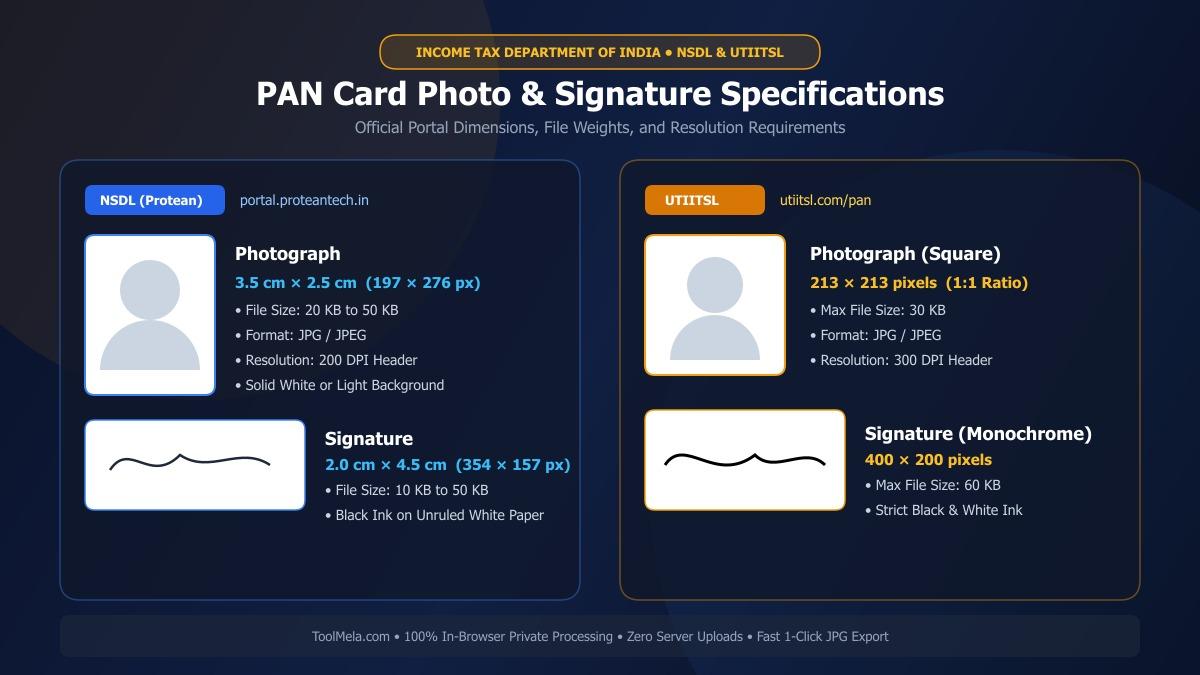
Visual Guide: Formatting applicant photographs and signatures to official NSDL and UTIITSL specifications on ToolMela.
Why People Use This Tool
- Agency-Specific Dimension Presets: Provides pre-calibrated framing boundaries for NSDL (3.5 × 2.5 cm photo and 2.0 × 4.5 cm signature) and UTIITSL (213 × 213 px photo and 400 × 200 px signature) so proportions are never distorted.
- Accurate File Size Boundary Compression: Dial in exact target weights—safely landing within the mandatory 20 KB to 50 KB bracket for NSDL and the under-30 KB requirement for UTIITSL without quality degradation.
- Instant Solid White Background Replacement: Removes busy room interiors, domestic shadows, and wallpaper patterns with a single click, substituting the plain white backdrop demanded by tax authorities.
- Binary DPI Metadata Injection: Writes standard 200 DPI and 300 DPI resolution tags directly into the JPEG file header, preventing automated portal rejection flags triggered by missing density markers.
- High-Contrast Signature Optimization: Enhances black ink strokes, suppresses gray paper shadows, and removes scanner tint to ensure handwritten signatures remain crisp and legible on plastic card prints.
- Dual Portal Compatibility: Switch effortlessly between NSDL/Protean and UTIITSL modes depending on which authorized service provider processes your application.
- Zero Registration or Watermarks: Completely free to use on desktop computers, tablets, and smartphones without account logins, subscriptions, or branding watermarks.
How to Use the Tool
- Select Your Processing Preset: Choose between NSDL or UTIITSL, and select either Photo or Signature mode to load the exact dimensional rules and file weight parameters.
- Upload Your Image: Drag and drop your image file or tap the upload box to select a JPG, PNG, or WEBP photo from your device's storage.
- Adjust the Proportional Crop Box: Position and size the locked bounding frame over your image. For photographs, center your face and shoulders so your face covers 70% to 80% of the area. For signatures, crop closely around the written name while removing extra margins.
- Clean the Background (Photos): If your photo was taken against an uneven or colored wall, use the background cleaner to generate a uniform solid white backdrop.
- Adjust the Target File Weight: Use the intuitive KB compression slider to set your desired file size—35 KB for NSDL photos or 25 KB for UTIITSL photos works reliably to clear portal upload filters.
- Preview and Download: Check the real-time visual output, verify the final dimensions and file size in kilobytes, then click Download to save your compliant JPEG file.
Understanding the Output
When you process an image through ToolMela's PAN Card Resize tool, the resulting file is engineered to satisfy the validation scripts used by official tax document repositories:
- File Format: Baseline JPG/JPEG encoding, universally accepted by both NSDL/Protean and UTIITSL upload portals.
- Exact Dimensions: Formatted to official portal standards—197 × 276 pixels (3.5 × 2.5 cm) for NSDL photos, 354 × 157 pixels (2 × 4.5 cm) for NSDL signatures, 213 × 213 pixels for UTIITSL photos, and 400 × 200 pixels for UTIITSL signatures.
- Calibrated File Size: Downloaded files comfortably satisfy the required upload thresholds (typically 20–45 KB for NSDL and 15–28 KB for UTIITSL).
- Visual Sharpness: Preserves facial contours, eye clarity, and clean pen strokes without pixelated noise, blurring, or unnatural artifacting.
- Embedded Resolution Tags: Official 200 DPI or 300 DPI metadata written directly into the binary header to prevent low-resolution warnings during portal ingestion.
Privacy & File Handling
Photographs and handwritten signatures represent sensitive identity credentials that require stringent privacy safeguards. ToolMela processes all image cropping, background modifications, and file compressions entirely on the client side using your web browser's local HTML5 Canvas and WebAssembly memory.
Your images are never transmitted across the internet, saved on remote servers, or stored in any database. All modifications happen entirely within your local device session. As soon as you close or refresh your browser tab, all temporary cache data is permanently cleared. You can prepare documents for official government filings with total peace of mind, even when using shared devices or public networks.
Useful Tips for PAN Card Photos and Signatures
- Sign with a Dark Black Pen: Income tax guidelines strongly advise signing with dark black ink on smooth, unlined white paper. Black ink provides maximum contrast against the white backdrop, ensuring clean optical character and signature recognition.
- Never Sign in Capital or Block Letters: Signatures penned entirely in capital letters or solitary initials are rejected during verification scrutiny. Use your normal, continuous cursive handwriting.
- Remove Eyeglasses and Spectacles: Even if you wear glasses daily, remove them before capturing your portrait. Spectacle frames frequently obscure eye contours, and anti-reflective lens coatings can reflect camera flash, triggering automated rejection.
- Avoid Flash Shadows Behind the Head: When capturing your photo against a wall, ensure soft, diffused lighting from the front. Avoid hard direct flashes that create dark silhouette halos along your shoulders or neck.
- Verify File Attributes Before Final Upload: Always right-click your downloaded file on a desktop or view details on your mobile device to verify that the format is
.jpgand the file size sits safely below the portal's ceiling limit before submitting your application.
Common Problems and Solutions
Problem: “File size exceeds 50 KB” error on NSDL or “File size exceeds 30 KB” on UTIITSL.
Solution: Each portal enforces different maximum boundaries. On ToolMela, adjust the target file weight slider to 35 KB when preparing files for NSDL and 25 KB when preparing files for UTIITSL to ensure the generated file comfortably clears the ceiling.
Problem: “Invalid Image Dimensions” or aspect ratio mismatch.
Solution: Uploading arbitrary rectangular photos to UTIITSL (which requires a 1:1 square ratio of 213 × 213 px) triggers an immediate error. Always ensure you select the correct agency preset in ToolMela before cropping to lock the mandatory aspect ratio.
Problem: Signature appears faint, broken, or washed out on the preview.
Solution: Low indoor lighting often produces muddy gray paper backgrounds. Sign firmly using a dark black ink pen, illuminate the page evenly, crop closely around the signature, and use ToolMela's contrast enhancer to ensure solid black lettering on a clean white field.
Problem: Photo rejected due to domestic or patterned background.
Solution: Tax department portals require a clean, uniform light or white background. If your photo includes curtain patterns, door frames, or wall textures, use ToolMela's one-click background remover to replace it with a compliant solid white background.
Frequently Asked Questions (FAQs)
What are the official photo and signature size limits for NSDL and UTIITSL PAN card applications?
For NSDL (Protean), the photograph must have dimensions of 3.5 cm × 2.5 cm (approximately 197 × 276 pixels at 200 DPI) with a file size between 20 KB and 50 KB in JPEG format. The signature must measure 2.0 cm × 4.5 cm (approximately 354 × 157 pixels at 200 DPI) with a file size between 10 KB and 50 KB. For UTIITSL, the photograph must measure exactly 213 × 213 pixels at 300 DPI with a file size under 30 KB, and the signature must measure 400 × 200 pixels with a file size under 60 KB.
Why does the UTIITSL portal require a 213 × 213 pixel photograph?
UTIITSL utilizes a standardized square portrait format measuring exactly 213 × 213 pixels at 300 DPI for digital document processing and physical card printing. Uploading an uncropped passport photo with a rectangular ratio will result in an "Invalid Image Dimensions" error. ToolMela's UTIITSL preset automatically locks the 1:1 aspect ratio and scales the image to exactly 213 × 213 pixels.
Can I use blue ink to sign my PAN card application form?
While blue ink is occasionally accepted, the Income Tax Department and processing agencies strongly recommend using dark black ink on smooth, unlined white paper. Black ink ensures superior optical contrast during automated document scanning and prevents the signature from appearing faded or pixelated when printed onto the physical PVC card.
Are my PAN card photograph and signature uploaded to ToolMela servers?
No. ToolMela processes all image files entirely inside your device's web browser using client-side JavaScript, HTML5 Canvas, and WebAssembly. Your photograph and signature files are never sent across the internet, stored on remote cloud servers, or accessible to third parties, ensuring complete privacy and data security.
