Voter ID PVC Card Maker: Crop, Resize, and Generate Print-Ready PVC Layouts Online
Downloading an official Election Photo Identity Card (e-EPIC) gives citizens a quick electronic record, but turning that digital file into a wallet-sized physical card presents practical formatting challenges. The official download arrives as an unformatted A4 PDF surrounded by instructions and wide margins, while phone snapshots and scanner images frequently suffer from uneven borders and tilted angles.
Manually cropping, aligning, and scaling both card faces in graphic software takes time and precise measurements. If the aspect ratio is slightly off, the printed card will not fit standard wallet slots, badge holders, or laminating pouches. Cyber café owners and Common Service Centre (CSC) operators preparing voter cards daily need a fast, standardized workflow that eliminates guesswork.
The ToolMela Voter ID PVC Card Maker removes the measuring altogether. An e-EPIC sheet prints both faces side by side inside a dashed cut box, and the tool reads that section off the page itself — so opening a file is usually the whole job. Both faces come back framed to the exact ISO CR80 shape and re-rendered at print resolution, ready to place on an A4 sheet.
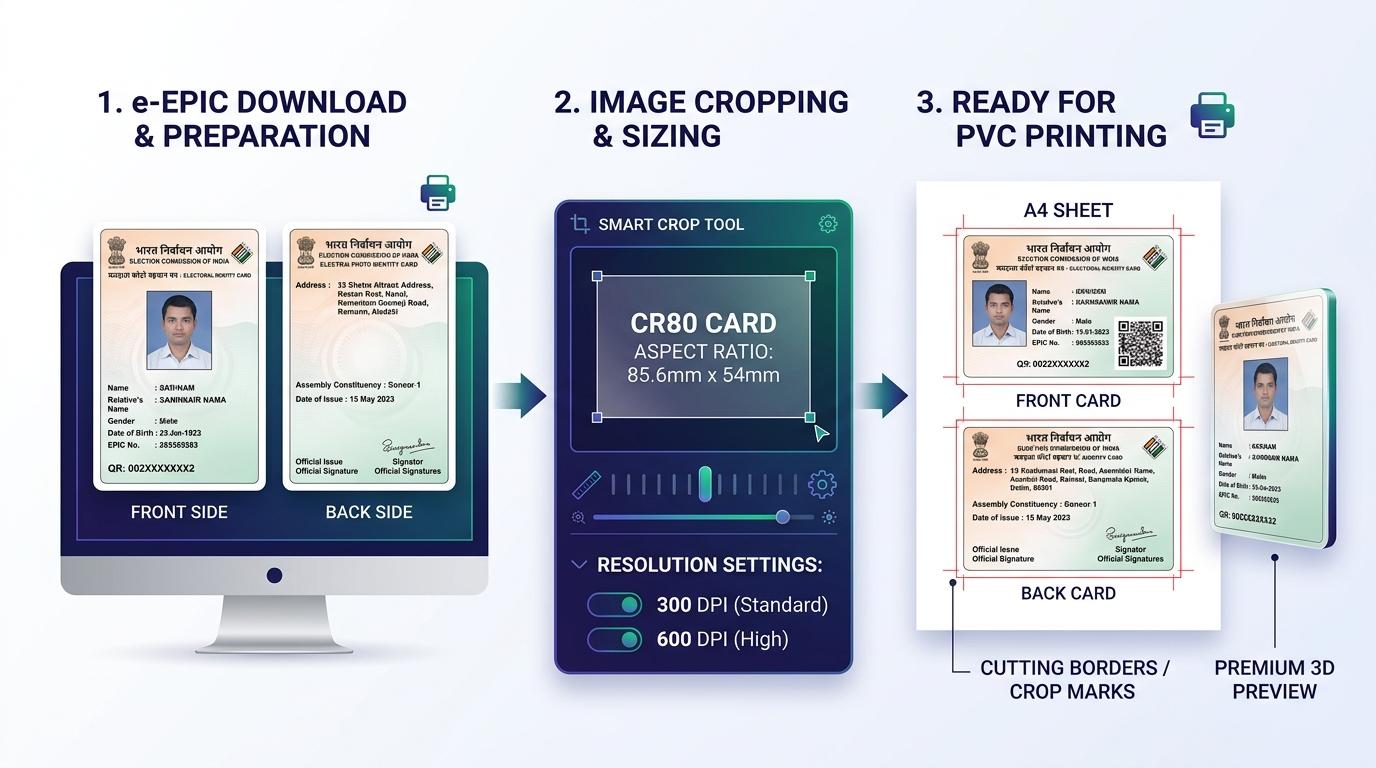
Visual Guide: Cropping e-EPIC documents to standard CR80 dimensions and generating ready-to-print A4 sheets on ToolMela.
Why People Use This Tool
- Automatic Card Detection: The dashed cut section holding both faces is located from the page itself, so an original e-EPIC PDF, a flatbed scan and a phone photo all land in the same place without any dragging.
- Standard CR80 Card Proportions: Enforces the universal 85.6 mm × 53.98 mm card ratio so your finished voter ID fits standard wallets, lanyards, and laminating pouches.
- Selectable Print Clarity (DPI): Offers 300 DPI, 600 DPI, and 900 DPI rendering modes so portrait photos, barcodes, QR codes, and EPIC serial numbers stay sharp.
- True Resolution From PDFs: Only the framed area is re-rendered from the source document, which is why 600 and 900 DPI on an e-EPIC PDF are genuinely sharper rather than an enlarged preview.
- Locked PDFs Supported: A password-protected e-EPIC opens with its password in the browser, so there is no need to strip the protection in another program first.
- Side-by-Side A4 Print Sheet: Places the front and back next to each other on a portrait A4 page in millimetres, with optional cut marks and adjustable row spacing.
- Batch Queuing for Print Shops: Allows operators to queue multiple voter cards into a single print batch to save paper and printing time.
How to Use the Tool
- Drag your e-EPIC PDF or image file (JPG, PNG, WebP) onto the tool, or click Open document to browse your device. If the PDF is locked, enter its password when asked.
- Wait a moment. Both card faces are located, framed to CR80, and rendered — the run strip across the top reports what was found and whether the layout was recognised.
- Check the two cards. If one is off, click Adjust beneath it to open the framing view, drag the frame over the correct face, then click Crop the front or Crop the back.
- In the framing view you can also rotate a sideways scan by 90 degrees, straighten a tilted one by a fraction of a degree, choose a different source page, or press Find card to search that page again.
- Set the output resolution in the Quality panel — 300 DPI for ordinary printing, 600 or 900 DPI for photo printers. Both sides re-crop immediately when you change it.
- Use Save under either card for a single high-resolution image, or Add to print batch if you are preparing several cards at once.
- Open the Print tab, choose pairs or fronts-only, set the number of copies and the row spacing, then download the A4 sheet PDF and print it at 100% scale.
Understanding the Output
Physical identity cards adhere to the ISO/IEC 7810 ID-1 standard (CR80), specifying dimensions of 85.60 mm by 53.98 mm (a 1.586:1 aspect ratio). The ToolMela cropper maintains this proportion precisely so neither card side appears distorted.
When generating the A4 Print Sheet:
- Geometry: Cards are placed in two columns on a portrait A4 sheet (210 mm × 297 mm) with an 8 mm gutter between the columns, and the whole block is centred. In Pairs mode the front and back of one card share a row, so a trimmed pair can be glued or laminated back to back.
- Row Spacing: The gap between rows is adjustable from 2 mm to 14 mm. Leave a little room if you are cutting by hand rather than with a trimmer.
- Cutting Guides: Optional hairline cut marks sit just outside each card's corners, so the guide itself never prints on the card. A full hairline outline on the card edge is available separately.
- Print Resolution: At 300 DPI each card renders at 1011 × 638 pixels, at 600 DPI at 2022 × 1275, and at 900 DPI at 3033 × 1913. On a PDF those larger sizes are re-rendered from the document, so fine electoral text and QR modules gain real detail.
- Printer Scaling: Always set your printer dialog to Actual Size (100%) rather than "Fit to Page" so the millimeter measurements remain exact on paper.
Privacy & File Handling
Identity documents contain sensitive personal data, including legal names, dates of birth, residential addresses, and unique EPIC numbers. ToolMela prioritizes complete privacy.
- In-Browser Processing: All PDF page rendering, cropping, and PDF compilation run entirely inside your web browser using client-side JavaScript.
- No Server Uploads: Your voter ID files are never sent across the internet to ToolMela servers, external databases, or third-party cloud APIs.
- Memory Isolation: Files exist only temporarily in browser memory during your active session and are cleared automatically when you refresh or close the tab.
- Safe for Commercial Centers: CSC operators and cyber cafés can process customer cards without worrying about data storage or privacy violations.
Useful Tips
- Print at 100% Actual Size: In your print settings, disable "Fit to Page" and choose "Actual Size" to ensure proper physical dimensions.
- Start With the Digital e-EPIC PDF: Official vector PDFs downloaded from the voter portal provide significantly sharper text than photos of old laminated cards.
- Straighten Instead of Re-shooting: If a phone photo is a degree or two off, open Adjust and use the straighten slider — it turns the page in tenths of a degree, and the 90-degree buttons handle a sideways scan.
- Use Heavy Photo Paper or PVC Substrates: For inkjet printing, print onto 250+ GSM glossy photo paper or inkjet-compatible PVC sheets before thermal pouch lamination.
- Check the QR Code Before Printing: The two cards shown after cropping are the real output at card size. Glance at the QR code and the EPIC number to confirm nothing sits on the frame edge.
Common Problems and Solutions
Problem: The printed card is slightly smaller or larger than an ATM card.
Solution: This is caused by printer driver auto-scaling. In your print dialog, disable "Fit to Page" and choose "Actual Size" or set the custom scale to 100%.
Problem: Both cards show the same face, or the frame landed in the wrong place.
Solution: The run strip will say the layout was unfamiliar, which usually means only one face was on the page. Click Adjust under the side that is wrong, drag the frame over the correct face — picking a different source page if the back is on one — and crop that side again.
Problem: The uploaded PDF fails to render.
Solution: If the e-EPIC PDF is password-protected the tool will ask for the password — a download from the Voters' Service Portal normally opens with your EPIC number. If the file still refuses to open it may be damaged, in which case download a fresh copy or export the page as a high-resolution JPG.
Problem: Card text appears blurry on heavy photo paper.
Solution: Raise the resolution to 600 or 900 DPI in the Quality panel — both sides re-crop straight away — and set your printer's media setting to "High Quality Glossy Paper". If the panel reports a source ceiling below your chosen DPI, the original file simply does not hold that much detail; start from the e-EPIC PDF rather than a photo.
Explore Related PVC Crop Tools
Frequently Asked Questions
What are the standard dimensions of a PVC Voter ID Card?
A standard PVC Voter ID Card follows the CR80 format, measuring 85.60 mm by 53.98 mm (3.37 inches by 2.125 inches). The ToolMela cropper locks to this exact proportion so your card fits standard wallets, lanyards, and card holders.
Can I print the generated voter card layout on a regular home inkjet printer?
Yes. The tool produces a standard A4 PDF with front and back sides and cutting borders. You can print this sheet on any inkjet printer using heavy photo paper (250+ GSM) or inkjet PVC sheets, cut along the lines, and laminate the card.
Does the tool crop the voter card automatically?
Yes. When you open an e-EPIC sheet the tool locates the dashed cut section holding both card faces, frames each one to CR80, and renders both sides straight away. You only touch the framing controls if the guess needs a nudge, which can happen with a tilted phone photo or an unusual scan.
Can I use a password-protected e-EPIC PDF?
Yes. If the PDF is locked, the tool asks for its password and opens it in your browser. An e-EPIC downloaded from the Voters' Service Portal normally opens with your EPIC number. The password is used locally and is never transmitted.
Does ToolMela save or upload my Voter ID card information?
No. ToolMela operates entirely inside your web browser using client-side JavaScript. Your voter card images, names, addresses, and EPIC numbers are never sent to our servers, stored in any database, or shared with third parties.
Why do I need to set the printer scale to "Actual Size" (100%) when printing the A4 PDF?
Printer software often defaults to "Fit to Printable Area," which shrinks documents to fit default margins. Selecting "Actual Size" ensures the cards print at their exact physical millimeter dimensions (85.6 mm × 53.98 mm).
