Resize and Generate Print-Ready PVC Ration Cards Online
Across India, state Food and Supplies Departments and the National Food Security Act (NFSA) portal issue electronic ration cards (e-Ration Cards) as digital downloads. While these digital certificates contain essential family entitlement details, the official document usually downloads as a full-page A4 PDF or multi-page record. It contains extensive legal disclaimers, fair price shop (FPS) license numbers, monthly grain quotas, and large white margins.
When visiting local ration dealers or government distribution centers equipped with biometric electronic Point of Sale (e-PoS) devices, carrying large paper sheets or old paper booklets frequently results in torn edges, water damage, and unreadable barcodes. However, converting these documents into durable, wallet-sized plastic (PVC) cards requires standardizing the front and back faces to the international CR80 credit-card dimensions (85.6 mm × 54.0 mm) while ensuring that head of family details, family member tables, and QR codes remain sharp and scannable.
Cyber café operators and Common Service Centre (CSC) managers preparing ration cards daily need a dependable, quick workflow that eliminates guesswork. The ToolMela Ration Card PVC Crop Tool automates this process directly in your browser. With locked CR80 proportions, intuitive pan-and-zoom controls, 90-degree rotation, selectable print resolutions, and direct A4 print layout generation, you can create professional, print-ready PVC ration card sheets in seconds.
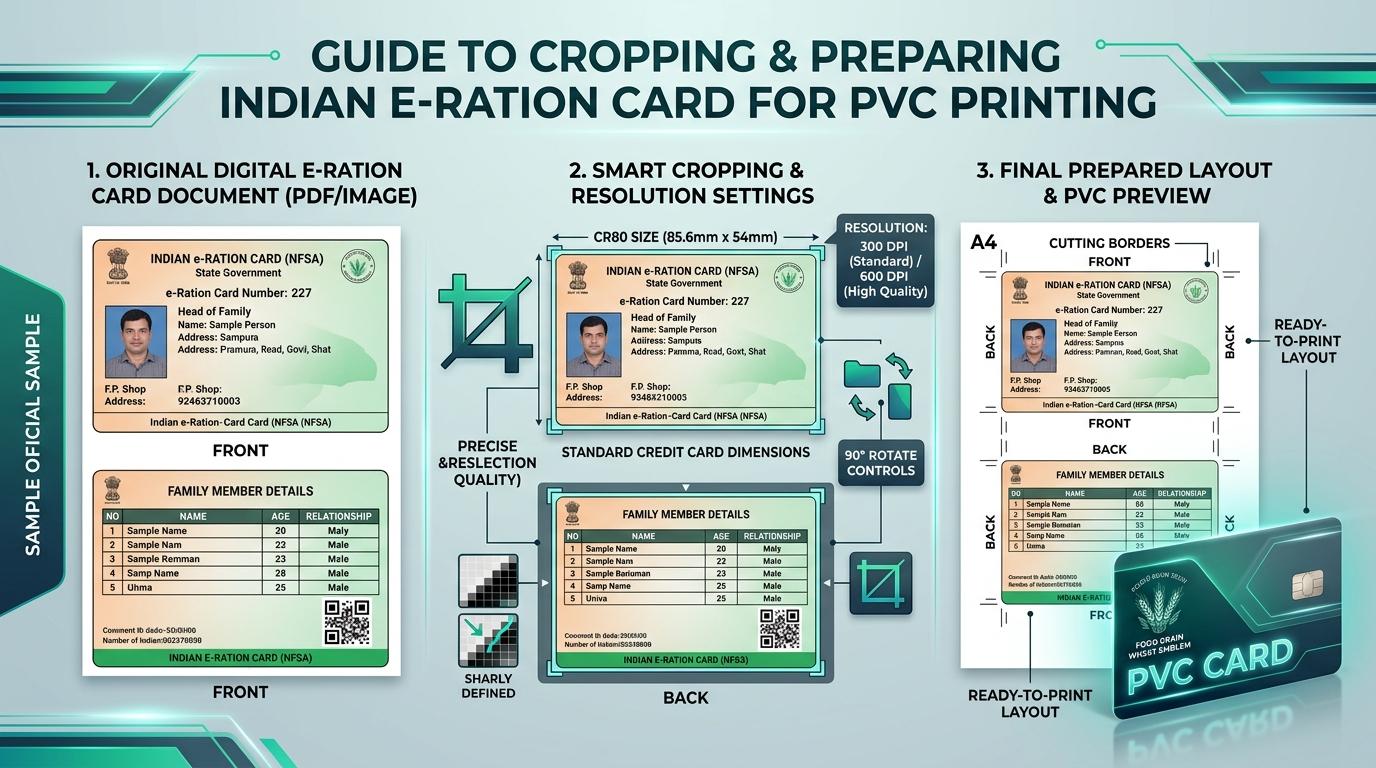
Visual Guide: Cropping digital e-Ration cards to standard CR80 dimensions and generating ready-to-print A4 sheets on ToolMela.
Why People Use This Tool
- Automatic Face Detection: On a standard West Bengal e-Ration download the tool finds both card faces on its own and crops them to size, so the usual workflow needs no dragging at all. It reads the wording from the PDF's text layer when there is one, and otherwise recognises the West Bengal layout and places both frames on the card's printed edges — inside the dashed cut lines, so no blank paper or cut line ends up in the export.
- Honest Confidence Reporting: Every crop states the evidence behind it — text layer, the recognised West Bengal template, page layout, or a manual starting point — and whether the card's own edges were actually measured or the frames come from that template's measured card position. A crop it is sure of says so; one worth a second look says that instead.
- Automatic Straightening: A scan or phone photo that sits a degree or two off square is levelled before cropping, and the amount is shown. The correction only runs when the card has a hard edge to measure the tilt against, so a card that is already square is never rotated for no reason.
- Universal CR80 Card Sizing: Automatically maintains the standard 85.6 mm × 54.0 mm card ratio so your finished ration card fits comfortably into standard wallets, card sleeves, and badge holders.
- Multi-Page PDF Page Separation: Automatically assigns Page 1 to the front card face and Page 2 to the back card face when uploading a multi-page e-Ration PDF, eliminating manual screenshotting.
- Selectable Print Resolution (DPI): Offers 300 DPI, 600 DPI, and 900 DPI rendering modes to ensure that family member names, Aadhaar linkage markers, and QR codes remain sharp.
- Manual Fine-Tuning When You Need It: Drag the locked CR80 frame, rotate in 90-degree steps, zoom into the frame, or straighten a skewed scan within ±15 degrees, then apply. You can also re-run auto-crop at any time.
- Direct A4 Print Sheet Output: Generates a ready-to-print A4 sheet with front and back sides placed side-by-side with dashed cutting outlines, ready for inkjet printing and dual-side thermal lamination.
How to Use the Tool
- Select your target print resolution using the Print Quality (DPI) selector—choose 300 DPI for standard printing or 600/900 DPI for high-definition photo printers.
- Drag and drop your downloaded e-Ration PDF or scanned image (JPG, PNG, WebP) into the upload area, or click to browse files on your device.
- Both faces are cropped automatically. The panel above the previews tells you what the tool found: whether it used the PDF's text layer, placed the frames from the recognised West Bengal template, or fell back to a starting point you should check. It also names the scheme when it can read one, and says so if it straightened a tilted scan.
- Look at the two previews. If both faces are framed correctly, continue to print. If a frame is slightly off, click Adjust under that face and drag the locked CR80 frame to include the photo, card number, and FPS address, then click Apply crop. Detect again re-runs auto-crop from scratch.
- Review both card previews. Use the download icon below either face for an individual image, or choose Download images (ZIP) to save a package.
- Click Prepare print sheet to review the A4 layout. Adjust copies, spacing, and cutting guides, then choose Download A4 PDF or Print A4 sheet. Print at 100% scale for exact 85.60 mm × 53.98 mm cards.
Understanding the Output
Physical identity and ration cards follow the ISO/IEC 7810 ID-1 standard (CR80), specifying exact dimensions of 85.60 mm by 53.98 mm (a 1.585:1 aspect ratio). The ToolMela cropper maintains this proportion precisely so neither card face appears distorted.
When generating the A4 Print Sheet:
- Geometry: Front and back panels are placed side-by-side with standard 4 mm margins and subtle dashed outlines, designed specifically for standard A4 paper.
- Cutting Guides: Dashed border lines enclose each card face, giving you a straight guide when using scissors, a rotary paper trimmer, or an ID die-cutter.
- Print Resolution: At 300 DPI, each card renders at roughly 1011 × 638 pixels. At 600 DPI, the pixel count doubles, keeping family beneficiary tables, FPS dealer numbers, and 2D barcodes sharp and easily scannable by biometric e-PoS devices.
- Printer Scaling: Always set your printer dialog to Actual Size (100%) rather than "Fit to Page" so physical millimeter measurements remain exact on paper.
Privacy & File Handling
Ration cards contain sensitive family information, including beneficiary names, ages, family relationships, head of family photos, and local FPS dealer numbers. ToolMela prioritizes complete privacy.
- In-Browser Processing: All PDF page extraction, cropping, and print sheet generation execute entirely inside your web browser using client-side JavaScript.
- No Server Uploads: Your ration card files and family entitlement details are never uploaded or transmitted across the internet to ToolMela servers, external databases, or third-party cloud APIs.
- Memory Isolation: Files exist only temporarily in browser memory during your active session and are cleared automatically when you refresh or close the tab.
- Safe for Commercial Centers: CSC operators and cyber cafés can process citizen ration cards without worrying about data storage, logging, or privacy violations.
Useful Tips
- Print at 100% Actual Size: In your print settings, disable "Fit to Page" and choose "Actual Size" to ensure proper physical dimensions.
- Start With the Digital e-Ration PDF: Official vector PDFs downloaded directly from your state food portal provide significantly sharper text than photos of old paper booklets.
- Straighten Scans Before Cropping: If your scanned document was captured sideways, use the built-in 90-degree rotation buttons on the toolbar before placing your crop area.
- Use Heavy Photo Paper or PVC Substrates: For inkjet printing, print onto 250+ GSM glossy photo paper or inkjet-compatible PVC sheets before thermal pouch lamination.
- Verify the Barcode and QR Code in Preview: Make sure your crop boundary does not clip any edge of the QR code or the ration card number before printing.
Common Problems and Solutions
Problem: The printed card is slightly smaller or larger than an ATM card.
Solution: This is caused by printer driver auto-scaling. In your print dialog, disable "Fit to Page" and choose "Actual Size" or set the custom scale to 100%.
Problem: Both previews show the same face.
Solution: This happens when auto-crop could not tell the two faces apart, which the panel above the previews will say. Click Adjust under the back preview and use the Position presets to place it over the other half of the sheet, or drag the frame there yourself, then click Apply crop.
Problem: Auto-crop framed the wrong part of the page.
Solution: Check the confidence panel above the previews. If it says the layout was not recognised, the frames are only a starting point. Click Detect again to retry, upload the original vector PDF from your state food portal instead of a photo, or adjust both frames by hand with the Adjust buttons.
Problem: The print window does not open when clicking Print A4 Sheet.
Solution: Browsers sometimes block pop-up windows. Look for the pop-up blocker icon in your browser address bar, allow pop-ups for ToolMela.com, and click "Print A4 Sheet" again.
Problem: Small text in the family member table looks blurry when printed.
Solution: Set the Print Quality selector to 600 or 900 DPI before uploading your file, and ensure your physical printer's media setting is set to "High Quality Glossy Photo Paper".
Frequently Asked Questions
Does the tool crop the ration card automatically?
Yes. On a standard West Bengal e-Ration download it finds both card faces and crops them to CR80 size without any dragging. If the file is a PDF it reads the printed field labels from the text layer to place the frames exactly; if it is a scan, screenshot or the portal's own JPG render, it recognises the West Bengal layout and places both frames on the card's printed edges, which sit just inside the dashed cut lines. The panel above the previews always states which of these was used, so you know whether to trust the crop or check it.
What are the standard dimensions of a PVC Ration Card?
A standard PVC Ration Card follows the CR80 format, measuring 85.60 mm by 53.98 mm (3.37 inches by 2.125 inches) with rounded corners. The ToolMela cropper locks to this exact proportion so your card fits standard wallets, lanyards, and badge holders.
Can I print the generated ration card layout on a regular inkjet printer?
Yes. The tool produces an A4 print sheet with front and back sides and dashed cutting borders. You can print this sheet on any standard inkjet printer using heavy photo paper (250+ GSM) or inkjet PVC sheets, cut along the lines, and laminate the card.
Does ToolMela store or access my ration card information or family details?
No. ToolMela operates entirely inside your web browser using client-side JavaScript. Your ration card files, family details, photos, and QR codes are never sent to our servers, stored in any database, or shared with third parties.
Why do I need to set the printer scale to "Actual Size" (100%) when printing the A4 sheet?
Printer software often defaults to "Fit to Printable Area," which shrinks documents to fit default margins. Selecting "Actual Size" ensures the cards print at their exact physical millimeter dimensions (85.6 mm × 54.0 mm).
