Ayushman Card PVC Crop Tool: Auto-Crop and Generate Print-Ready PM-JAY PVC Cards Online
Under the Pradhan Mantri Jan Arogya Yojana (PM-JAY), Ayushman Bharat Golden Cards provide eligible families across India with cashless medical treatment coverage up to ₹5 lakh per year. Beneficiaries download their official digital e-cards through state health department portals, the National Health Authority (NHA) beneficiary app, or DigiLocker. However, the official digital file typically downloads as a full-page A4 document or multi-page PDF surrounded by broad white margins, scheme guidelines, and regional administrative disclaimers.
When visiting empanelled public or private hospitals during a medical emergency, carrying a large paper sheet or fragile folded letter often leads to torn edges, moisture damage, and crumpled barcodes. Hospital Pradhan Mantri Arogya Mitra (PMAM) helpdesks require patients to present readable identity documents for rapid biometric authorization. Converting an e-card into a durable, wallet-sized plastic (PVC) smart card requires conforming both front and back faces to the international CR80 dimensions (85.6 mm × 54.0 mm) while ensuring that beneficiary names, PM-JAY IDs, family IDs, photos, and verification QR codes remain crisp and scannable.
Manually editing and resizing these cards in generic image software requires calculating millimeter ratios and arranging complex printing sheets. The ToolMela Ayushman Card PVC Crop Tool automates this process directly in your browser. With intelligent 1-click auto-cropping, locked CR80 proportions, selectable 300 and 600 DPI rendering, manual adjustment presets, and direct A4 print layout generation, you can create professional, print-ready PVC card sheets in seconds.
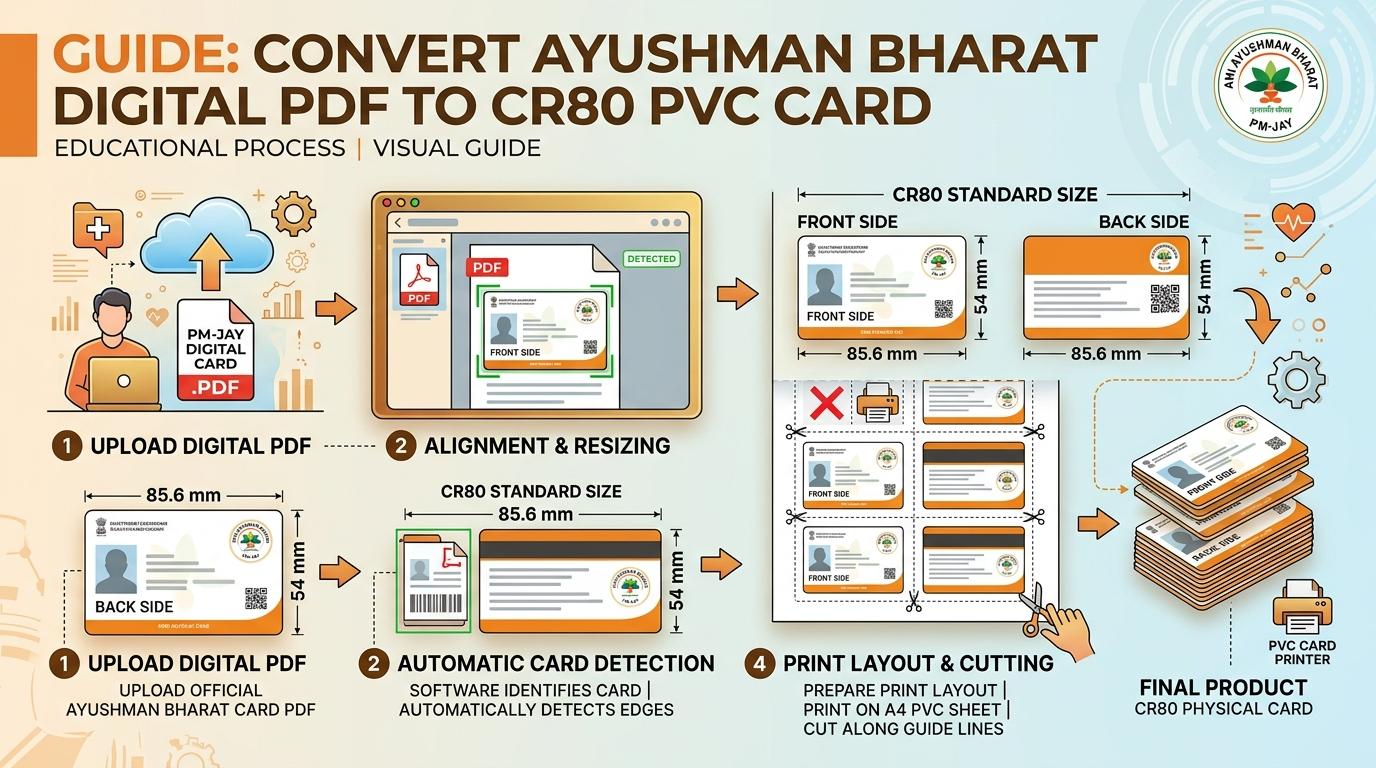
Visual Guide: Cropping digital PM-JAY Ayushman Bharat cards to standard CR80 dimensions and generating ready-to-print A4 sheets on ToolMela.
Why People Use This Tool
- Intelligent 1-Click Auto-Crop: Automatically detects document orientation and card borders from official PM-JAY downloads, extracting front and back faces without manual measuring.
- Standard CR80 Smart Card Dimensions: Locks the final output to 85.6 mm × 54.0 mm so your laminated Ayushman card fits easily into wallet card slots and lanyard pouches.
- Dual Print Resolution Settings: Select between 300 DPI (1012 × 638 px) and 600 DPI (2024 × 1276 px) to maintain sharp text, legible beneficiary IDs, and scannable QR codes.
- Manual Crop Modal with Quick Presets: Fine-tune margins or snap to top, center, bottom, or full card frames if you are working with non-standard scans.
- Multi-Card A4 Print Batching: Queue up to 5 patient cards per A4 sheet with neat 0.15 mm cutting guides, saving paper and lamination pouches for CSC centres and hospital helpdesks.
- Instant Side Swapping & Rotation: Correct upside-down scans or reverse inverted front-and-back pages with a single click before printing.
How to Use the Tool
- Choose your preferred print quality—select 300 DPI for standard card printing or 600 DPI for ultra-high-definition photo printing.
- Drag and drop your downloaded Ayushman Card PDF or image (JPG, PNG, WebP) into the upload area, or click "Choose Ayushman Card" to browse files on your device.
- The auto-crop engine instantly processes your file. Two-page PDFs automatically load Page 1 as Front and Page 2 as Back; single-page documents detect top/bottom or left/right card placements.
- Review the extracted Front and Back card previews in the PVC Card View. If needed, click the rotate, flip, or swap buttons to adjust orientation.
- To adjust boundaries manually, click Crop / Adjust on either side. Use the interactive cropping box or quick presets (Top, Center, Bottom, Full), then click Save Crop.
- Download individual high-resolution graphics using the Download Front or Download Back buttons, or click Download ZIP to save both card faces together.
- Switch to the A4 Print Sheet view, click Add to Batch if printing multiple family cards, and click Download A4 Print Sheet PDF to generate a formatted PDF with cutting lines ready for printing.
Understanding the Output
Physical smart cards and health identity cards follow the ISO/IEC 7810 ID-1 standard (CR80), specifying exact physical dimensions of 85.60 mm by 53.98 mm (an aspect ratio of approximately 1.586:1). The ToolMela cropper maintains this proportion precisely so neither card face appears stretched or compressed.
When viewing or printing the generated A4 layout:
- Side-by-Side Arrangement: Front and back panels are placed horizontally side-by-side with an 8 mm gap, allowing you to fold the card along a center crease during dual-side pouch lamination.
- Subtle Cutting Guides: Fine 0.15 mm border lines enclose each card face, giving you a straight guide when using scissors, a rotary paper trimmer, or an ID die-cutter.
- Hospital Verification Readiness: Renders beneficiary details, state health authority logos, and 2D QR codes with high contrast so hospital kiosks and optical scanners can verify patient eligibility instantly.
- Printer Scaling: Always set your printer dialog to Actual Size (100%) rather than "Fit to Page" so physical millimeter measurements remain exact on paper.
Privacy & File Handling
Ayushman Bharat cards contain personal identity and health welfare information, including beneficiary names, family member details, PM-JAY identification numbers, gender, birth years, and state district references. Protecting citizen confidentiality is essential.
- In-Browser Processing: All document rendering, edge detection, image cropping, and PDF layout generation execute entirely inside your web browser using client-side JavaScript.
- Zero Server Uploads: Your health card documents and personal identification numbers are never sent to ToolMela servers, external databases, or third-party cloud APIs.
- Volatile Memory Storage: Files exist only temporarily in your browser's local session memory and are erased automatically as soon as you close or reload the browser tab.
- Safe for Commercial Kiosks: CSC operators, cyber cafés, and hospital helpdesk staff can process patient cards without data logging or privacy risks.
Useful Tips
- Use Original Vector PDFs: Always upload the digital PDF downloaded directly from the official PM-JAY portal or DigiLocker rather than a mobile screen photo for maximum print clarity.
- Confirm the QR Code Boundary: When reviewing the reverse side, ensure the selection box covers the entire 2D barcode and verification serial numbers.
- Use the Swap Button When Inverted: If a multi-page PDF loaded the back page first, click the "Swap" button on the toolbar to interchange front and back faces instantly.
- Choose Heavyweight Paper or PVC Substrates: For standard inkjet printers, print onto 250+ GSM glossy inkjet photo paper or composite PVC sheets prior to heat pouch lamination.
- Batch Print Family Members Together: Use the "Add to Batch" button to place multiple family members' cards onto a single A4 sheet to minimize paper and laminate pouch waste.
Common Problems and Solutions
Problem: The printed card is slightly smaller than an ATM card.
Solution: Printer drivers often default to "Fit to Printable Area." In your print settings dialog, disable automatic scaling and select "Actual Size" or set custom scale to 100%.
Problem: Front and back sides are reversed after uploading.
Solution: Some state portals place the reverse side on the first page. Click the "Swap" button in the top toolbar to switch Front and Back positions with a single click.
Problem: Edge text or official seals appear clipped.
Solution: Click "Crop / Adjust" on the affected card face, choose the "Full Card Frame" preset to expand the crop box to the outer boundaries, and click "Save Crop".
Problem: The downloaded PDF will not open or prints blank.
Solution: Verify that your original uploaded file was not password-protected. Remove any PDF password lock before uploading your card to the tool.
Frequently Asked Questions
What are the standard dimensions of a PVC Ayushman Card?
A standard PVC Ayushman Card follows the CR80 format, measuring 85.60 mm by 53.98 mm (3.370 inches by 2.125 inches) with rounded corners. ToolMela locks your crop area to this exact proportion so your printed card matches official smart cards.
Can I print multiple family members' Ayushman cards on a single A4 sheet?
Yes. The tool features an A4 Print Batch mode that fits up to 5 card pairs (front and back sides placed side-by-side) on a single A4 sheet with 0.15 mm cutting guides, allowing you to print an entire family's cards in one pass.
Does ToolMela save or view my Ayushman Bharat health card details?
No. ToolMela operates entirely inside your web browser using client-side JavaScript. Your health card documents, PM-JAY ID numbers, family details, and photos are never uploaded to our servers, logged in any database, or shared with third parties.
How do I print the card using a regular color inkjet printer without PVC tray equipment?
Print the generated A4 sheet onto 250+ GSM glossy photo paper or inkjet PVC sheets. Cut along the outer cutting borders, fold front and back sides back-to-back, place the folded card inside a thermal lamination pouch (250 to 350 microns), and run it through a standard pouch laminator.
