ABHA Card PVC Crop Tool: Resize and Generate Print-Ready ABHA PVC Cards Online
The Ayushman Bharat Health Account (ABHA) card serves as India's primary digital health identity under the Ayushman Bharat Digital Mission (ABDM). When citizens download their official ABHA card from the national portal or health locker application, the file usually arrives as an unformatted A4 PDF. It features the front and back card faces stacked vertically amid official disclaimers, usage instructions, and broad white margins.
While storing an electronic copy on a smartphone is helpful, presenting a physical card at hospital outpatient registration desks, diagnostic laboratories, and pharmacies is frequently required. Carrying fragile paper printouts often leads to creased barcodes, moisture smudges, and torn sheets. However, preparing a wallet-sized, rigid plastic (PVC) card requires standardizing both sides to the universal ISO CR80 credit-card dimensions (85.6 mm × 54.0 mm) while ensuring that the 14-digit ABHA number, photograph, and digital QR code remain sharp and readable.
Cyber café owners and Common Service Centre (CSC) operators handling citizen registrations daily need a fast, reliable workflow that eliminates guesswork. The ToolMela ABHA Card PVC Crop Tool automates this process directly in your browser. With intelligent auto-detection calibrated to the official ABHA layout, multi-resolution rendering, and instant A4 print sheet generation, you can produce professional, print-ready PVC card layouts in seconds.
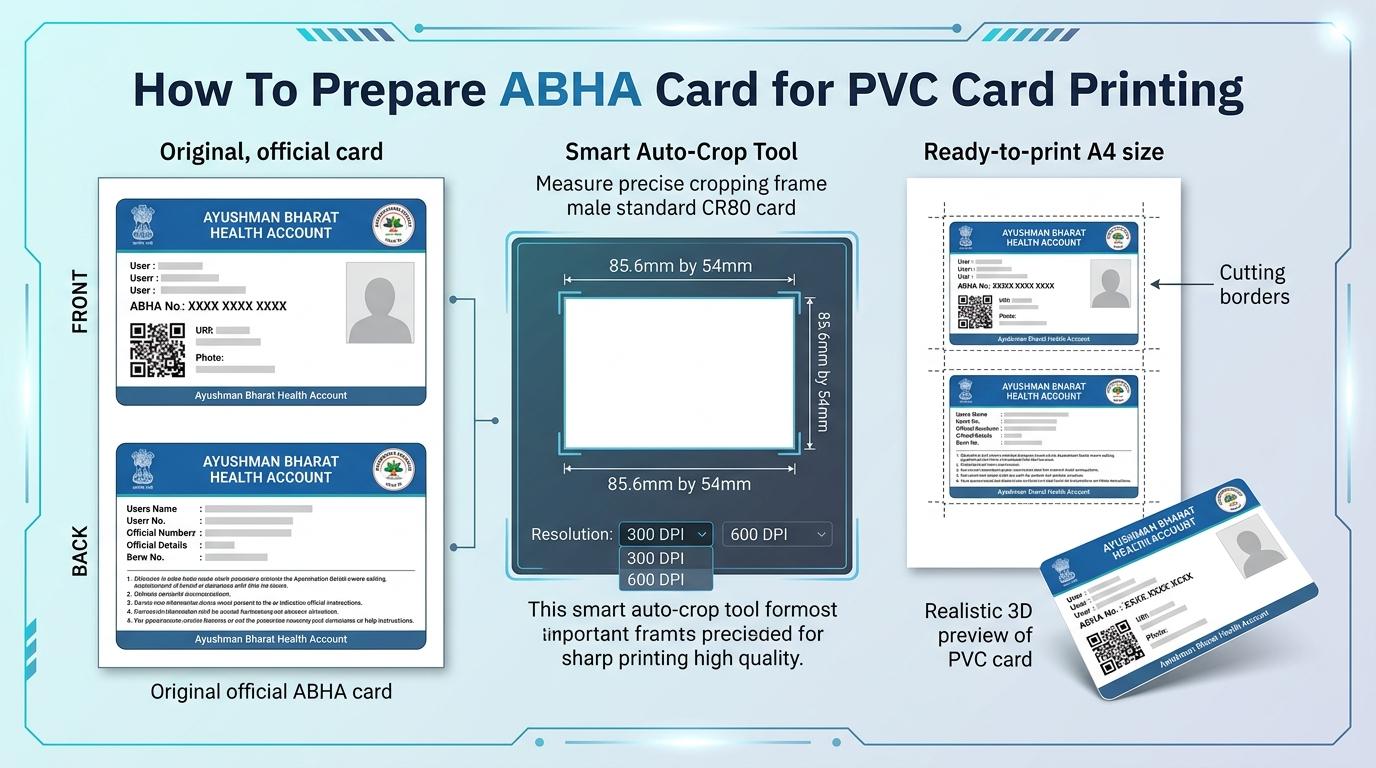
Visual Guide: Cropping digital ABHA cards to standard CR80 dimensions and generating ready-to-print A4 sheets on ToolMela.
Why People Use This Tool
- Exact CR80 Wallet-Card Dimensions: Enforces the standard 85.6 mm × 54.0 mm physical card ratio, ensuring the finished ABHA card fits neatly into wallets, card sleeves, and badge holders.
- Calibrated ABHA Smart Auto-Crop: Features built-in layout detection that recognizes the distinctive blue header banners of official ABHA documents, isolating front and back card faces automatically with one click.
- Selectable Print Clarity (DPI): Offers 300 DPI, 600 DPI, and 900 DPI rendering modes to ensure that the 14-digit ABHA number, beneficiary portrait, and digital QR code stay sharp and scannable.
- Side-by-Side A4 Print Sheet Generation: Compiles front and back panels horizontally with subtle 0.1 mm cutting guidelines onto a standard A4 PDF sheet, perfectly arranged for thermal pouch lamination.
- Multi-Card Batch Queuing: Enables CSC operators and print shops to queue multiple citizen ABHA files into a shared print batch, fitting multiple cards on a single sheet of paper to reduce waste.
- Interactive 3D Holographic Preview: Provides a realistic 3D tilt preview with simulated holographic glare so you can verify alignment and check for clipped text before printing.
How to Use the Tool
- Select your target print quality using the DPI selector—choose 300 DPI for standard inkjet printing or 600/900 DPI for high-definition photo printers.
- Drag and drop your downloaded ABHA card PDF or scanned image (JPG, PNG, WebP) into the upload box, or click to browse files from your computer or smartphone.
- The tool renders the document onto an internal canvas. If your file is a standard official ABHA A4 sheet, click Auto Crop ABHA to let the algorithm automatically detect the blue headers and extract both front and back sides.
- Alternatively, click Crop Front or Crop Back to manually position the CR80 cropping frame. Use the 90-degree rotate buttons if your scanned document is sideways, then save your selection.
- Switch to the Front & Back Preview tab to inspect both sides in the interactive 3D card viewer, verifying that the 14-digit ABHA number, QR code, and address are completely inside the boundary.
- Open the A4 Print Layout tab, select the number of copies required, and click Download A4 PDF (or Direct Print) to generate your ready-to-print sheet with built-in cutting outlines. You can also download individual high-resolution JPG files directly from the crop tab.
Understanding the Output
Physical healthcare identity cards follow the ISO/IEC 7810 ID-1 standard (CR80), specifying exact dimensions of 85.60 mm by 53.98 mm (a 1.586:1 aspect ratio). The ToolMela cropper locks to this ratio so that personal portraits, beneficiary names, and official emblems remain completely uncompressed.
When compiling your A4 Print Sheet:
- Geometry: Front and back panels are placed horizontally side-by-side with an exact 10 mm gap between them, centered on a portrait A4 sheet (210 mm × 297 mm).
- Cutting Guides: Subtle 0.1 mm grey border lines outline each card to guide scissors, paper trimmers, or manual die-cutters.
- Print Resolution: At 300 DPI, each card renders at roughly 1011 × 638 pixels. At 600 DPI, the pixel count doubles, keeping the 14-digit ABHA number, emergency details, and high-density QR codes sharp and easily scannable by hospital barcode readers.
- Printer Scaling: Always set your printer dialog to Actual Size (100%) rather than "Fit to Page" so physical millimeter measurements remain exact on paper.
Privacy & File Handling
Medical identity documents contain sensitive personal data, including the citizen's 14-digit ABHA number, photograph, date of birth, residential address, and unique health locker address. ToolMela prioritizes complete privacy.
- In-Browser Processing: All PDF page extraction, cropping, and PDF compilation run entirely inside your web browser using client-side JavaScript.
- No Server Uploads: Your ABHA card files and health identification numbers are never uploaded or transmitted across the internet to ToolMela servers, external databases, or third-party cloud APIs.
- Memory Isolation: Files exist only temporarily in browser memory during your active session and are cleared automatically when you refresh or close the tab.
- Safe for Commercial Centers: CSC operators and cyber cafés can process customer ABHA cards without worrying about data storage, logging, or privacy violations.
Useful Tips
- Print at 100% Actual Size: In your print settings, disable "Fit to Page" and choose "Actual Size" to ensure proper physical dimensions.
- Start With the Official Vector PDF: Official vector PDFs downloaded directly from
abha.abdm.gov.inprovide significantly sharper text and barcodes than photos of old laminated cards. - Straighten Scans Before Cropping: If your scanned document was captured slightly crooked, use the built-in 90-degree rotation buttons inside the crop window to align it before placing the crop frame.
- Use Heavy Photo Paper or PVC Substrates: For inkjet printing, print onto 250+ GSM glossy photo paper or inkjet-compatible PVC sheets before thermal pouch lamination.
- Verify QR Codes in Preview: Check that your crop boundary leaves a small margin of white space around the QR code edges so hospital OPD scanners can read it instantly.
Common Problems and Solutions
Problem: The printed card is slightly smaller or larger than an ATM card.
Solution: This is caused by printer driver auto-scaling. In your print dialog, disable "Fit to Page" and choose "Actual Size" or set the custom scale to 100%.
Problem: The Auto Crop ABHA button cannot detect card borders.
Solution: The auto-crop algorithm searches for the official ABHA blue header banner. If your file is a black-and-white scan or a third-party summary, use the Manual Crop buttons to position the frame yourself.
Problem: The uploaded PDF fails to render.
Solution: If your ABHA PDF was protected with a password, the browser cannot open it directly. Remove the password beforehand or convert the page to a high-resolution JPG image before uploading.
Problem: The QR code fails to scan after printing.
Solution: Set the Print Quality selector to 600 DPI before uploading your file, and ensure your crop boundary does not cut off the white quiet zone around the QR code edges.
Frequently Asked Questions
What are the standard dimensions of an ABHA PVC card?
A standard ABHA PVC card follows the CR80 format, measuring 85.60 mm by 53.98 mm (3.37 inches by 2.125 inches) with rounded corners. The ToolMela cropper locks to this exact proportion so your card fits standard wallets, lanyards, and badge holders.
Can I print the generated ABHA card layout on a standard home inkjet printer?
Yes. The tool produces a standard A4 PDF with front and back sides and cutting borders. You can print this sheet on any inkjet printer using heavy photo paper (250+ GSM) or inkjet PVC sheets, cut along the lines, and laminate the card.
Does ToolMela store or access my ABHA number or personal health records?
No. ToolMela operates entirely inside your web browser using client-side JavaScript. Your ABHA card documents, beneficiary names, policy numbers, and QR codes are never sent to our servers, stored in any database, or shared with third parties.
Why do I need to set the printer scale to "Actual Size" (100%) when printing the A4 PDF?
Printer software often defaults to "Fit to Printable Area," which shrinks documents to fit default margins. Selecting "Actual Size" ensures the cards print at their exact physical millimeter dimensions (85.6 mm × 54.0 mm).
