Driving Licence PVC Crop Tool: Resize and Prepare Print-Ready PVC Driving Licences Online
When you renew, update, or pass the driving test for a motor vehicle in India, the Ministry of Road Transport and Highways (MoRTH) and state transport departments issue electronic driving licences (e-DL) through the Sarathi Parivahan portal and DigiLocker. While downloading your digital licence is convenient, the official document is typically delivered as a multi-page A4 PDF or a document page surrounded by wide white borders, regional transport office (RTO) dispatch notices, and fee receipt tables.
Carrying full-size paper printouts inside a vehicle glove box or wallet quickly leads to creased paper, moisture damage, and faded signatures. During routine police checks or rental car verifications, motorists need a durable, wallet-sized smart card that fits standard card slots. Converting a digital driving licence PDF into a physical plastic (PVC) card requires standardizing both front and back faces to the international CR80 dimensions (85.6 mm × 54.0 mm) while keeping driver portraits, blood group markings, vehicle class endorsement tables, and digital QR codes crisp and scannable.
Managing this formatting manually in generic graphic software requires calculating exact millimeter proportions and creating tedious printing layouts. The ToolMela Driving Licence PVC Crop Tool automates this workflow directly inside your browser. With fixed CR80 aspect ratios, automated PDF page extraction, 90-degree image rotation, interactive 3D card previewing, and direct A4 print layout generation, you can produce professional, print-ready PVC driving licence sheets in seconds.
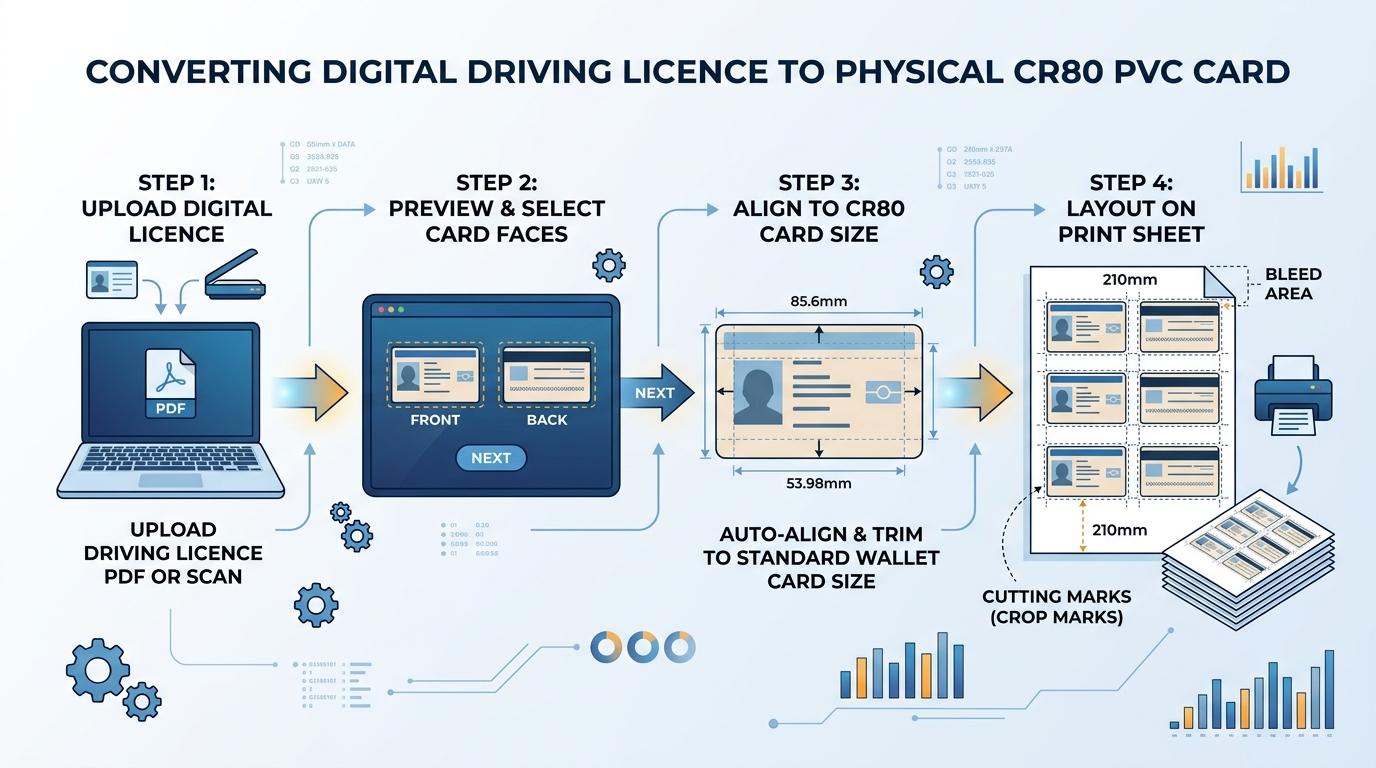
Visual Guide: Cropping digital Driving Licences to standard CR80 dimensions and generating ready-to-print A4 sheets on ToolMela.
Why People Use This Tool
- Exact CR80 Card Dimensions: Locks the crop frame to the international 85.6 mm × 54.0 mm standard so your printed driving licence fits comfortably into wallets, card holders, and vehicle document pouches.
- Automated Two-Page PDF Separation: Automatically extracts Page 1 as the front card face and Page 2 as the reverse face when uploading multi-page Parivahan PDFs, removing the need for manual screenshotting.
- Fine Alignment & 90-Degree Rotation: Corrects tilted or sideways smartphone scans using left and right 90-degree rotation buttons and responsive drag-to-pan controls.
- Interactive 3D Card Simulation: Lets you examine realistic card reflections with dynamic glare and holographic overlays to check text alignment before using paper or ink.
- Direct A4 Print Layout with Cutting Guides: Generates a ready-to-print A4 PDF layout with front and back faces placed side-by-side with 0.1 mm dashed cutting guidelines.
- Batch Processing with Print Queue: Commercial print operators can queue multiple driving licence files and organize them onto a shared print run to reduce paper waste.
How to Use the Tool
- Drag and drop your downloaded Parivahan or DigiLocker Driving Licence PDF or scan (JPG, PNG, WebP) into the upload area, or click to choose files from your computer or phone.
- The tool extracts your file in browser memory. For two-page PDFs, Page 1 loads into the Front panel and Page 2 loads into the Back panel; single-page documents load into both panels for independent cropping.
- Click Crop Front to open the cropping stage. Position the fixed CR80 selection box over the front card face containing your photograph, licence number, name, issue date, and validity period. Click Save Crop.
- Click Crop Back and position the selection box over the reverse side containing vehicle category endorsement tables (MCWG, LMV, HGMV), authorization stamps, and the official verification QR code, then click Save Crop.
- Switch to the Front & Back Preview tab to inspect your card in the interactive 3D viewer. Move your cursor over the cards to verify that borders and critical information are cleanly framed.
- If you require standalone digital images, click the JPG download button under either card preview to save high-resolution graphics to your device.
- Switch to the A4 Print Layout tab, select the number of copies needed, and click Print for direct browser printing or Download PDF to save the formatted A4 sheet for inkjet or PVC tray printing.
Understanding the Output
Physical smart cards and driver licences adhere to the ISO/IEC 7810 ID-1 standard (CR80), specifying exact physical dimensions of 85.60 mm in width by 53.98 mm in height (an aspect ratio of approximately 1.586:1). The ToolMela cropping engine locks to this proportion and exports high-density imagery at 3038 × 1913 pixels to ensure sharp prints.
When viewing or printing the generated A4 layout:
- Side-by-Side Arrangement: Front and back faces are aligned horizontally with standard 10 mm separation, allowing you to fold the card along a center crease during dual-side pouch lamination.
- Fine Cutting Outlines: Subtle 0.1 mm border rectangles mark the exact boundaries of each card face, providing a reliable visual guide for scissors, rotary trimmers, or manual card cutters.
- Text and Barcode Readability: Driver licensing details, address records, and 2D matrix barcodes are rendered without aggressive compression so law enforcement e-challan machines can read them without errors.
- Printer Scaling: In your print settings window, always select Actual Size (100%) rather than "Fit to Printable Area" to preserve exact millimeter dimensions on physical paper.
Privacy & File Handling
Driving licences contain sensitive identity records, including full names, dates of birth, residential addresses, biometric photographs, emergency contacts, and organ donor declarations. Protecting citizen privacy is critical.
- In-Browser Execution: Document extraction, image cropping, and PDF layout generation happen entirely inside your web browser using client-side JavaScript.
- Zero Server Uploads: Your driving licence file is never transferred to ToolMela servers, cloud databases, or third-party web services.
- Volatile Memory Storage: Uploaded files exist only in your browser's temporary session memory and are deleted automatically as soon as you close or reload the browser tab.
- Safe for Commercial Kiosks: CSC centres, cyber cafés, and print service providers can process customer driving licences safely without storing citizen records or risking regulatory privacy non-compliance.
Useful Tips
- Use Original Vector PDFs: Always upload the original electronic PDF downloaded directly from Sarathi Parivahan or DigiLocker rather than a smartphone photo for maximum print clarity.
- Confirm Vehicle Endorsement Codes: When cropping the reverse side, ensure the selection box covers all authorized vehicle classes (e.g., LMV for cars, MCWG for motorcycles) and their corresponding issue dates.
- Print at 100% Scale: Always verify that your printer driver is configured to 100% scale ("Actual Size") to ensure the card matches the physical size of an ATM or credit card.
- Choose Heavyweight Paper or PVC Substrates: For standard inkjet printers, print onto 250+ GSM glossy inkjet photo paper or composite PVC inkjet sheets prior to heat pouch lamination.
- Correct Angled Scans First: If your scanned driving licence was placed crooked on the scanner bed, use the 90-degree rotation controls before locking in your crop boundaries.
Common Problems and Solutions
Problem: The printed driving licence does not fit inside standard wallet card slots.
Solution: Your printer software applied automatic scaling. In your printer dialog box, disable "Fit to Page" or "Shrink Oversized Pages" and set the scale explicitly to 100% or "Actual Size".
Problem: The back side preview shows the front card image on single-page uploads.
Solution: When both card faces appear on a single document page, the tool loads that image into both crop slots. Open "Crop Front" to frame the top half, then open "Crop Back" and position the frame over the bottom half.
Problem: The multi-page PDF fails to extract or asks for a password.
Solution: Some state RTOs issue password-protected PDFs (often using your date of birth). Remove the password security from the PDF file before uploading it to the tool.
Problem: Clicking the Print button does not open the printer dialog.
Solution: Web browsers sometimes block automatic pop-up print windows. Check your browser address bar for a blocked pop-up icon, choose "Always allow pop-ups from ToolMela.com", and click Print again.
Frequently Asked Questions
What are the exact dimensions of a PVC Driving Licence?
A PVC Driving Licence follows the international CR80 standard, measuring 85.60 mm by 53.98 mm (3.370 inches by 2.125 inches) with a thickness of roughly 0.76 mm and rounded corners. ToolMela locks your crop area to this exact proportion so your printed card matches official smart cards.
Can I print the generated A4 sheet on an ordinary inkjet or laser printer?
Yes. The tool outputs a standardized A4 print sheet containing front and back sides placed side-by-side with cutting guides. You can print this layout on any standard color inkjet or laser printer using 250+ GSM glossy photo paper, cut along the guidelines, and seal it inside a thermal lamination pouch.
Does ToolMela store my driving licence details or upload them to any database?
No. ToolMela processes your documents entirely on your own device using client-side JavaScript. Your driving licence PDF, photograph, signature, address, and licence number are never uploaded to our servers, logged in any database, or shared with third parties.
How do I print both front and back sides on a single card without a dedicated PVC card printer?
Print the generated A4 sheet onto glossy photo paper or inkjet PVC paper. Cut along the outer cutting borders of both sides together, fold them back-to-back along the center line, insert the folded card into a thermal butterfly pouch (250 or 350 microns), and run it through a standard pouch laminator.
