Driving License Photo Resize: Format Photo and Signature for Driving Licence Applications
Obtaining or renewing a driving licence is a mandatory legal milestone for every motorist across India. Whether applying for an initial Learner's Licence (LL), graduating to a permanent Driving Licence (DL), adding an endorsement for a commercial transport vehicle, or renewing an expired permit, the application process is handled through the centralized transport portal managed by the Ministry of Road Transport and Highways—Parivahan Sewa via the Sarathi system (sarathi.parivahan.gov.in)—and regional state transport departments. With the widespread rollout of contactless online licensing and Aadhaar-based e-KYC services, applicants can now submit documents, complete driving theory tests, and pay fees directly from their smartphones or computers. However, the automated document verification system on the portal strictly scrutinizes uploaded media files, making proper image preparation essential before starting your application.
The Parivahan and Sarathi portals enforce strict automated validation checks on photograph and signature uploads. Candidate photographs must adhere to standard passport dimensions of 3.5 cm width by 4.5 cm height (equivalent to 413 × 531 pixels at standard 300 DPI print resolution, or 200 × 230 pixels minimum on regional modules). The file size must remain strictly between 10 KB and 50 KB in JPG or JPEG format. The photograph must display a clear, frontal portrait against a plain white or light-colored background, with the applicant's face covering 70% to 80% of the frame. Both eyes and ears must remain fully visible with a neutral facial expression; sunglasses, tinted spectacles, caps, and face coverings are strictly prohibited. Simultaneously, applicant signatures must be uploaded in JPG format within a 10 KB to 20 KB file size limit, measuring 400 × 200 pixels (a standard 2:1 horizontal ratio). The signature must be penned using dark black or blue ink on smooth, unlined white paper in natural cursive handwriting. Faint ink, patterned paper, or signatures written in block capital letters trigger immediate verification delays or rejections by Regional Transport Office (RTO) scrutiny officers.
Modern smartphone cameras capture images at high resolutions that produce files between 4 MB and 15 MB with non-compliant aspect ratios, busy domestic backgrounds, and uneven shadows. When applicants attempt to reduce file sizes using generic photo compressors or chat applications, signatures frequently degrade into unreadable blurs, faces become stretched or distorted, or file weights drop below the required 10 KB lower boundary. ToolMela's Driving License Photo Resize tool provides a purpose-built utility engineered directly around Parivahan and Sarathi specifications. It combines locked aspect ratio cropping, intelligent white background replacement, target file size compression, and standard 300 DPI metadata injection to produce fully compliant files directly inside your web browser.
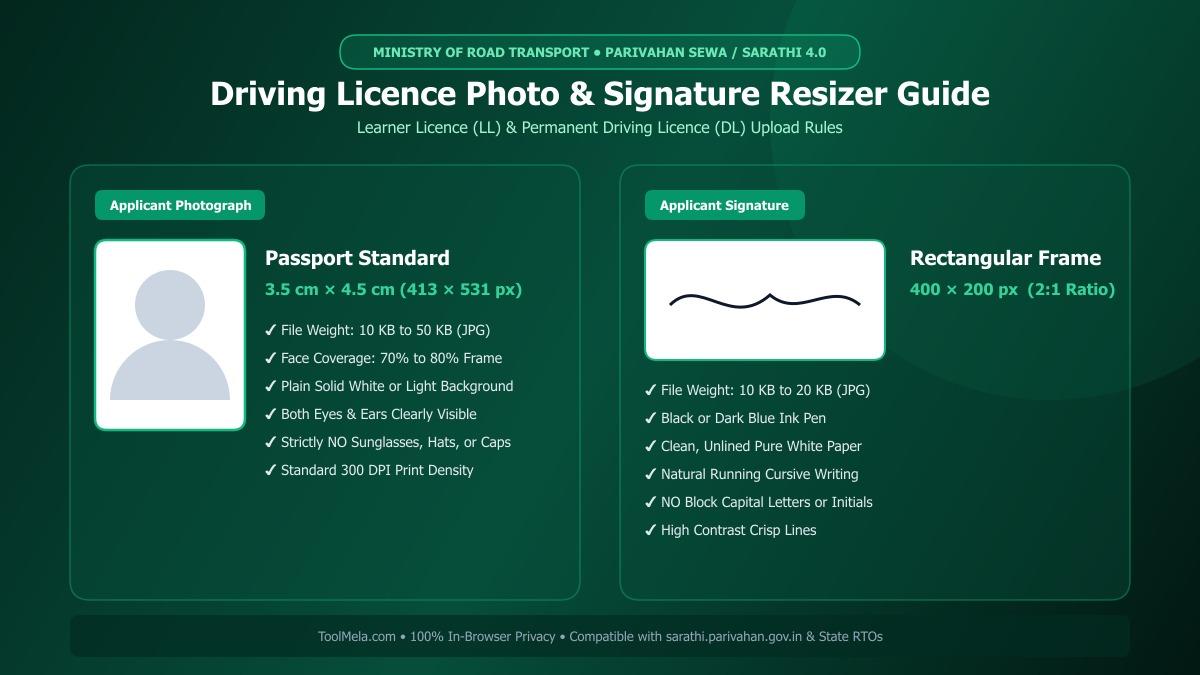
Visual Guide: Formatting applicant photographs and signatures to official Parivahan Sarathi specifications on ToolMela.
Why People Use This Tool
- Calibrated Passport & Signature Aspect Ratios: Automatically locks the 3.5:4.5 passport ratio (413 × 531 px) for applicant photos and 2:1 rectangular framing (400 × 200 px) for signatures, preventing unnatural stretching or squashing.
- Strict KB Size Target Compression: Accurately dials file weights into the mandatory 10 KB to 50 KB envelope for photos and 10 KB to 20 KB for signatures, eliminating “File Size Exceeded” errors on Sarathi.
- Instant Solid White Background Replacement: Removes busy room interiors, furniture, and shadows behind your portrait with one click, substituting the clean, solid white backdrop required by RTO guidelines.
- Embedded 300 DPI Print Clarity: Writes standard 300 DPI density tags directly into the JPEG file header, ensuring your photo and signature print crisply on physical smart-card driving licences.
- Enhanced Ink Contrast for Signatures: Filters out paper grain, background shadows, and yellow scanner tints to produce deep, clear signature strokes ready for biometric signature capture.
- Full Parivahan & Sarathi Compatibility: Pre-configured to match upload validation rules across all state RTOs in India operating on the Sarathi 4.0 portal.
- Immediate Browser Processing: Works on any smartphone, tablet, or desktop without app downloads, account creation, or hidden paywalls.
How to Use the Tool
- Choose Your Document Mode: Toggle between Photo or Signature mode to load the exact dimensional bounds and file size targets required for driving licence forms.
- Upload Your Image: Drag and drop your image file or tap the upload box to pick a JPG, PNG, or WEBP photo from your device's photo gallery or local storage.
- Frame Your Image with the Crop Box: Adjust the proportional cropping boundary. For photographs, center your head and shoulders so your face occupies roughly 75% of the frame. For signatures, crop tightly around your handwritten text while eliminating excess white border.
- Replace the Background (Optional for Photos): If your photo was captured against an uneven wall or domestic setting, use the background cleaner tab to generate a compliant, uniform solid white backdrop.
- Set Your Target File Size: Adjust the target KB slider—selecting approximately 30 KB for photos (within 10–50 KB) and 15 KB for signatures (within 10–20 KB) ensures safe clearance of portal upload limits.
- Preview and Download Your JPG: Inspect the real-time visual preview and file metadata, then click Download to save your RTO-compliant JPG file.
Understanding the Output
After processing your file with ToolMela's Driving License Photo Resize tool, you receive a production-grade file formatted to clear the validation filters of official transport department portals:
- File Format: Baseline JPG/JPEG encoding, fully recognized by Parivahan, Sarathi, and state RTO document upload engines.
- Pixel Dimensions: Exactly 413 × 531 pixels (3.5 cm × 4.5 cm passport ratio) for applicant photographs and 400 × 200 pixels (2:1 ratio) for signatures.
- Controlled File Weight: Applicant photographs download safely between 10 KB and 50 KB, while signatures download between 10 KB and 20 KB.
- Visual Fidelity: Retains sharp facial contours, clear eye details, and crisp signature penmanship without blurring or jagged compression artifacts.
- Header Metadata: Standard 300 DPI density markers embedded directly into the file structure, ensuring clean reproduction on physical laminated or smart-card driving licence prints.
Privacy & File Handling
Personal photographs and handwritten signatures represent sensitive biometric and identity credentials. ToolMela executes all cropping, resizing, background replacement, and file compression locally inside your web browser using client-side HTML5 Canvas and WebAssembly algorithms.
Your original images and processed files are never uploaded to ToolMela servers, external cloud storage buckets, or third-party networks. Every modification occurs strictly within your device's local memory. The moment you close or refresh your browser tab, all temporary working data is instantly flushed. You can prepare your official licensing documents with complete confidence, even on shared computers or mobile connections, knowing your personal biometric data remains entirely private.
Useful Tips for Driving Licence Photos and Signatures
- Avoid Tinted Lenses and Eyeglasses: RTO regulations require clear visibility of the applicant's eyes. Even if you wear prescription glasses for driving, remove them before taking your application photo to avoid lens glare, reflections, and automated portal rejection.
- Sign on Blank, Unlined Paper: Always create your signature on plain, unlined white paper using a dark black or deep blue ballpoint or gel pen. Ruled lines or textured paper backgrounds interfere with automated edge-detection scanners.
- Avoid Capital or Block Letter Signatures: Sign in your customary, continuous cursive handwriting. Transport offices reject signatures written entirely in block capital letters or initials as non-verifiable.
- Maintain Balanced Frontal Lighting: Position yourself facing a natural window or soft room light when capturing your portrait. Avoid overhead illumination that casts harsh dark shadows beneath your eyes, nose, or chin.
- Keep a Copy of the Original High-Resolution Photo: Always preserve your original high-resolution camera photo before processing so you have an untouched master copy for future renewal or international driving permit applications.
Common Problems and Solutions
Problem: “File size exceeds 50 KB” or “File size below 10 KB” error on the Sarathi portal.
Solution: Transport department portals reject files outside the 10 KB to 50 KB envelope. In ToolMela, adjust the target file size slider to roughly 30 KB for photos and 15 KB for signatures to ensure your output sits safely within acceptable limits.
Problem: Signature rejected due to faint lines or gray, shadowed paper.
Solution: Photographing signatures indoors often creates shadowy, gray backgrounds. Sign firmly using a black ink pen on clean white paper, crop tightly around the text, and use ToolMela's contrast and brightness controls to ensure clean black writing against pure white.
Problem: Uploaded photo appears stretched or squashed on the driving licence preview.
Solution: Manually forcing non-standard pixel dimensions in basic graphic editors distorts natural proportions. ToolMela automatically locks the 3.5:4.5 photo ratio and 2:1 signature ratio, guaranteeing your image proportions remain natural.
Problem: Photo rejected for irregular or patterned domestic background.
Solution: Regional Transport Offices mandate a solid white or light, plain background. If your photo was taken against a textured wall, curtain, or room interior, use ToolMela's one-click background remover to replace it with a clean, solid white backdrop before uploading.
Frequently Asked Questions (FAQs)
What are the official photo and signature specifications for the Parivahan Sarathi driving licence portal?
On the Parivahan Sarathi portal (sarathi.parivahan.gov.in), applicant photographs must be in JPG or JPEG format with file size strictly between 10 KB and 50 KB, measuring 3.5 cm × 4.5 cm (equivalent to 413 × 531 pixels at 300 DPI, or 200 × 230 pixels minimum). Signatures must also be in JPG/JPEG format with file size strictly between 10 KB and 20 KB, measuring 400 × 200 pixels (or 2:1 aspect ratio). The photo must have a plain white or light background, and both eyes and ears must be clearly visible.
Why does the Parivahan portal show an "Invalid Image Dimensions" error?
The Parivahan portal validates both aspect ratio and file dimensions during upload. If you upload a square image, a wide landscape crop, or an uncalibrated high-resolution smartphone image, the automated portal script flags it as invalid. Using ToolMela's Driving License Photo Resize locks the required 3.5:4.5 aspect ratio for photos and 2:1 ratio for signatures, ensuring full compliance.
Can I wear prescription eyeglasses in my driving licence application photograph?
No. Official transport guidelines recommend removing all spectacles, reading glasses, sunglasses, and tinted lenses when capturing your application photo. Eyeglasses frequently produce flash reflections or obscure eye contours, which can lead to automated biometric scan rejection or manual disqualification by RTO scrutiny officers.
Are my driving licence photo and signature files uploaded to ToolMela servers?
No. ToolMela processes all images locally inside your web browser using client-side JavaScript, HTML5 Canvas, and WebAssembly. Your photograph and handwritten signature files are never sent across the internet, saved on remote servers, or stored in any database. All image processing takes place entirely on your own device.
