CUET Photo and Signature Resizer: Prepare Compliant Images for NTA Application Forms
Every year, thousands of candidates register for the Common University Entrance Test (CUET) to secure admission to undergraduate and postgraduate programs across central, state, and private universities. During the online registration process on the National Testing Agency (NTA) portal, applicants must upload digital copies of their recent passport photograph and handwritten signature. The portal enforces rigid technical upload thresholds: applicant photographs must remain between 10 KB and 200 KB, while signatures must fall strictly between 10 KB and 50 KB, with both files formatted as JPG or JPEG files.
Most students capture their photographs and signatures using modern smartphones. While camera sensors produce sharp images, the resulting files typically range from 2 MB to 6 MB—far exceeding the portal’s file-size ceiling. When candidates attempt to shrink these files with generic online image compressors, two common problems emerge: the image either becomes excessively blurry and fails facial verification, or the signature drops below the mandatory 10 KB minimum threshold. In addition, home portraits often capture distracting room shadows, colored wallpapers, or gray paper textures instead of the uniform white background mandated by examination guidelines.
ToolMela’s CUET Photo & Signature Resizer solves these formatting roadblocks in one streamlined workspace. By pairing official NTA aspect ratios with a precise kilobyte target slider, the tool lets you adjust document dimensions, refine visual contrast, and lock file weights within valid submission limits without sacrificing facial features or signature legibility.
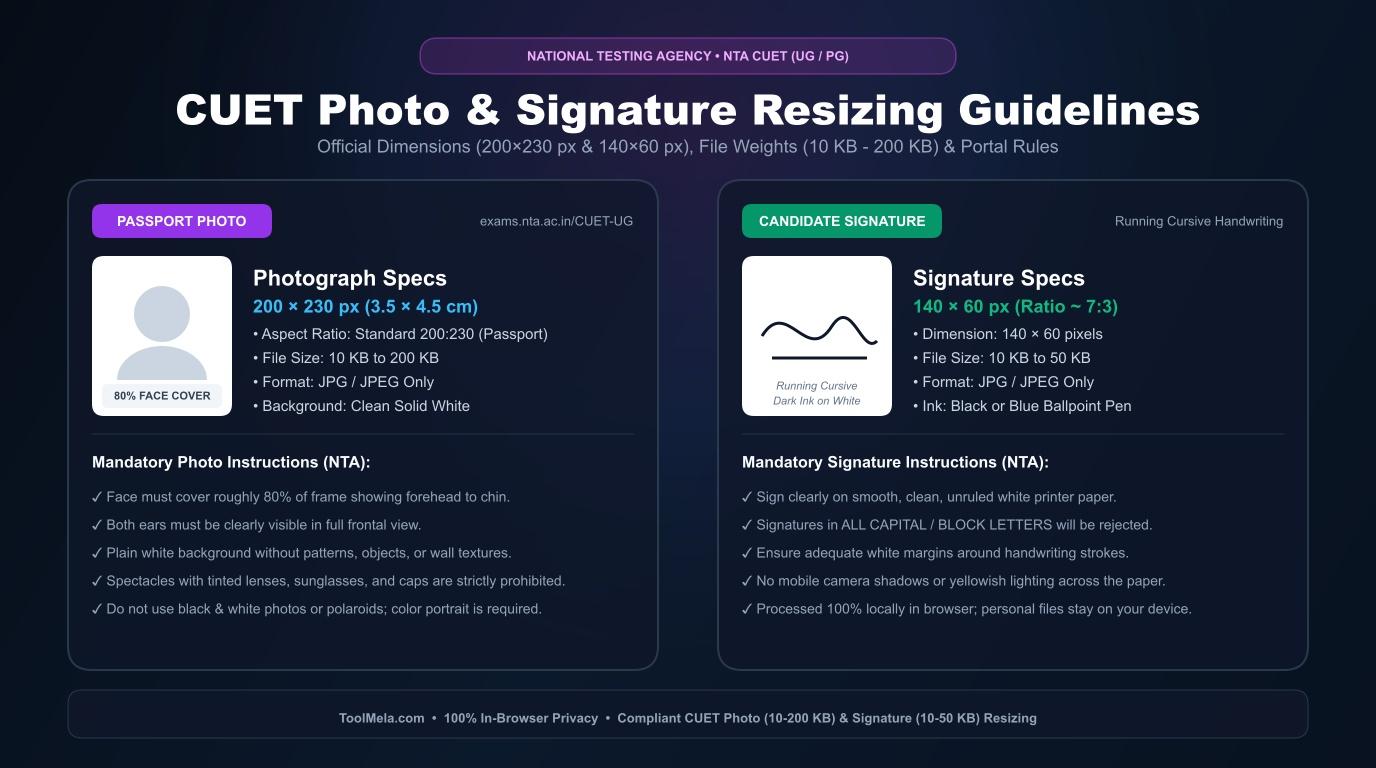
Visual Guide: Formatting passport photographs (200x230 px, 10-200 KB) and signatures (140x60 px, 10-50 KB) to official NTA CUET specifications on ToolMela.
Why People Use This Tool
- Preset entrance test ratios: Aligns cropping frames to official application specifications (200×230 pixels for photographs and 140×60 pixels for signatures) so portraits never appear stretched or squashed.
- Granular kilobyte control: Features a dedicated slider to select an exact file weight between 10 KB and 200 KB for portraits, or 10 KB and 50 KB for signatures, helping you stay clear of portal upload errors.
- Background compliance verification: Automatically analyzes image borders in real time and flags background inconsistencies before you proceed to download.
- Integrated signature enhancement: Automatically cleans up background paper grain and darkens pen strokes to ensure handwritten signatures remain crisp on printed admit cards.
- Direct camera integration: Lets mobile applicants take a fresh portrait or document snapshot straight from their mobile web browser without transferring files between apps.
- Local browser processing: Performs cropping, resizing, and kilobyte compression on your device, ensuring private identity documents are not uploaded to remote servers.
How to Use the Tool
- Choose your document type: Click either the Photo or Signature toggle button on the left panel to load the correct dimensions and file-size range.
- Set your target file size: Adjust the Target File Size (KB) slider to your desired value. Setting your photo around 50 KB to 100 KB and your signature around 20 KB to 30 KB provides a safe buffer within official boundaries.
- Select your image file: Click Browse File to open an image from your device storage, or tap Take Photo to snap a new picture using your device camera.
- Position your framing: Use the interactive cropping box to frame your subject. For portraits, position your face centrally with both ears, eyes, and shoulders visible. For signatures, frame the handwritten text cleanly with equal margins on all sides.
- Configure processing options: Keep Force White Background checked for photographs to replace uneven backdrops. For signatures, leave AI Enhance Signature enabled to sharpen ink lines against a pure white background.
- Process your image: Click the Crop & Process button to apply the dimension and kilobyte adjustments.
- Inspect and download: Review the generated preview, verify that the final size and pixel dimensions match portal rules, and click Download Final JPG to save the file.
Understanding the Output
Before uploading your processed image to the CUET registration portal, open the downloaded file on your device and verify five specific details:
- File weight: Check that your photograph file measures between 10 KB and 200 KB, and your signature file measures between 10 KB and 50 KB. Files outside these thresholds trigger instant upload rejections.
- Proportions and framing: Confirm that your facial photograph occupies roughly 80 percent of the frame, showing a clear frontal view without red-eye, headwear, or face coverings.
- Signature contrast: Ensure your signature displays dark black or blue ink against a solid white background with no faint, broken strokes or visible notebook ruling.
- Format: Ensure the final saved filename ends with
.jpgor.jpeg. Formats such as PNG, WebP, or PDF are not supported by the candidate upload portal. - Display clarity: Zoom in on your screen to verify that your eyes, nose, and facial contours remain recognizable without heavy pixelation or compression artifacts.
Privacy & File Handling
Candidate identity documents—especially passport photos and personal signatures—deserve careful handling. ToolMela’s CUET Photo & Signature Resizer operates entirely client-side using standard HTML5 Canvas rendering and local browser compression scripts.
When you select or capture an image, the file loads into your web browser's local memory. The cropping, color adjustments, dimension scaling, and JPEG compression happen directly on your personal computer or mobile phone. Your files are not transmitted to or stored on ToolMela’s servers, meaning your personal identification images never leave your control during the formatting process.
Useful Tips
- Capture portraits in daylight: Stand facing an open window or well-diffused light source to eliminate harsh shadows behind your ears and under your chin.
- Use unruled white paper: Sign on plain white printer paper using a dark ballpoint or gel pen. Avoid writing on lined notebook sheets or receipts, as printed lines disrupt digital processing.
- Avoid social media screenshots: Never crop a screenshot taken from a messaging app or social profile. Screenshots carry heavy image compression and often lack the resolution required for clean identity verification.
- Leave margin around your signature: Keep small empty margins around the outer edges of your handwriting when cropping so letter loops do not touch the image border.
- Preserve the original source photo: Store your uncropped high-resolution photo in your photo library so you can re-crop it easily if registration guidelines change.
Common Problems and Solutions
- Output size drops below 10 KB: When compressing simple signatures, aggressive compression can push the file below the mandatory 10 KB minimum. Move the target slider up to 25 KB or 30 KB and click "Crop & Process" again.
- White Background warning badge appears: If the live validation displays a warning, the corners of your crop box contain colored walls or dim lighting. Recrop closer to your head or ensure the "Force White Background" toggle is active.
- Signature lines look faint or broken: This happens when an original photo was taken in low light with a light-colored ballpoint pen. Retake the snapshot under bright indirect daylight using a dark pen on clean paper.
- Crop box clips letter strokes: If your signature has tall loops (such as "l", "t", or "g"), zoom out slightly inside the cropper view before confirming the crop area.
Frequently Asked Questions
What are the official photo and signature specifications for the CUET application form?
The National Testing Agency requires passport photographs to measure between 10 KB and 200 KB with at least 80 percent face coverage against a plain white background. Signatures must measure between 10 KB and 50 KB on white paper with dark ink. Both uploads must be in JPG or JPEG format.
Can I upload a signature written in capital letters or pencil?
No. Examination guidelines state that signatures written entirely in capital block letters, initials only, or in pencil are unacceptable. Candidates must provide a standard running cursive signature written by hand using blue or black ink.
Does this tool automatically convert PNG or JPEG images to JPG?
Yes. If you upload an image in PNG or JPEG format, the tool automatically crops and re-encodes the finished file into a compliant JPG image upon processing.
Can I resize my CUET photo and signature directly on an Android or iPhone device?
Yes. The tool runs entirely inside mobile web browsers such as Chrome and Safari. You can choose an existing file from your photo gallery or use the built-in camera button to capture your document directly.
Always compare your downloaded files against the specific photograph instructions published in the current academic year's CUET information bulletin before final form submission.
