NEET Photo & Signature Resizer: Prepare Application Images to Exact Specifications
Every year, hundreds of thousands of medical aspirants prepare to submit their National Eligibility cum Entrance Test (NEET) application forms. During this process, one of the most persistent bottlenecks is meeting the stringent image upload criteria set by examination authorities. Application portals frequently reject image files if they differ by even a few kilobytes from the mandated size bracket or if their aspect ratios distort facial features and handwritten signatures.
Applicants are typically required to supply up to four distinct graphical assets: a standard passport-size photograph, a larger 4x6 inch postcard-size photograph, a handwritten signature, and left- or right-hand finger and thumb impressions. Each category carries its own dimension benchmarks, resolution requirements, and strict file weight limits (such as 10 KB to 200 KB for photos and 10 KB to 50 KB for signatures). Manually resizing these files using generic image software often causes pixelation, illegible text, or unwanted background tints.
The NEET Photo and Signature Resizer on ToolMela simplifies this technical preparation into a straightforward, guided process. By providing preconfigured profiles for each document category, an interactive cropping interface, background adjustments, and calibrated file-size compression, the utility ensures your uploaded files match the required submission criteria without sacrificing visual clarity.
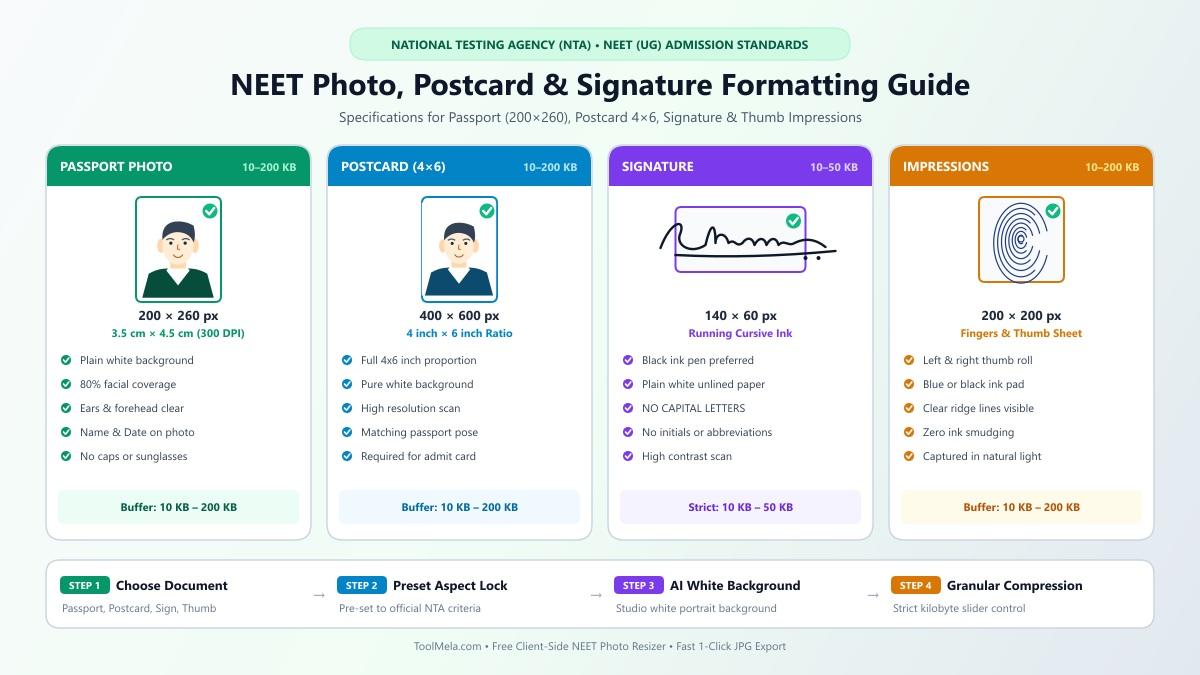
Visual Guide: Formatting passport photographs (200×260 px, 10–200 KB), postcard photos (400×600 px), signatures (140×60 px, 10–50 KB), and thumb impressions to official NTA NEET specifications on ToolMela.
Why People Use This Tool
- Standardized NEET profiles: Select between passport photos, 4x6 postcard photos, signatures, and thumb impressions with preset aspect ratios that eliminate manual guesswork.
- Granular file size slider: Fine-tune target file size anywhere between the minimum and maximum kilobyte boundaries permitted by the exam portal.
- Integrated ink enhancement: Automatically clean up muddy grayish paper tones and darken pen strokes on scanned signatures and finger impressions.
- White background verification: Real-time inspection alerts you if photo borders or background corners lack sufficient brightness.
- Local browser-based processing: All crops, adjustments, and compression routines run locally within your web browser, keeping your personal documents on your device.
- Direct camera and file upload support: Upload existing JPG or PNG files directly from your computer, or capture a fresh image using your mobile phone camera.
How to Use the Tool
- Select your document category: Click on the appropriate button at the top—Passport Photo, Postcard Photo (4x6), Signature, or Thumb Impression. The tool instantly updates the aspect ratio and kilobyte boundaries for that selection.
- Load your image: Drag and drop your file into the upload area, click Browse File to pick a file from your storage, or tap Take Photo to use your device camera.
- Adjust the crop frame: Move and scale the crop box over your photo. For portraits, position the head and shoulders symmetrically within the frame. For signatures and prints, center the ink strokes evenly.
- Set your background and ink preferences: For portraits, keep Force White Background active to maintain a clean white border. For signatures or impressions, ensure AI Enhance Ink is checked to remove paper shadows.
- Adjust the target file size: Use the slider to specify your preferred file size in kilobytes (for example, 100 KB for photos or 30 KB for signatures).
- Process the image: Click the Crop & Process button to generate the final JPG file.
- Inspect and download: Review the preview, check the reported dimensions and final kilobyte size, and click Download Final JPG to save the file to your device.
Understanding the Output
Before uploading your processed image to an application portal, take a moment to evaluate the final output against these standard criteria:
- File weight (KB): Ensure the final file size falls safely inside the published window (10 KB to 200 KB for passport and postcard photos; 10 KB to 50 KB for signatures). The download summary displays the exact kilobyte size.
- Pixel dimensions: The output adheres to standard proportions (200×260 px for passport, 400×600 px for postcard, 140×60 px for signature, and 250×150 px for thumb impressions).
- Format: The output is rendered as a clean JPG file, which is the universal standard required across major entrance portals.
- Visual clarity: Confirm that facial features—especially both ears, eyes, and the outline of the head—are crisp and unobstructed. On signatures and impressions, lines must appear dark, unbroken, and free of blur.
Privacy & File Handling
Personal identity documents such as passport photos, signatures, and fingerprint impressions require thoughtful handling. This tool operates entirely inside your web browser using client-side JavaScript and Canvas technology.
When you select a file or take a picture, the data is loaded directly into your local browser memory. Resizing, cropping, ink adjustments, and compression occur on your device's own processor. The file is not uploaded to ToolMela's servers to complete the resizing process, significantly minimizing external transmission risks and allowing you to prepare your application materials securely.
Useful Tips
- Use bright, even lighting: When capturing a portrait, face a natural light source to prevent heavy shadows across your cheeks, nose, or behind your ears.
- Sign on unruled white paper: Always use a fresh sheet of plain white paper and a dark blue or black ink pen. Avoid lined notebook paper, as grid lines interfere with ink contrast.
- Keep high-resolution originals: Save your uncropped, original photograph and high-resolution scan on your device before performing any downscaling or edits.
- Avoid compressing multiple times: Repeatedly compressing an already downscaled JPG causes cumulative digital artifacts. Always begin adjustments from your clearest source image.
- Leave margin around signatures: When signing or stamping an impression, leave clean white space around the outer edges so the cropping boundary does not clip letter loops or ridge patterns.
Common Problems and Solutions
- Portal rejects file due to size: If your application form rejects the image because it is slightly above or below the allowed threshold, return to the editor, move the target size slider toward the middle of the allowed range (e.g., 80–120 KB), and re-download.
- Signature lines appear faint or broken: Faint pencil or ballpoint ink can look washed out. Enable the ink enhancement toggle in the editor, or re-take the photo using a dark gel or fountain pen under direct light.
- Photo background appears grey or colored: Official requirements call for a clean white background. Check the white background validation indicator in the tool, or use the background removal feature to isolate your portrait against pure white.
- Image appears stretched or squeezed: This happens when an image is forced into new dimensions without preserving aspect ratio. Using the preset crop frames inside the tool ensures the width-to-height proportion remains correct.
Frequently Asked Questions
What are the standard image dimensions and size limits for NEET applications?
NEET application guidelines generally require passport photos to be 10 KB to 200 KB (roughly 200×260 pixels), postcard photos (4x6 inches) to be 10 KB to 200 KB (400×600 pixels), and signatures to be 10 KB to 50 KB (140×60 pixels). Thumb impressions usually fall within 10 KB to 200 KB.
Can I resize both passport photos and postcard-size photos with this tool?
Yes. The tool includes dedicated configuration buttons for both standard passport photos and larger 4x6 postcard photos, automatically applying the correct aspect ratios and dimension parameters for each.
Why does my signature need to be on a pure white background?
Exam portals use automated document verification scanners. Any colored paper, yellow tint, or shadow can trigger automated rejection or render your signature illegible on your admit card and examination records.
Can I use this resizer on my smartphone?
Yes. The resizer works directly in modern mobile browsers on Android and iOS devices. You can pick photos from your mobile gallery or use your phone camera directly within the interface.
Always compare your downloaded files against the specific photograph instructions published in the current academic year's NEET information bulletin before final form submission.
