JEE Main Photo & Signature Resizer: Format Application Images to Official Standards
Registering for the Joint Entrance Examination (JEE Main) is one of the most critical milestones for aspiring engineering candidates across the nation. During online submission on the National Testing Agency (NTA) portal, applicants must supply digital reproductions of their recent passport photograph and handwritten signature. The registration system enforces rigid validation gates: photographs must adhere to a 10 KB to 200 KB boundary with a strict white background and 80 percent face visibility, while signatures must fit between 10 KB and 100 KB on unruled white paper.
Modern smartphones take high-resolution photographs that frequently exceed 3 MB to 6 MB in file weight. When candidates attempt to squeeze these large files using generic compression utilities, they often end up with pixelated portraits that obscure facial contours or signatures that shrink below readable legibility. Furthermore, portraits snapped in home environments frequently suffer from room shadows, wall patterns, or uneven lighting, leading to automated rejection warnings during portal document verification.
The JEE Main Photo & Signature Resizer on ToolMela simplifies this technical preparation into a guided three-stage workflow. With pre-calibrated NTA aspect ratios, automated background inspection, ink stroke sharpening, and precise kilobyte slider compression, candidates can format application-ready JPG files directly in their browser without compromising image definition.
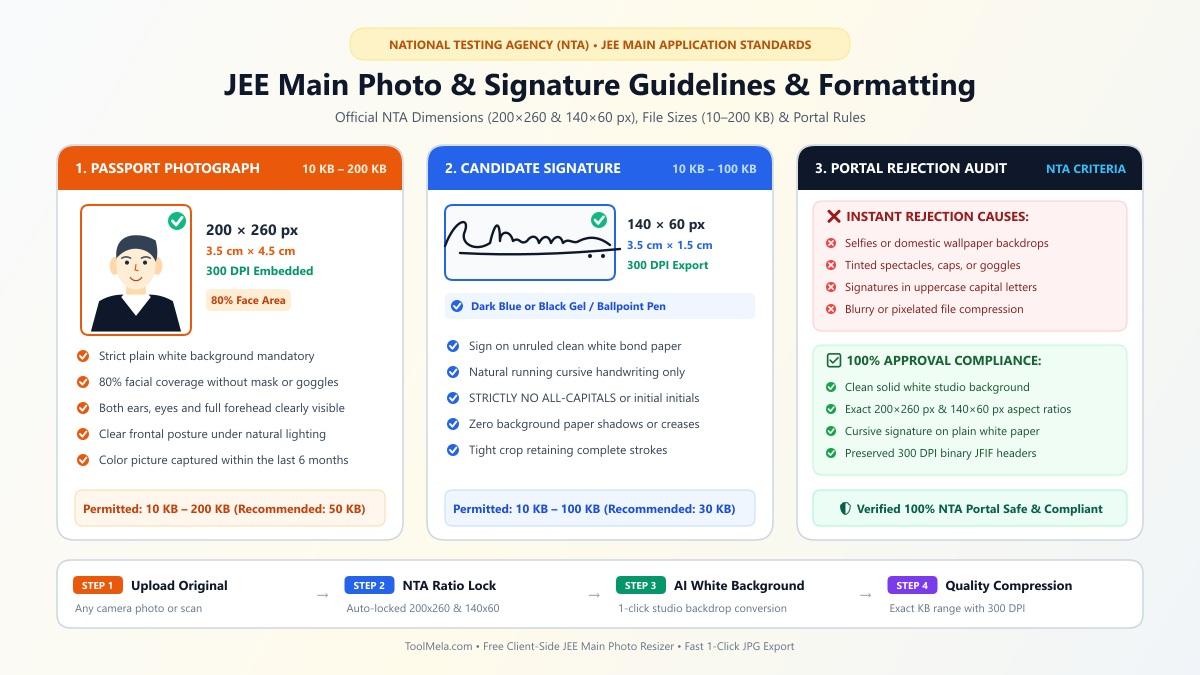
Visual Guide: Formatting passport photographs (200×260 px, 10–200 KB) and candidate signatures (140×60 px, 10–100 KB) to official NTA JEE Main standards on ToolMela.
Why People Use This Tool
- Calibrated NTA aspect ratios: Locks the cropping frame to 200×260 pixels for passport photos and 140×60 pixels for signatures, preventing facial distortion and stretched handwriting.
- Precise kilobyte compression slider: Fine-tune target file size anywhere within the permitted 10 KB to 200 KB photo bracket or 10 KB to 100 KB signature range to avoid portal rejection errors.
- Automated white background conversion: Includes real-time corner contrast detection alongside a dedicated portrait segmentation engine that replaces busy domestic backgrounds with crisp white.
- Smart ink clarity enhancement: Automatically brightens background paper grain and darkens pen strokes so handwritten signatures stay legible on printed admit cards.
- Direct smartphone camera support: Enables mobile users to capture a fresh document snapshot or portrait directly through their browser without using external scanner apps.
- Client-side privacy preservation: All cropping, scaling, and compression operations run locally inside your browser memory, keeping your personal identity documents strictly on your device.
How to Use the Tool
- Choose your document type: Select either Passport Photo or Signature in Step 1 to load the corresponding dimensions and kilobyte parameters.
- Upload your source image: Drag and drop your image into the drop area, click to browse files from your computer storage, or tap Open Camera on your mobile phone to take a new picture.
- Frame your subject: In Step 2, adjust the locked crop box over your image. For portraits, center your face and shoulders symmetrically so roughly 80 percent of the frame covers facial features. For signatures, center the handwriting with equal outer margins.
- Check background and ink toggles: For photos, review the floating background badge; if uneven backdrops exist, click AI White BG or ensure Force White Background is active. For signatures, leave Auto Enhance Ink Clarity checked to clean paper textures.
- Select your target file weight: Move the slider to specify your preferred file size (for instance, 80–100 KB for portraits and 20–30 KB for signatures).
- Generate your document: Click Finish & Generate to run local canvas scaling and kilobyte compression.
- Verify and download: In Step 3, inspect the rendered output, confirm the reported dimensions and final kilobyte weight, and click Download JPG to save the file.
Understanding the Output
Before submitting your processed files to the JEE Main candidate portal, open the downloaded images on your screen and verify four essential points:
- File weight boundaries: Verify that your photograph file measures between 10 KB and 200 KB, and your signature file measures between 10 KB and 100 KB (ideally around 20–30 KB). Files outside these brackets are blocked by the portal upload script.
- Pixel dimensions: Check that the output retains official proportions—200×260 pixels for passport photographs and 140×60 pixels for signatures.
- File format: Ensure the file extension is
.jpgor.jpeg. Formats like PNG, HEIC, or PDF cannot be uploaded into candidate image fields. - Visual definition: Zoom in on the photo to ensure that facial features—specifically both ears, eyes, and the outline of the head—remain crisp and distinct without blurred compression blocks. On signatures, confirm that ink loops are dark, connected, and unobstructed.
Privacy & File Handling
Candidate identity materials deserve rigorous privacy standards. ToolMela’s JEE Main Photo & Signature Resizer performs all calculations entirely on the client side using standard HTML5 Canvas rendering and local browser-based image compression.
When you select or capture an image, the file loads into your web browser's local memory space. Cropping, background enhancement, pixel resizing, and JPEG compression take place on your own computer or smartphone processor. Your original files and finalized photos are never transferred across the network to ToolMela's servers or stored in any cloud repository, eliminating data leakage risks.
Useful Tips
- Stand facing natural light: When capturing your portrait, face an open window to eliminate shadows beneath your jawline or behind your ears. Avoid using direct camera flash against glossy walls.
- Sign on unruled white paper: Always sign on a clean sheet of plain white printer paper using a black or dark blue ballpoint pen. Ruled notebook lines create visual noise that interferes with automated portal checks.
- Avoid social media downloads: Do not use photos downloaded from social media apps or messaging platforms, as these files have already undergone destructive lossy compression and often lack requisite facial sharpness.
- Maintain margins around handwriting: Leave clean white space around the perimeter of your signature when setting the crop boundary so letter loops do not touch the image border.
- Retain uncropped original photos: Keep your high-resolution original source photograph stored safely on your device in case future counseling sessions require reprints.
Common Problems and Solutions
- Portal rejects file due to size mismatch: If your application form rejects the upload because the file is slightly above or below the allowed threshold, return to Step 2, move the target slider toward the middle of the range (e.g., 80–120 KB for photos or 20–30 KB for signatures), and click "Finish & Generate" again.
- Signature handwriting appears faint: Faint pencil or light ballpoint ink can look washed out after digital compression. Ensure the "Auto Enhance Ink Clarity" option is enabled, or re-sign using a dark gel pen under bright light.
- Background warning badge persists: If the live validation displays a warning, the corners of your crop box contain colored walls or dim lighting. Use the "AI White BG" button to replace uneven backgrounds with solid white.
- Facial proportions appear distorted: This happens when an image is stretched into new dimensions without maintaining the original aspect ratio. Using the preset crop frame in the tool guarantees that width-to-height proportions remain intact.
Frequently Asked Questions
What are the official photo and signature specifications for the JEE Main application form?
The National Testing Agency requires candidate passport photographs to measure 200×260 pixels with a file size between 10 KB and 200 KB against a solid white background (80% face coverage). Candidate signatures must measure 140×60 pixels with a file size between 10 KB and 100 KB (recommended 20–30 KB) on white paper with dark ink. Both uploads must be in JPG or JPEG format.
Can I use a photograph with spectacles or headwear?
Regular corrective clear spectacles are permissible provided there is no flash reflection across the lenses. Dark tinted sunglasses, goggles, and caps are strictly prohibited. Religious head coverings are accepted only if facial features from the forehead to the chin remain completely unobstructed.
Why does my signature need to be in running handwriting?
NTA rules state that signatures written entirely in capital block letters or abbreviated initials will be rejected. A standard running cursive handwriting signature is required to verify identity across examination sessions, attendance sheets, and admission counseling.
Can I resize my JEE Main photo and signature directly on an iPhone or Android phone?
Yes. ToolMela operates directly within modern mobile web browsers. You can choose photos directly from your phone gallery or use the integrated camera button to take a fresh picture.
Always compare your downloaded files against the specific photograph and signature instructions published in the current academic year's JEE Main information bulletin before final form submission.
